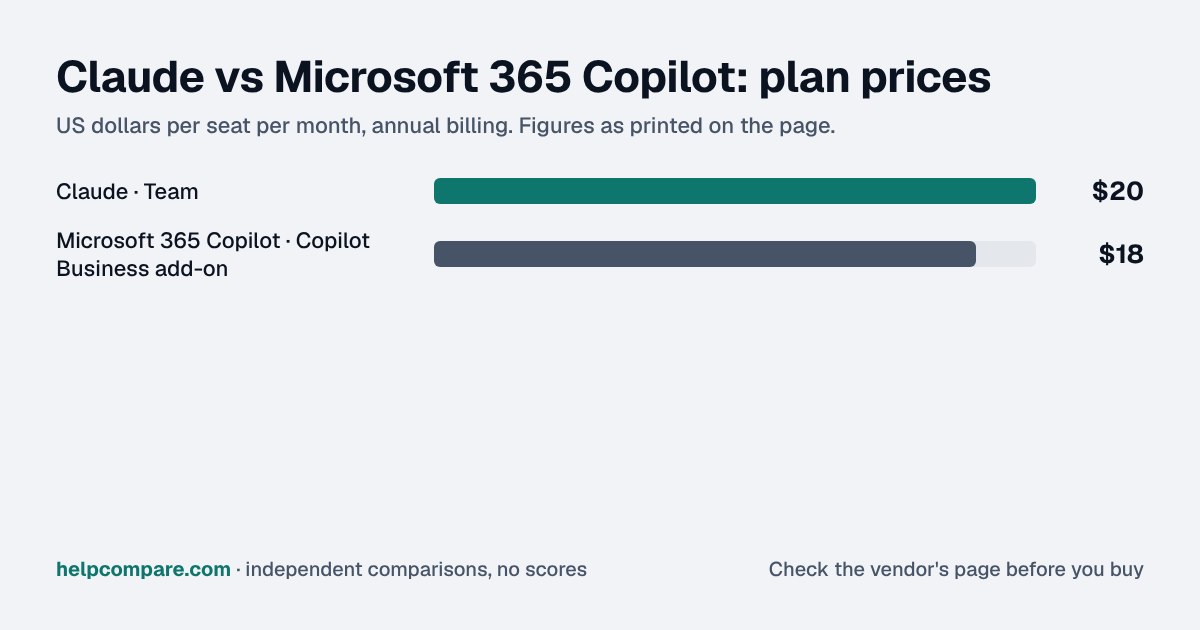
Every eligible Microsoft 365 business account already includes Copilot Chat for free. The real choice is between paying $18 a user for Copilot inside Word, Excel and Outlook, or $20 a seat for Claude Team, which works alongside any office suite and leads on coding.
Copilot fits a team that lives in Word, Excel, Outlook and Teams, Claude fits one doing coding or long-document work, and the price gap is shorter-lived than it looks.
Copilot Business is $18/user/mo on annual billing, but that's a discount that reverts to $21 after December 31, 2026, and it only attaches to an eligible Microsoft 365 Business plan; Claude Team is $20 with a 2-seat minimum. Start with Copilot Chat, which eligible plans already include at no extra cost. Here's what catches companies out: an assistant grounded in your files and email can surface anything a user already has access to, including the overshared folder nobody remembers. Tighten file and Teams permissions before you switch the paid add-on on, not after someone finds the salary spreadsheet.
My read of the verified data on this page, checked against vendor sources on September 23, 2026. Disagree or spot an error? Tell Bill
Heads up: AI assistants change their plans, prices, models and usage limits almost daily. Everything on this page is accurate as of September 23, 2026, the date we checked each vendor’s pricing page and documentation. Confirm current terms on the vendor’s own site before you buy.
| At a glance | Claude | Microsoft 365 Copilot |
|---|---|---|
| Category | AI Assistants | |
| Entry price | Free plan; Team from $20/seat/mo (annual, 2-seat min) | Copilot Chat free with Microsoft 365; Copilot Business $18/user/mo add-on (annual, discounted from $21 through Dec 31, 2026) |
| Free plan | Yes, Free plan for individuals | Copilot Chat included with eligible Microsoft 365 business plans |
At its current discounted rate, Microsoft 365 Copilot Business is $2 a seat cheaper than Claude Team ($18 vs $20 a month, both annual) — but that discount is temporary, reverting to $21 (making Claude the cheaper option) after December 31, 2026. Copilot also requires an underlying Microsoft 365 Business license to attach to; Claude Team has no such prerequisite and works with any office suite you already use.
| Category | Claude | Microsoft 365 Copilot |
|---|---|---|
| Entry team price | Team — $20/seat/mo annual, $25 monthly (2-seat min) | Copilot Business add-on — $18/user/mo annual (discounted through Dec 31, 2026; reverts to $21) |
| Requires | Nothing — works with any office suite | An eligible Microsoft 365 Business plan underneath |
| Free tier for business use | Free plan for individuals; no free business tier | Copilot Chat included free with eligible Microsoft 365 plans |
| Coding | Claude Code included in every seat | Not a comparable coding-agent feature at this tier |
| Grounded in your files | Via connectors/integrations | Yes, natively in Word, Excel, PowerPoint, Outlook, Teams |
| Bundled pricing | Not applicable — Claude is sold standalone | Business Standard with Copilot — $23.50/mo annual; Business Premium with Copilot — $32 |
| Context window | Up to 1M tokens, varies by model | Grounded in Microsoft Graph data rather than a comparable raw context figure |
| Team size | 2 to 150 seats | Up to 300 users on Business plans |
Verified September 23, 2026Prices recorded from each vendor’s own pricing page. See sources
Explore the numbers
Claude and Microsoft 365 Copilot: plan prices side by side
Plan price: US dollars per seat per month, annual billing
ClaudeMicrosoft 365 Copilot
Prices exactly as printed in the comparison table on this page (annual billing), in the table’s own tier order: Entry team price. Claude Team needs at least 2 seats.
What Claude and Microsoft 365 Copilot cost per month for a team
5 seats: monthly cost = seats × the per-seat price on this page (annual billing)
10 seats: monthly cost = seats × the per-seat price on this page (annual billing)
25 seats: monthly cost = seats × the per-seat price on this page (annual billing)
50 seats: monthly cost = seats × the per-seat price on this page (annual billing)
ClaudeMicrosoft 365 Copilot
An example, not a quote: team size times the per-seat prices printed on this page. It leaves out tax, add-ons, discounts and any plan limits. Where a plan has a minimum number of seats, the minimum is used.
List prices from this page’s own comparison table, not a quote. Plans differ in what they include.
Prices in USD from claude.com/pricing and microsoft.com/en-us/microsoft-365-copilot/pricing, both checked September 23, 2026.
Editorial assessmentCopilot is Microsoft’s AI layered into the Office apps you already use; Claude is a dedicated assistant that stands on its own regardless of which office suite your company runs.
You cannot buy Microsoft 365 Copilot Business without an underlying Microsoft 365 Business plan (Basic, Standard or Premium) — it is an add-on, currently $18/user/mo on annual billing, discounted from the standard $21 rate through December 31, 2026. Claude Team has no such prerequisite: it is a standalone $20/seat subscription that works with Google Workspace, Microsoft 365 or no office suite at all.
Claude Code ships in every paid Claude seat, sharing the plan’s usage limits at no extra charge — a meaningful edge for any team doing technical or coding work. Claude also supports up to a 1M-token context on some models for working across long documents.
Copilot is grounded directly in your organization’s Word documents, Excel spreadsheets, Outlook email and Teams chats via Microsoft Graph — a native, deep integration Claude reaches only through separate connectors. For a Microsoft-365-native team, that grounding can matter more than raw model capability.
List prices checked September 23, 2026. Copilot Business add-on requires an eligible underlying Microsoft 365 Business plan (Basic, Standard or Premium), not included in the price shown; its $18 rate is discounted from $21 through December 31, 2026. Claude Team needs at least 2 seats. Taxes are not included.
Your team does technical or coding work, wants a standalone assistant independent of any office suite, or needs very long context for documents.
Your organization already runs Microsoft 365 and wants AI natively grounded in Word, Excel, Outlook and Teams without adopting a separate tool.
Uses your selections above. Estimate excludes add-ons, overages, and negotiated discounts.
If you are on Microsoft 365, try Copilot Chat (free) first to see how far the included tier gets you. Then run the same tasks — especially any coding — through Claude’s free plan before paying for either add-on.
How Claude and Microsoft 365 Copilot compare on compliance reports, sign-in controls, offline access and the setup details that matter for remote, hybrid and in-office teams. Every value links to the vendor page it came from.
| What we checked | Claude | Microsoft 365 Copilot |
|---|---|---|
| Security & compliance | ||
| SOC 2 report | SOC 2 Type IIsource | Not published |
| ISO/IEC 27001 | Certifiedsource | Certifiedsource |
| Other certifications | ISO/IEC 42001, HIPAAsource | ISO/IEC 42001source |
| HIPAA (BAA) | BAA availableEnterprisesource | BAA availablesource |
| GDPR data processing agreement | DPA offeredsource | DPA offeredsource |
| Single sign-on (SAML/OIDC) | YesTeamsource | YesAny eligible Microsoft 365 plan (sign-in via Microsoft Entra ID)source |
| SCIM user provisioning | YesEnterprisesource | Not published |
| Two-factor authentication | Not published | YesEnforcement: All Microsoft 365 plans via Entra ID security defaults; Conditional Access policies need Entra ID P1 (included in Business Premium)source |
| Admin audit log | YesEnterprisesource | YesCopilot Chat (included)source |
| Data residency choices | US onlysource | Not published |
| Encryption | Encrypted in transit and at rest; customer-managed encryption keys (AWS KMS, Google Cloud KMS, Azure Key Vault) for eligible Enterprise organizationssource | BitLocker and per-file encryption at rest; TLS and IPsec in transitsource |
| Self-hosting option | Not published | Not published |
| Offline access | ||
| Offline mode | Needs a connectionAnthropic states Cowork needs an active internet connection throughout a session; no offline mode is documented for Claude chat on any app.source | Not documented |
| Desktop apps | Windows, macOS, Linuxsource | Windows, macOSsource |
| Mobile apps | iOS, Androidsource | iOS, Androidsource |
| Remote, hybrid & in-office | ||
| IP allowlisting | YesEnterprisesource | YesMicrosoft 365 Business Premium (Entra ID P1 Conditional Access)source |
| Device & session controls | YesEnterpriseEnterprise admins can shorten session length (1, 7, 14 or 28 days); Team and Enterprise get enterprise deployment for the desktop app and admin controls for remote and local connectors.source | Not published |
| Office & room hardware | — | Copilot in Teams Phone works on VoIP and PSTN calls; no Copilot-specific room hardware is documented.source |
Currently, yes, by $2 a seat — $18 against Claude Team’s $20, both annual — but Copilot’s $18 rate is a temporary discount from its standard $21 price, running through December 31, 2026, after which Claude becomes the cheaper option.
Yes. Copilot Business is an add-on that requires an eligible underlying Microsoft 365 Business plan (Basic, Standard or Premium). Claude Team has no such requirement.
Yes, Copilot Chat is included at no extra cost with eligible Microsoft 365 business plans, though it is more limited than the paid Copilot Business add-on, which grounds it in your organization’s files and email.
Yes — Claude Code is included in every paid Claude plan at no separate charge, sharing the plan’s usage limits. Microsoft 365 Copilot does not offer a comparable dedicated coding agent at this tier.
Step-by-step migration guides covering what transfers automatically, what doesn’t, and how to handle the gap — in both directions.
Every “best AI assistant” listicle tells you why to buy. Here’s the other half: the specific conditions under which Claude or Microsoft 365 Copilot is the wrong purchase for your team.
Buy Claude if:
Do NOT buy Claude if:
Buy Microsoft 365 Copilot if:
Do NOT buy Microsoft 365 Copilot if:
Every pricing fact, rating, AI billing model and switching guide we hold on each tool, on one page, with the date each figure was last verified.
Prices on this page were recorded from each vendor’s own pricing page on the date shown at the top of the page. Vendors change pricing often — check the live source before you buy.
Every figure is also in our open dataset (JSON and CSV, CC BY 4.0), with its source page and verification date. See how we research pricing.
Cite this page: HelpCompare, “Claude vs Microsoft 365 Copilot”, helpcompare.com/claude-vs-microsoft-copilot/ (updated ).
Source links on this site are checked every month; last check . How sources are checked.
Plain-language guides: the steps, what to check before you buy, common mistakes, and every tool it takes with verified prices.
Verified prices costed for your team size, a check against your must-have requirements, the questions to settle before you sign, and a source for every figure. Print it, or paste it into an email to whoever approves the spend.
Built for the leader who owns the selection, answers for the spend, drives the rollout, and lives with the results. HelpCompare covers the whole decision, not just the first step.