ChatGPT vs Claude for Teams: Which AI Assistant Fits Your Business in 2026?
ChatGPT Business and Claude Team now cost exactly the same per seat. What decides it is team size, what each assistant can make, which plan unlocks the admin controls you need, and how you get your data back out.
By Bill Belcamino · Last updated September 19, 2026 · Our methodologyResearched and fact-checked by the HelpCompare team
Free plan; Business from $20/seat/mo (annual, 2-seat min)
Bottom line up front: Should my team buy ChatGPT Business or Claude Team?
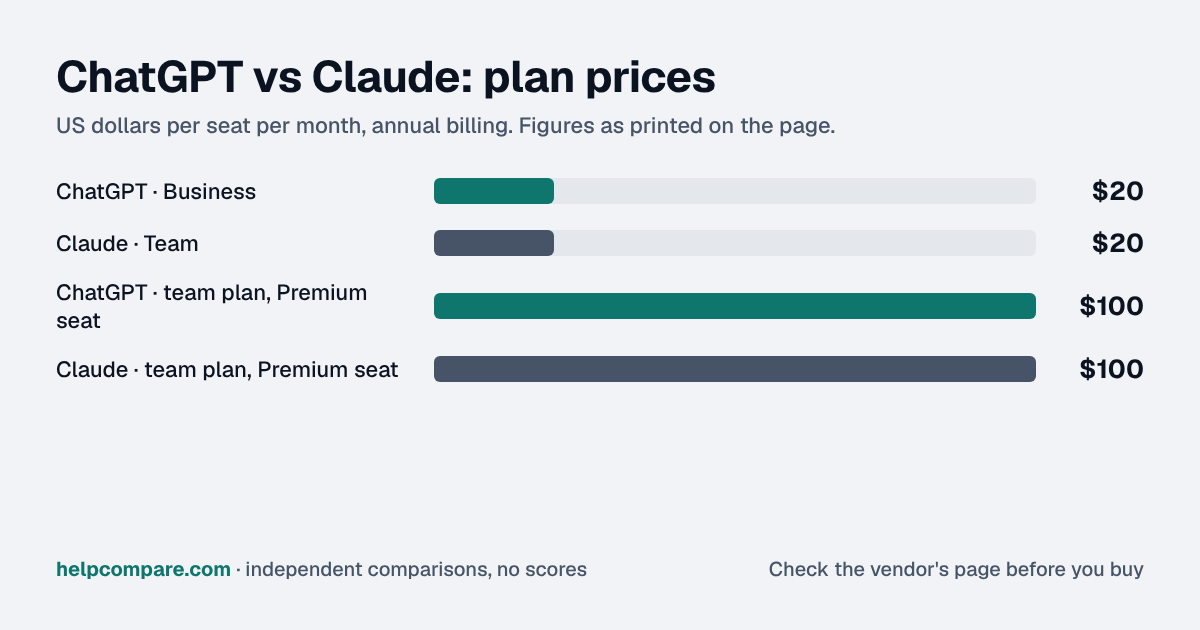
Price won't decide it: both charge $20 per Standard seat and $100 per Premium seat a month on annual billing, so decide on what your team makes and how big it will get.
ChatGPT Business makes images and runs to 200 seats, while Claude Team makes no images, stops at 150 and puts Claude Code in every paid seat. Neither publishes a message count per seat, and that's where AI budgets quietly drift. I've worked with both, and usage on seat-based AI plans tends to be lopsided: a few heavy users hit the limits while most people barely touch them. So don't buy Premium seats on a hunch. Start everyone on Standard, run a week of real work through both tools, note exactly who hits a limit, and upgrade only those people, since both vendors let you mix seat types in one workspace.
Heads up: AI assistants change their plans, prices, models and usage limits almost daily. Everything on this page is accurate as of September 19, 2026, the date we checked each vendor’s pricing page and documentation. Confirm current terms on the vendor’s own site before you buy.
Free plan; Business from $20/seat/mo (annual, 2-seat min)
Free plan; Team from $20/seat/mo (annual, 2-seat min)
Free plan
Yes, Free plan for individuals
Yes, Free plan for individuals
Is ChatGPT cheaper than Claude?
Neither, at list price. Both team plans are $20 per Standard seat a month billed annually ($25 monthly) and $100 per Premium seat ($125 monthly), with a two-seat minimum. For one person, Claude Pro is $17 a month on annual billing ($20 monthly), while ChatGPT Plus is $20 a month with no annual option. The real difference is how much work a seat buys: both vendors describe usage limits relative to their own plans rather than as message counts, so pilot both with your team’s actual work.
Yes, individuals; unlimited text chats with GPT-5.6 Luna, limited tools
Yes, individuals; Sonnet and Haiku models, up to 5 projects
Individual paid plans
Go $8/mo (may include ads), Plus $20/mo, Pro $100 or $200/mo — monthly billing only
Pro $17/mo annual ($20 monthly); Max $100 or $200/mo, monthly only
Team plan, Standard seat
Business — $20/mo annual, $25 monthly
Team — $20/mo annual, $25 monthly
Team plan, Premium seat
$100/mo annual, $125 monthly — 5x Standard usage, no 5-hour limit
$100/mo annual, $125 monthly — 5x Standard usage
Team size
2–200 seats
2–150 seats
Enterprise
Custom pricing (contact sales)
$20/seat/mo billed annually, plus all usage at API rates; 20-seat minimum self-serve
Single sign-on / SCIM
SAML SSO on Business; SCIM on Enterprise
SSO on Team; SCIM on Enterprise
Trains on business data
No, by default
No, by default
Image generation
Yes
No, builds diagrams, charts and visuals instead
Coding agent
Codex, in every seat
Claude Code, in every paid seat
Reusable assistants
Custom GPTs and workspace agents, shareable in the workspace
Shared projects with instructions and knowledge; Skills
Getting team data out
No self-service export on Business; through the workspace owner
Only the Primary Owner can export the organization’s data
Verified September 19, 2026Prices recorded from each vendor’s own pricing page. See sources
Explore the numbers
ChatGPT vs Claude: the prices as a chart
ChatGPT and Claude: plan prices side by side
Plan price: US dollars per seat per month, annual billing
ChatGPT · Business$20
Claude · Team$20
ChatGPT · team plan, Premium seat$100
Claude · team plan, Premium seat$100
ChatGPTClaude
Prices exactly as printed in the comparison table on this page (annual billing), in the table’s own tier order: Team plan, Standard seat, Team plan, Premium seat.
What ChatGPT and Claude cost per month for a team
5 seats: monthly cost = seats × the per-seat price on this page (annual billing)
ChatGPT · Business: 5 × $20$100
Claude · Team: 5 × $20$100
ChatGPT · team plan, Premium seat: 5 × $100$500
Claude · team plan, Premium seat: 5 × $100$500
10 seats: monthly cost = seats × the per-seat price on this page (annual billing)
ChatGPT · Business: 10 × $20$200
Claude · Team: 10 × $20$200
ChatGPT · team plan, Premium seat: 10 × $100$1,000
Claude · team plan, Premium seat: 10 × $100$1,000
25 seats: monthly cost = seats × the per-seat price on this page (annual billing)
ChatGPT · Business: 25 × $20$500
Claude · Team: 25 × $20$500
ChatGPT · team plan, Premium seat: 25 × $100$2,500
Claude · team plan, Premium seat: 25 × $100$2,500
50 seats: monthly cost = seats × the per-seat price on this page (annual billing)
ChatGPT · Business: 50 × $20$1,000
Claude · Team: 50 × $20$1,000
ChatGPT · team plan, Premium seat: 50 × $100$5,000
Claude · team plan, Premium seat: 50 × $100$5,000
ChatGPTClaude
An example, not a quote: team size times the per-seat prices printed on this page. It leaves out tax, add-ons, discounts and any plan limits. Where a plan has a minimum number of seats, the minimum is used.
List prices from this page’s own comparison table, not a quote. Plans differ in what they include.
Prices in USD from chatgpt.com/pricing and claude.com/pricing; features from each vendor’s pricing page and help center. All checked September 19, 2026.
At list price the two team plans are identical, down to the seat types: a $20 Standard seat and a $100 Premium seat on annual billing, mixable within one workspace. So the decision rests on what each tool does, how far it scales, and how it is administered.
What each one can make
ChatGPT includes image generation, voice, deep research, custom GPTs and Codex, and on Business adds shared projects, company knowledge and workspace agents. Claude does not generate images; it builds diagrams, charts and interactive visuals, and its paid plans include Claude Code, Claude Design, Slides and Docs, and research. Both search the web and connect to Google Workspace or Google Drive, GitHub, Microsoft 365 and Slack.
How usage limits work
Neither vendor publishes a message count for its team seats. OpenAI says Standard seats have included limits in 5-hour windows for ChatGPT Work and Codex, and 15 messages a month with its Pro model; Premium seats get 5x Standard usage, no 5-hour limit and 50 Pro-model messages a week. Anthropic says Team Standard seats get 1.25x Pro’s per-session allowance and Premium seats 6.25x, with a 5-hour session window plus a weekly limit. Both let you buy extra usage when a seat runs out: workspace credits on ChatGPT, usage credits at API rates on Claude.
Admin, security and billing
Both team plans include single sign-on, central billing and usage analytics, and neither trains on business data by default. SCIM user provisioning is Enterprise-only on both. On Claude, audit logs, custom data retention, IP allowlisting and a HIPAA-ready offering are also Enterprise features; on ChatGPT, Enterprise adds SCIM, encryption key management, role-based access and data residency in ten regions. ChatGPT Business is paid by card, without invoicing.
Two different Enterprise models
OpenAI prices ChatGPT Enterprise by quote, with credit-based and token-based options. Anthropic publishes Claude Enterprise at $20 a seat a month, billed annually, with all usage billed on top at API rates and no seat-level usage limit. That makes Claude Enterprise easy to start but harder to forecast: the bill scales with the models and tasks your people run.
Cost calculator: what does your team actually pay?
ChatGPT
$0/mo
Claude
$0/mo
List prices checked September 19, 2026. Both vendors require at least 2 seats; ChatGPT Business allows up to 200 and Claude Team up to 150. Standard and Premium seats can be mixed on both; this estimate prices one seat type at a time. Extra usage (workspace credits or usage credits), Enterprise pricing and taxes are not included.
Choose ChatGPT if…
You need image generation, custom GPTs the whole team can reuse, more than 150 seats, or your team already works in ChatGPT and wants the same tools with admin controls.
Choose Claude if…
Your team does a lot of writing, analysis or coding and wants Claude Code in every seat, shared projects with edit permissions, or an Enterprise plan with a published seat price.
Total cost over time
Uses your selections above. Estimate excludes add-ons, overages, and negotiated discounts.
Ready to pick your AI assistant?
Both have free plans for individuals. Run the same real tasks through each for a week before you buy seats.
ChatGPT vs Claude: security, offline & remote work
How ChatGPT and Claude compare on compliance reports, sign-in controls, offline access and the setup details that matter for remote, hybrid and in-office teams. Every value links to the vendor page it came from.
Encrypted in transit and at rest; customer-managed encryption keys (AWS KMS, Google Cloud KMS, Azure Key Vault) for eligible Enterprise organizationssource
Self-hosting option
Not published
Not published
Offline access
Offline mode
Not documented
Needs a connectionAnthropic states Cowork needs an active internet connection throughout a session; no offline mode is documented for Claude chat on any app.source
YesEnterpriseEnterprise: Intune for iOS (pricing table) and Workspace Blocking via a ChatGPT-Allowed-Workspace-Id HTTP header on the corporate network; not ticked for Business.source
YesEnterpriseEnterprise admins can shorten session length (1, 7, 14 or 28 days); Team and Enterprise get enterprise deployment for the desktop app and admin controls for remote and local connectors.source
Audit reports: both publish a SOC 2 report, and ChatGPT and Claude also hold ISO/IEC 27001. Ask each vendor for the report under NDA before you sign; security reviews usually want the latest one.
Single sign-on: ChatGPT includes it on Business; Claude includes it on Team. If your team signs in through Okta, Microsoft Entra ID or Google, price the plan that includes SSO, not the entry plan.
Health data: ChatGPT and Claude will sign a HIPAA business associate agreement (ChatGPT: Enterprise; Claude: Enterprise).
Working offline: Claude needs an internet connection; ChatGPT doesn’t document an offline mode. Details are in the Offline mode row above.
Office-only access: ChatGPT can restrict sign-ins to approved IP ranges on Enterprise; Claude can restrict sign-ins to approved IP ranges on Enterprise. That suits an office network or a company VPN; fully remote teams need a VPN for it to work.
Where your data lives: ChatGPT lets you choose US, EU, UK, Japan, Canada, South Korea, Singapore, India, Australia, UAE on Enterprise. This matters for teams hiring across the EU, UK or Australia.
ChatGPT: worth knowing
SecurityBusiness data residency is rolling out gradually; if a non-US region is chosen, a copy of every prompt and response is still stored in the US for a limited time for abuse monitoring. source
RemoteIn Business workspaces admins can view, access, export and delete member conversations, though by default they cannot see all private member chats in the product. source
RemoteSelf-serve Business can't pay by invoice, PO, ACH or wire; organisations needing those must buy a contracted plan such as Enterprise. source
Claude: worth knowing
RemoteOn Enterprise, admins can restrict access to approved CIDR ranges such as office locations and VPN exit points; requests from other IPs are blocked. source
SecurityCustomer data is stored in the US; by default traffic may be routed to select countries in the US, Europe, Asia and Australia. source
OfflineCowork runs tasks in an isolated virtual machine on the user's computer and can read and write only folders the user connects. source
RemoteTeam usage limits are per member, so one person hitting a limit does not affect colleagues. source
Checked September 19, 2026 against each vendor’s own trust center, help docs and app pages. Hover or tap “source” to see the exact wording we relied on. “Not published” means we could not find the vendor saying it on its own site; it doesn’t mean the feature is missing. Plan names are the lowest plan the vendor says includes the feature.
No. At list price they are identical: $20 per Standard seat a month on annual billing ($25 monthly) and $100 per Premium seat ($125 monthly), with a two-seat minimum. Prices checked September 19, 2026.
What is the difference between Standard and Premium seats?
On both, a Premium seat gets five times the usage of a Standard seat. OpenAI adds that ChatGPT Premium seats have no 5-hour usage limit. Both vendors let you mix seat types in one workspace.
How many users can ChatGPT Business and Claude Team have?
ChatGPT Business supports 2 to 200 seats per subscription. Claude Team supports 2 to 150. Beyond that, both point you to Enterprise.
Do ChatGPT or Claude train on my company’s data?
Not by default on their business plans. OpenAI says there is no training on business data by default for Business and Enterprise; Anthropic says the same for Team, Enterprise and the API.
Does either team plan include SCIM or audit logs?
SCIM is Enterprise-only on both. Claude also keeps audit logs and custom data retention for Enterprise.
Can Claude generate images?
No. Claude builds diagrams, charts and interactive visuals and can analyse images you upload, but it does not generate images. ChatGPT does.
How much does Claude Enterprise cost?
Anthropic lists $20 per seat per month, billed annually, plus all usage billed at API rates. ChatGPT Enterprise is priced by quote.
Can I move my chats from ChatGPT to Claude?
Not the chat history. Claude offers an experimental memory import from other assistants, and custom GPTs can be rebuilt as Claude projects. See our migration guides for both directions.
Migration Guides
Already decided? Here’s how to actually switch.
Step-by-step migration guides covering what transfers automatically, what doesn’t, and how to handle the gap, in both directions.
Every “best AI assistant” listicle tells you why to buy. Here’s the other half: the specific conditions under which ChatGPT or Claude is the wrong purchase for your team.
ChatGPT
✓
Buy ChatGPT if:
Your team needs image generation or voice built in
You want reusable custom GPTs shared across the workspace
You will need more than 150 seats on a self-serve plan
✕
Do NOT buy ChatGPT if:
You need SCIM, custom retention or data residency but will not buy Enterprise
You must pay by invoice or purchase order on a team plan
Members need to export their own chat history
Claude
✓
Buy Claude if:
Coding, long documents or analysis are the main use
You want Claude Code in every seat without a separate subscription
You want Enterprise pricing you can read before talking to sales
✕
Do NOT buy Claude if:
Image generation is a must-have
You need more than 150 seats but not Enterprise
You cannot forecast usage and would be on usage-billed Enterprise
Canonical data for the tools on this page
Every pricing fact, rating, AI billing model and switching guide we hold on each tool, on one page, with the date each figure was last verified.
Prices on this page were recorded from each vendor’s own pricing page on the date shown at the top of the page. Vendors change pricing often — check the live source before you buy.
Verified prices costed for your team size, a check against your must-have requirements, the questions to settle before you sign, and a source for every figure. Print it, or paste it into an email to whoever approves the spend.
Built for the leader who owns the selection, answers for the spend, drives the rollout, and lives with the results. HelpCompare covers the whole decision, not just the first step.
Engineer by training, operator by experience, marketer by choice. Bill spent eight and a half years as an engineer at HP, was COO of Auctiva (the number one third-party selling platform on eBay, past 200,000 users) and ran Google’s $70M/year search syndication partnership at Alot.com. Then he spent 13 years building his own web properties with his own money at stake. He has bought, trialled, integrated and cancelled more SaaS tools than he can count, and started HelpCompare because the real cost of switching tools is the part nobody covers.
“I’ve sat on both sides of the table: the agency recommending the tool and the client paying for it.”
Researched and fact-checked by the HelpCompare team. Pricing on this page was last verified on September 19, 2026. No paid sponsorships, no affiliate commissions.
Squarespace vs WordPressSep 23
Square vs StripeSep 23
Salesforce vs Zoho CRMSep 23
n8n to MakeWorkflow Automation
ZoomInfo to LushaSales Intelligence
Zoho CRM to PipedriveCRM Platforms
WooCommerce to BigCommerceE-commerce Platforms
Trello to ClickUpProject Management
Squarespace to WordPressWebsite Builders
Square to StripePayment Processing
Square to PayPalPayment Processing