Skip to content
Start here
AI Assistants

ChatGPT vs Microsoft 365 Copilot: Which AI Assistant Fits Your Business in 2026?

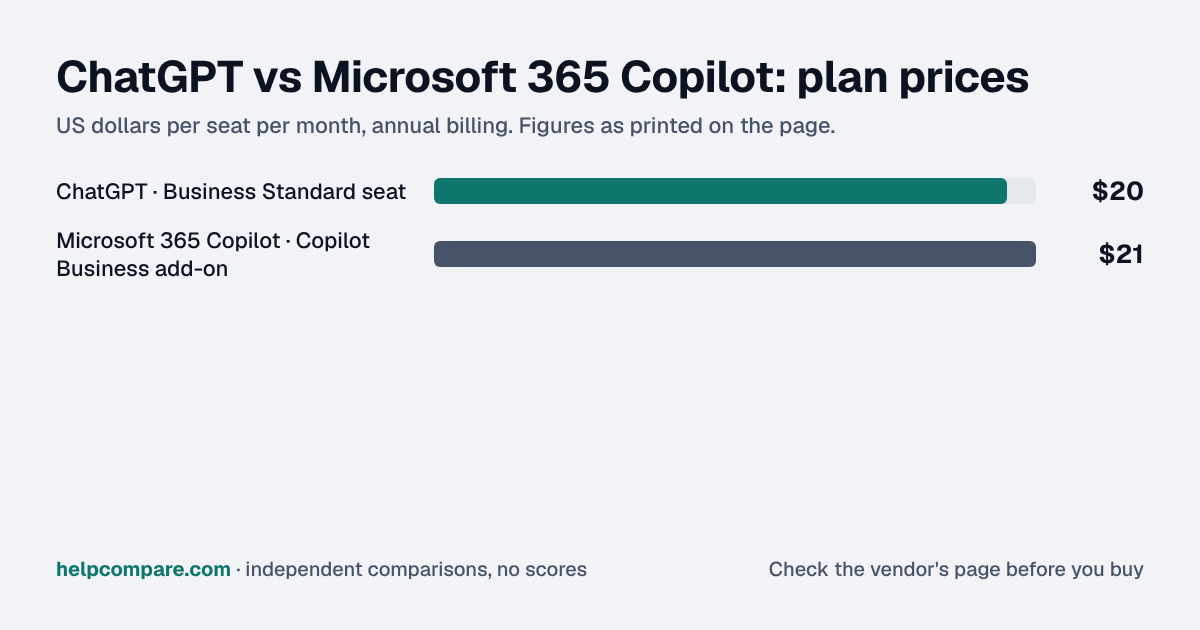
Every Microsoft 365 business account already gets Copilot Chat for free. The question is whether to pay $21 a user for Copilot inside Word, Excel and Outlook, or $20 a seat for ChatGPT Business, which works alongside any office suite.

ChatGPT logoFree plan; Business from $20/seat/mo (annual, 2-seat min)

ChatGPT

VS
Microsoft 365 Copilot logoCopilot Chat free with Microsoft 365; Copilot Business $21/user/mo add-on (annual)

Microsoft 365 Copilot

Bottom line Editorial assessment

Which is better for teams, ChatGPT or Microsoft 365 Copilot?

Choose Microsoft 365 Copilot if your company runs on Microsoft 365: Copilot Chat is free, and Copilot inside Word, Excel and Outlook is a $21 add-on or part of cheaper bundles. Choose ChatGPT Business at $20 a seat if you use other office tools or need image generation, custom GPTs or Codex.

Heads up: AI assistants change their plans, prices, models and usage limits almost daily. Everything on this page is accurate as of September 19, 2026, the date we checked each vendor’s pricing page and documentation. Confirm current terms on the vendor’s own site before you buy.

Quick verdict: Microsoft 365 Copilot is sold as part of Microsoft 365, not as a standalone assistant. Eligible Microsoft 365 work accounts already get Copilot Chat at no extra cost. The paid Copilot Business add-on ($21 a user a month on annual billing, $25.20 monthly, up to 300 users) puts Copilot inside Word, Excel, PowerPoint, Outlook and Teams and grounds it in your work data. Microsoft’s bundles cost less than buying the parts: Business Standard with Copilot is $23.50, against $35 for Business Standard plus the add-on. ChatGPT Business is $20 a seat on annual billing, works with any office suite, and adds image generation, custom GPTs and Codex.
Verified data

ChatGPT vs Microsoft 365 Copilot: quick facts

At a glanceChatGPTMicrosoft 365 Copilot
CategoryAI Assistants
Entry priceFree plan; Business from $20/seat/mo (annual, 2-seat min)Copilot Chat free with Microsoft 365; Copilot Business $21/user/mo add-on (annual)
Free planYes — Free plan for individualsCopilot Chat included with eligible Microsoft 365 business plans

Is ChatGPT cheaper than Microsoft 365 Copilot?

It depends on what you already pay for. A Microsoft 365 business customer already has Copilot Chat for free. Copilot inside the Office apps costs $21 a user a month on annual billing, a dollar more than ChatGPT Business at $20, but Microsoft’s bundles undercut the parts: Business Standard with Copilot is $23.50 a user a month and Business Premium with Copilot $32, against $35 and $43 when bought separately. Microsoft is also running a first-year price of $18 for the Copilot Business add-on for existing Business customers, from July 1 to December 31, 2026.

Verified data

ChatGPT vs Microsoft 365 Copilot at a glance

CategoryChatGPTMicrosoft 365 Copilot
Free optionFree ChatGPT for individualsCopilot Chat, included with eligible Microsoft 365 work subscriptions
Paid AI seatBusiness Standard seat — $20/mo annual, $25 monthlyCopilot Business add-on — $21/mo annual, $25.20 monthly ($18 first-year promotion, Jul 1–Dec 31, 2026)
What else you needNothingA qualifying Microsoft 365 Business plan: Basic $7, Standard $14 or Premium $22 a user a month (annual)
BundlesNoneBusiness Standard with Copilot $23.50; Business Premium with Copilot $32 (annual)
Large organizationsEnterprise — custom pricingMicrosoft 365 Copilot add-on — $30/mo paid yearly, $31.50 paid monthly (annual commitment)
Team size2–200 seats (Business)Up to 300 users on Business plans
Where it worksChatGPT apps, with connectors to Google Workspace, Microsoft 365, Slack and GitHubInside Word, Excel, PowerPoint, Outlook and Teams, grounded in your work data
Reusable assistantsCustom GPTs and workspace agentsAgents built with Copilot Studio
Coding agentCodex, in every seatNone listed in the Copilot Business plans
Trains on business dataNo, by defaultNo — prompts, responses and Graph data are not used to train foundation models
Free trialNone stated for BusinessOne month (credit card required)
Getting chat data outThrough the workspace ownerAdmins export with Microsoft Purview eDiscovery

Verified September 19, 2026Prices recorded from each vendor’s own pricing page. See sources

Prices in USD from chatgpt.com/pricing and Microsoft’s Microsoft 365 Copilot business and enterprise pricing pages (US, with Teams); features from each vendor’s pricing pages and documentation. All checked September 19, 2026.

Editorial assessment

How they actually differ

ChatGPT Business is a standalone AI seat. Microsoft 365 Copilot is a layer on top of Microsoft 365: free Copilot Chat for every eligible work account, and a paid licence that brings Copilot into the Office apps and your organization’s data. If you do not use Microsoft 365, Copilot Business is not an option on its own.

Add-on or bundle

Microsoft sells the Copilot Business add-on at $21 a user a month on annual billing for companies up to 300 users, on top of Business Basic ($7), Standard ($14) or Premium ($22). It also sells bundles that cost less than the parts: Business Standard with Copilot at $23.50 and Business Premium with Copilot at $32. Larger organizations pay $30 a user a month for the Microsoft 365 Copilot add-on, on an annual commitment.

Where the assistant lives

Copilot works inside Word, Excel, PowerPoint, Outlook and Teams and grounds its answers in your Microsoft Graph data, with pre-built agents such as Researcher and Analyst. ChatGPT works in its own apps and reaches your files through connectors to Microsoft 365, Google Workspace, Slack and GitHub, and adds image generation, custom GPTs and Codex. Microsoft publishes no numeric usage limits for Copilot: a paid licence gets “priority access” over free Copilot Chat.

Compliance and data

Copilot interactions are stored in the user’s Exchange mailbox, so admins can apply Microsoft Purview retention policies and export them with eDiscovery. OpenAI does not train on Business data by default, and lists SCIM, encryption key management and custom retention under Enterprise. Microsoft notes that Anthropic models used in Copilot, and Copilot Chat’s web searches, sit outside its EU Data Boundary.

ChatGPT

Pros

  • Works with any office suite, including Google Workspace
  • Image generation, voice, deep research and Codex in every seat
  • Custom GPTs and workspace agents
  • No base licence required

Cons

  • Not built into Word, Excel or Outlook
  • A separate subscription for Microsoft 365 companies
  • Business members cannot export their own chats
  • SCIM and custom retention need Enterprise

Microsoft 365 Copilot

Pros

  • Copilot Chat is free with Microsoft 365
  • Built into Word, Excel, PowerPoint, Outlook and Teams
  • Bundles cost less than Microsoft 365 plus the add-on
  • Purview retention and eDiscovery for AI chats

Cons

  • Requires a Microsoft 365 plan
  • No published usage limits
  • No coding agent listed in the business plans
  • Users cannot export their own chat history
Verified data

Cost calculator: what does your team actually pay?

ChatGPT

 
$0/mo

Microsoft 365 Copilot

 
$0/mo
 

List prices checked September 19, 2026 (US, with Teams). The Copilot Business add-on also needs a Microsoft 365 Business plan, which is not included in that option; the bundles include Microsoft 365. ChatGPT prices are for the AI seat only, with a 2-seat minimum. The $18 first-year promotion, taxes and Enterprise pricing are not included.

Choose ChatGPT if…

Your team is not all-in on Microsoft 365, needs image generation, custom GPTs or Codex, or wants one assistant that reaches Google Workspace, Microsoft 365 and Slack.

Choose Microsoft 365 Copilot if…

Your company runs on Microsoft 365 and wants AI inside Word, Excel, Outlook and Teams, grounded in its own files and email, with retention and eDiscovery handled in Purview.

Total cost over time

Uses your selections above. Estimate excludes add-ons, overages, and negotiated discounts.

Ready to pick your AI assistant?

If you have Microsoft 365, start with the free Copilot Chat. Microsoft offers a one-month trial of the paid plans, and ChatGPT has a free plan for comparison.

Verified data

ChatGPT vs Microsoft 365 Copilot: security, offline & remote work

How ChatGPT and Microsoft 365 Copilot compare on compliance reports, sign-in controls, offline access and the setup details that matter for remote, hybrid and in-office teams. Every value links to the vendor page it came from.

What we checkedChatGPTMicrosoft 365 Copilot
Security & compliance
SOC 2 reportSOC 2 Type IIsourceNot published
ISO/IEC 27001CertifiedsourceCertifiedsource
Other certificationsISO/IEC 27017, ISO/IEC 27018, ISO/IEC 27701, ISO/IEC 42001, SOC 3, PCI DSS v4.0.1, CSA STAR, FedRAMP 20x, TX-RAMPsourceISO/IEC 42001source
HIPAA (BAA)BAA availableEnterprisesourceBAA availablesource
GDPR data processing agreementDPA offeredsourceDPA offeredsource
Single sign-on (SAML/OIDC)YesBusinesssourceYesAny eligible Microsoft 365 plan (sign-in via Microsoft Entra ID)source
SCIM user provisioningYesEnterprisesourceNot published
Two-factor authenticationYessourceYesEnforcement: All Microsoft 365 plans via Entra ID security defaults; Conditional Access policies need Entra ID P1 (included in Business Premium)source
Admin audit logYesEnterprisesourceYesCopilot Chat (included)source
Data residency choicesUS, EU, UK, Japan, Canada, South Korea, Singapore, India, Australia, UAEEnterprisesourceNot published
EncryptionAES-256 at rest; TLS 1.2+ in transitsourceBitLocker and per-file encryption at rest; TLS and IPsec in transitsource
Self-hosting optionNot publishedNot published
Offline access
Offline modeNot documentedNot documented
Desktop appsWindows, macOSsourceWindows, macOSsource
Mobile appsiOS, AndroidsourceiOS, Androidsource
Remote, hybrid & in-office
IP allowlistingYesEnterprisesourceYesMicrosoft 365 Business Premium (Entra ID P1 Conditional Access)source
Device & session controlsYesEnterpriseEnterprise: Intune for iOS (pricing table) and Workspace Blocking via a ChatGPT-Allowed-Workspace-Id HTTP header on the corporate network; not ticked for Business.sourceNot published
Office & room hardwareCopilot in Teams Phone works on VoIP and PSTN calls; no Copilot-specific room hardware is documented.source
Editorial assessment

What this means for your team

  • Audit reports: ChatGPT states a SOC 2 report on its own site; we found no SOC 2 statement for Microsoft 365 Copilot. If your security team requires SOC 2, ask Microsoft 365 Copilot directly before shortlisting.
  • Single sign-on: ChatGPT includes it on Business; Microsoft 365 Copilot includes it on Any eligible Microsoft 365 plan (sign-in via Microsoft Entra ID). If your team signs in through Okta, Microsoft Entra ID or Google, price the plan that includes SSO, not the entry plan.
  • Health data: ChatGPT and Microsoft 365 Copilot will sign a HIPAA business associate agreement (ChatGPT: Enterprise).
  • Working offline: ChatGPT and Microsoft 365 Copilot don’t document an offline mode. Details are in the Offline mode row above.
  • Office-only access: ChatGPT can restrict sign-ins to approved IP ranges on Enterprise; Microsoft 365 Copilot can restrict sign-ins to approved IP ranges on Microsoft 365 Business Premium (Entra ID P1 Conditional Access). That suits an office network or a company VPN; fully remote teams need a VPN for it to work.
  • Where your data lives: ChatGPT lets you choose US, EU, UK, Japan, Canada, South Korea, Singapore, India, Australia, UAE on Enterprise. This matters for teams hiring across the EU, UK or Australia.
  • In the office: Microsoft 365 Copilot: Copilot in Teams Phone works on VoIP and PSTN calls; no Copilot-specific room hardware is documented.

ChatGPT: worth knowing

  • SecurityBusiness data residency is rolling out gradually; if a non-US region is chosen, a copy of every prompt and response is still stored in the US for a limited time for abuse monitoring. source
  • RemoteIn Business workspaces admins can view, access, export and delete member conversations, though by default they cannot see all private member chats in the product. source
  • RemoteSelf-serve Business can't pay by invoice, PO, ACH or wire; organisations needing those must buy a contracted plan such as Enterprise. source

Microsoft 365 Copilot: worth knowing

  • SecurityFor EU customers Copilot runs inside the EU Data Boundary; customers outside the EU may have queries processed in the US, EU or other regions. source
  • SecurityWeb-search queries that Copilot Chat sends to Bing fall outside the EU Data Boundary, which matters for EU teams with strict residency rules. source
  • RemoteCopilot in Teams is available on Windows, Mac, web, Android and iOS, so remote and in-office staff get the same meeting features. source
  • OfficeEven without a paid Copilot licence, Copilot Chat in Outlook can answer questions across a user's email, calendar, meetings and chats. source

Checked September 19, 2026 against each vendor’s own trust center, help docs and app pages. Hover or tap “source” to see the exact wording we relied on. “Not published” means we could not find the vendor saying it on its own site — it doesn’t mean the feature is missing. Plan names are the lowest plan the vendor says includes the feature. Security · Offline · Remote vs office · Download the data

Frequently Asked Questions

Is Microsoft 365 Copilot free?

Copilot Chat is included at no extra cost for users with an eligible Microsoft 365 work subscription. Copilot inside Word, Excel, PowerPoint, Outlook and Teams needs the paid Copilot Business add-on ($21 a user a month on annual billing) or a bundle.

How much does Copilot Business cost?

$21 a user a month on annual billing or $25.20 monthly, for up to 300 users, on top of a Microsoft 365 Business plan. Microsoft lists an $18 first-year price for existing Business customers from July 1 to December 31, 2026. Prices checked September 19, 2026.

Is ChatGPT Business cheaper than Copilot?

ChatGPT Business is $20 a seat a month on annual billing; Copilot Business is $21 plus a Microsoft 365 plan. But if you already pay for Microsoft 365, Copilot Chat is free, and the bundles (Business Standard with Copilot at $23.50) include the office suite.

Does Copilot work without Microsoft 365?

No. Copilot Business and Copilot Chat for work require an eligible Microsoft 365 subscription. ChatGPT Business works on its own.

Do ChatGPT or Copilot train on my data?

Microsoft says prompts, responses and Microsoft Graph data are not used to train foundation models. OpenAI says it does not train on ChatGPT Business data by default.

Can I build custom assistants in both?

Yes. ChatGPT has custom GPTs and workspace agents; Microsoft 365 Copilot uses agents built with Copilot Studio, which are included for licensed users and otherwise billed by usage.

Migration Guides

Already decided? Here’s how to actually switch.

Step-by-step migration guides covering what transfers automatically, what doesn’t, and how to handle the gap — in both directions.

Editorial assessment

When to Buy — and When to Walk Away

Every “best AI assistant” listicle tells you why to buy. Here’s the other half: the specific conditions under which ChatGPT or Microsoft 365 Copilot is the wrong purchase for your team.

ChatGPT

Buy ChatGPT if:

  • Your team uses Google Workspace or a mix of tools
  • You need image generation, custom GPTs or Codex
  • You do not want AI tied to an office-suite licence

Do NOT buy ChatGPT if:

  • Your company is all-in on Microsoft 365 and wants AI inside Office
  • You need AI chats under Purview retention and eDiscovery
  • Free Copilot Chat already covers what your people need

Microsoft 365 Copilot

Buy Microsoft 365 Copilot if:

  • Your company runs on Microsoft 365
  • You want Copilot in Word, Excel, Outlook and Teams, grounded in your own data
  • You can buy Business Standard or Premium with Copilot as a bundle

Do NOT buy Microsoft 365 Copilot if:

  • You do not use Microsoft 365
  • You need published usage limits to plan capacity
  • Your team needs a coding agent included in the seat

Sources

Prices on this page were recorded from each vendor’s own pricing page on the date shown at the top of the page. Vendors change pricing often — check the live source before you buy.

Every figure is also in our open dataset (JSON and CSV, CC BY 4.0), with its source page and verification date. See how we research pricing.

Start with the job

Guides for the jobs this software does

Plain-language guides: the steps, what to check before you buy, common mistakes, and every tool it takes with verified prices.

Need sign-off?

Turn this into a one-page decision brief

Verified prices costed for your team size, a check against your must-have requirements, the questions to settle before you sign, and a source for every figure. Print it, or paste it into an email to whoever approves the spend.

Build a decision brief

From shortlist to switched

Built for the leader who owns the selection, answers for the spend, drives the rollout, and lives with the results. HelpCompare covers the whole decision, not just the first step.

Bill Belcamino, founder of HelpCompare
About the author

Bill Belcamino

Founder and author, HelpCompare

Bill has worked in software and digital marketing for more than 20 years. He spent nine years as an engineer at HP, served as COO scaling a platform past 200,000 users, and ran Google’s $70M/year search syndication partnership at Alot.com. He has bought, trialled, integrated and cancelled more SaaS tools than he can count, and started HelpCompare because the real cost of switching tools is the part nobody covers.

“I’ve sat on both sides of the table: the agency recommending the tool and the client paying for it.”

Researched and fact-checked by the HelpCompare team. Pricing on this page was last verified on September 19, 2026. No paid sponsorships, no affiliate commissions.