E-Signature

DocuSign vs Adobe Sign: Which E-Signature Platform Wins in 2026?

A standalone e-signature specialist vs. e-signing bundled into Adobe’s PDF stack — here is how DocuSign and Adobe Acrobat Sign actually compare on cost, workflow depth, and ecosystem fit.

From ~$10–15/mo (solo) or ~$25–30/user/mo (team)

DocuSign

VS
From $16.99/license/mo (bundled with Acrobat)

Adobe Acrobat Sign

DocuSign vs Adobe Acrobat Sign at a glance

CategoryDocuSignAdobe Acrobat Sign
Entry plan (annual)~$10–15/mo — Personal, 1 user, 5 envelopes/mo$16.99/license/mo — Acrobat Standard for teams
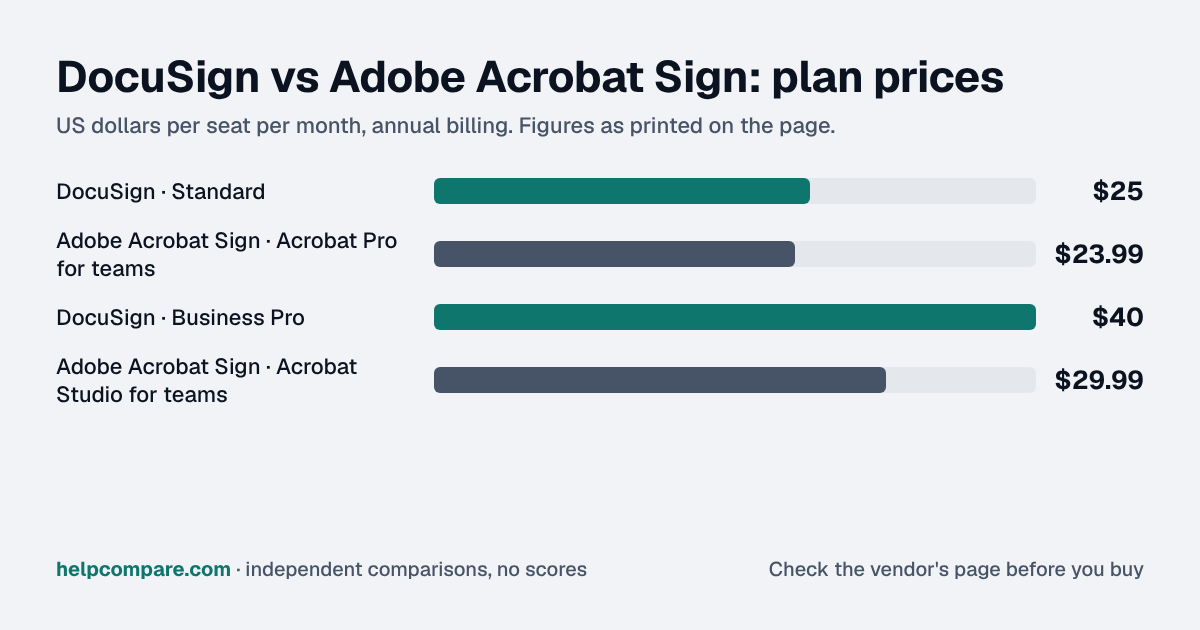
Standalone business tier~$25–30/user/mo — Standard, 100 envelopes/user/yr~$23/user/mo — Acrobat Sign Business, 100 envelopes/user/yr
Advanced tier~$40–45/user/mo — Business Pro$29.99/license/mo — Acrobat Studio (adds AI Assistant)
EnterpriseCustom — contact sales~$40/user/mo+ — Acrobat Sign Enterprise, unlimited envelopes
AI productIAM (Intelligent Agreement Management): $40–$75/user/moAcrobat AI Assistant — bundled in Studio or ~$5–$12/user/mo add-on
Deepest ecosystem tie-inOwn large partner network; strong CRM/HRIS connectorsMicrosoft 365 & Teams, plus native PDF/Adobe workflows
Free planNo — free trial onlyNo — free trial only
Best suited forStandalone e-sign need, integration-heavy sales/HR workflowsTeams already invested in Microsoft 365 or Adobe/PDF stacks

How they actually differ

DocuSign remains the deeper standalone e-signature product at lower price points — bulk send, conditional routing, and web forms are available well before Adobe reaches its Enterprise tier. Adobe’s advantage is that e-signing comes bundled with real PDF editing, so if your team is already paying for Acrobat or Microsoft 365, signing is effectively an add-on rather than a second subscription.

Compliance and ecosystem fit

Both are enterprise-grade on compliance — DocuSign covers eIDAS, HIPAA, and SOC 2; Adobe Acrobat Sign adds eIDAS, HIPAA, GDPR, FERPA, GLBA, and FDA 21 CFR Part 11, tied to native PDF/ISO 32000 standards. The bigger differentiator is ecosystem: DocuSign has the larger, more mature CRM/HRIS integration network, while Adobe is unmatched for Microsoft 365 and native PDF workflows.

2025–2026 moves

DocuSign launched IAM (Intelligent Agreement Management) with its Iris AI agents in May 2026, adding autonomous contract review and MCP integration with Claude, Gemini, and ChatGPT. Adobe rolled AI into its Acrobat AI Assistant (bundled in the Studio tier or as a paid add-on) alongside an April/June 2026 Acrobat price increase.

Pros & cons

DocuSign

Pros

  • Deeper standalone e-sign workflows at lower tiers — bulk send, conditional routing, web forms
  • More mature, better-documented API for pure e-signature use cases
  • Larger, longer-established CRM and HRIS integration network
  • IAM/Iris AI platform is ahead on contract-analysis AI features

Cons

  • Personal plan caps out at just 5 envelopes/month
  • No native PDF editing — e-sign only, not a document-editing suite
  • Enterprise pricing requires contacting sales
  • IAM’s AI tier carries a 3-user minimum

Adobe Acrobat Sign

Pros

  • Native PDF editing bundled with e-signing in one subscription
  • Deepest Microsoft 365, Teams, and SharePoint integration of any major e-sign vendor
  • Lower entry price if you already need Acrobat for PDF editing anyway
  • Strong compliance certification set (GDPR, FERPA, GLBA, FDA 21 CFR Part 11)

Cons

  • Real e-sign workflow depth is concentrated in the pricier Enterprise tier
  • Standalone Acrobat Sign Business is a separate purchase from Acrobat’s PDF plans
  • Less mature AI contract-analysis features than DocuSign’s IAM/Iris platform
  • 2026 price increases affected several Acrobat team tiers

Cost calculator: what does your team actually pay?

DocuSign

 
$0/mo

Adobe Acrobat Sign

 
$0/mo
 

Illustrative estimate based on publicly listed pricing as of September 2026. Always confirm current rates before purchasing.

Choose DocuSign if…

E-signature is a standalone, business-critical workflow — you need bulk sending, conditional routing, or deep CRM/HRIS integrations, and want the most mature dedicated e-sign product on the market.

Choose Adobe Acrobat Sign if…

Your team already works inside Microsoft 365 or the Adobe/PDF ecosystem and would rather have document editing and signing in one subscription than run two separate tools.

Related

See the full E-Signature category

Compare DocuSign against PandaDoc too, and browse every e-signature head-to-head we cover.

Ready to pick your e-signature platform?

Both offer a free trial or demo — confirm current pricing directly with the vendor before you sign.

Frequently Asked Questions

How much does Adobe Sign cost compared to DocuSign?

At comparable business tiers both land around $20–$30/user/month — DocuSign Standard (~$25–30/user/mo) versus Acrobat Sign Business (~$23/user/mo). DocuSign’s Personal plan is cheaper for solo use ($10–15/mo) but is capped at 5 envelopes a month.

Does DocuSign integrate with Adobe products?

Yes, through general PDF and document workflows, but it isn’t natively bundled the way Adobe’s own Acrobat-plus-Sign combination is.

Which has a free plan?

Neither offers an ongoing free plan in 2026; both offer free trials only.

Which is better for Microsoft-centric companies?

Adobe Acrobat Sign, due to its deeper native integration with Microsoft 365, Teams, and SharePoint compared with DocuSign’s more general-purpose integration approach.

Which has more AI features in 2026?

DocuSign, via its IAM (Intelligent Agreement Management) platform and Iris AI agents for contract analysis and risk extraction, is currently ahead of Adobe’s more document-editing-focused AI Assistant.

Can I send bulk signature requests on both platforms?

Yes, but DocuSign offers bulk send starting at its Business Pro tier, while Adobe’s bulk request feature is available starting at Acrobat Pro, one tier lower in Adobe’s ladder.

Which is better for a business with heavy compliance requirements?

Both are enterprise-grade with comparable certifications. Adobe Acrobat Sign additionally ties into native PDF/ISO 32000 document standards, which can matter for document-heavy regulated workflows.