Both have free plans. PandaDoc is a document and proposal builder; Zoho Sign is a low-cost e-signature tool that fits the Zoho suite. Here is what each costs per user and what the free plans really include.
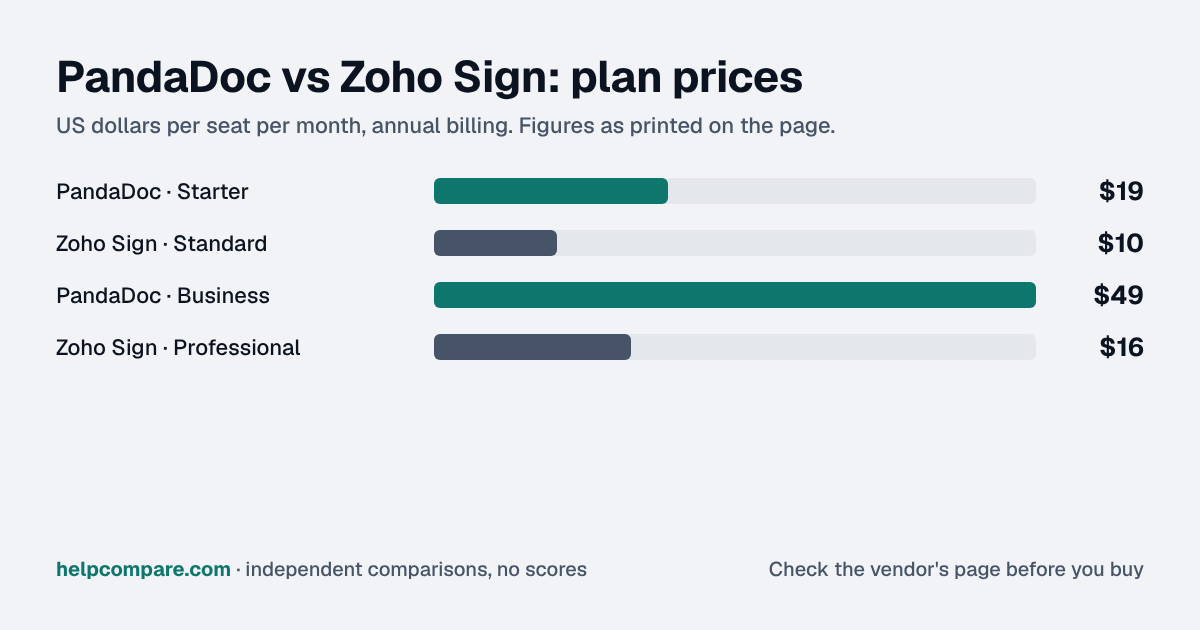
On list price, close to it: Zoho Sign Standard is $10 a user a month on annual billing against PandaDoc Starter at $19, but Standard caps each user at 25 envelopes a month.
Professional at $16 removes the cap, and PandaDoc's free plan covers 5 documents a month for the whole team, where Zoho's is one user with 5 envelopes a month. Per-user caps catch teams out because they don't pool. Most senders need a handful a month, while the one person who handles renewals or onboarding paperwork hits the limit in the busiest week, and one blocked sender is enough to force an upgrade. Price Zoho Sign on your heaviest sender's busiest month, not the team average. If that month runs past 25, you're really comparing $16 with $19, and whether your team builds proposals decides it.
My read of the verified data on this page, checked against vendor sources on September 25, 2026. Disagree or spot an error? Tell Bill
| At a glance | PandaDoc | Zoho Sign |
|---|---|---|
| Category | E-Signature | |
| Entry price | Free e-sign, from $19/seat/mo | Free for 1 user; Standard $10/user/mo (annual) |
| Free plan | Yes — 5 docs/month, unlimited users | Yes — single user, 5 envelopes per month |
Zoho Sign: Standard is $10 a user a month on annual billing against PandaDoc Starter at $19. For 5 people that is $50 a month against $95. For unlimited envelopes, Zoho Sign Professional is $16 a user, still below PandaDoc Starter.
| Category | PandaDoc | Zoho Sign |
|---|---|---|
| Entry price | Starter $19/seat/mo (annual), $35 monthly | Standard $10/user/mo (annual), 25 envelopes/user/mo |
| Next tier | Business $49/seat/mo (annual) | Professional $16/user/mo (annual), unlimited envelopes |
| Top published tier | Enterprise: custom | Enterprise $22/user/mo (annual) |
| Free plan | 5 documents a month, unlimited users | Single user, 5 envelopes a month |
| Trial | Free trial of paid plans | 14-day Enterprise trial, no credit card |
| Document builder | Drag-and-drop editor for proposals and quotes | Templates; SignForms on Enterprise |
| Advanced signatures | See vendor pricing page | AES on Standard; QES on Enterprise |
Verified September 25, 2026Prices recorded from each vendor’s own pricing page. See sources
Explore the numbers
PandaDoc and Zoho Sign: plan prices side by side
Plan price: US dollars per seat per month, annual billing
PandaDocZoho Sign
Prices exactly as printed in the comparison table on this page (annual billing), in the table’s own tier order: Entry price, Next tier.
What PandaDoc and Zoho Sign cost per month for a team
5 seats: monthly cost = seats × the per-seat price on this page (annual billing)
10 seats: monthly cost = seats × the per-seat price on this page (annual billing)
25 seats: monthly cost = seats × the per-seat price on this page (annual billing)
50 seats: monthly cost = seats × the per-seat price on this page (annual billing)
PandaDocZoho Sign
An example, not a quote: team size times the per-seat prices printed on this page. It leaves out tax, add-ons, discounts and any plan limits. Where a plan has a minimum number of seats, the minimum is used.
List prices from this page’s own comparison table, not a quote. Plans differ in what they include.
Prices in USD from pandadoc.com/pricing and zoho.com/sign/pricing.html, checked September 25, 2026. Zoho Sign shows yearly prices (it says yearly saves 20%).
Editorial assessmentBoth get documents signed; PandaDoc also builds the documents, while Zoho Sign focuses on signing and plugs into Zoho’s other apps.
PandaDoc Free includes 5 documents a month for your whole team. Zoho Sign Free is one user and 5 envelopes a month, with signature workflows, reminders and an audit trail.
Zoho Sign Standard ($10) allows 25 envelopes per user per month; Professional ($16) is unlimited and adds branding and reports; Enterprise ($22) adds bulk send, SignForms, in-person signing, payments, QES and 21 CFR Part 11 controls. PandaDoc Starter includes unlimited document uploads and e-signatures.
Neither imports the other’s templates. Download completed documents with their audit trails, upload blank documents to the new tool and place the fields, then reconnect integrations.
List prices on annual billing, checked September 25, 2026. Both bill per user. Zoho Sign Standard includes 25 envelopes per user per month. Local taxes are extra.
You build proposals and quotes, want a free plan for the whole team, or send a lot on the entry tier.
You want the lowest per-user price, already use Zoho apps, or need advanced or qualified electronic signatures.
Uses your selections above. Estimate excludes add-ons, overages, and negotiated discounts.
Both are free to try. If your team writes proposals, start with PandaDoc; if you mostly send contracts for signature, Zoho Sign costs about half as much.
How PandaDoc and Zoho Sign compare on compliance reports, sign-in controls, offline access and the setup details that matter for remote, hybrid and in-office teams. Every value links to the vendor page it came from.
| What we checked | PandaDoc | Zoho Sign |
|---|---|---|
| Security & compliance | ||
| SOC 2 report | SOC 2 Type IIsource | SOC 2 Type IIsource |
| ISO/IEC 27001 | Not published | Certifiedsource |
| Other certifications | HIPAAsource | ISO/IEC 27017, ISO/IEC 27018, ISO/IEC 27701, SOC 1 Type II, CSA STAR Self-Assessmentsource |
| HIPAA (BAA) | BAA availableEnterprise (add-on)source | Not published |
| GDPR data processing agreement | Not published | DPA offeredsource |
| Single sign-on (SAML/OIDC) | YesEnterprise (Business: paid add-on)source | Yessource |
| SCIM user provisioning | YesEnterprisesource | Not published |
| Two-factor authentication | Yessource | Yessource |
| Admin audit log | Not published | Not published |
| Data residency choices | US, EUEnterprisesource | US, EU, Australia, India, Japan, Canadasource |
| Encryption | AES-256 at rest; encrypted in transitsource | AES-256 at rest; SSL/TLS in transitsource |
| Self-hosting option | Not published | Not published |
| Offline access | ||
| Offline mode | Not documented | Not documented |
| Desktop apps | Not published | Not published |
| Mobile apps | iOS, Androidsource | Not published |
| Remote, hybrid & in-office | ||
| IP allowlisting | Not published | Not published |
| Device & session controls | Not published | Not published |
Zoho Sign: Standard is $10 a user a month on annual billing against PandaDoc Starter at $19. Prices checked September 25, 2026.
For a team, PandaDoc’s: 5 documents a month with unlimited users. Zoho Sign Free is one user and 5 envelopes a month.
Standard allows 25 envelopes per user per month; Professional and Enterprise are unlimited.
Not automatically. Rebuild templates from your blank documents in the new tool and download completed documents first.
Step-by-step migration guides covering what transfers automatically, what doesn’t, and how to handle the gap — in both directions.
Every “best e-signature tool” listicle tells you why to buy. Here’s the other half: the specific conditions under which PandaDoc or Zoho Sign is the wrong purchase for your team.
Buy PandaDoc if:
Do NOT buy PandaDoc if:
Buy Zoho Sign if:
Do NOT buy Zoho Sign if:
Every pricing fact, rating, AI billing model and switching guide we hold on each tool, on one page, with the date each figure was last verified.
Prices on this page were recorded from each vendor’s own pricing page on the date shown at the top of the page. Vendors change pricing often — check the live source before you buy.
Every figure is also in our open dataset (JSON and CSV, CC BY 4.0), with its source page and verification date. See how we research pricing.
Source links on this site are checked every month; last check . How sources are checked.
Verified prices costed for your team size, a check against your must-have requirements, the questions to settle before you sign, and a source for every figure. Print it, or paste it into an email to whoever approves the spend.
Built for the leader who owns the selection, answers for the spend, drives the rollout, and lives with the results. HelpCompare covers the whole decision, not just the first step.