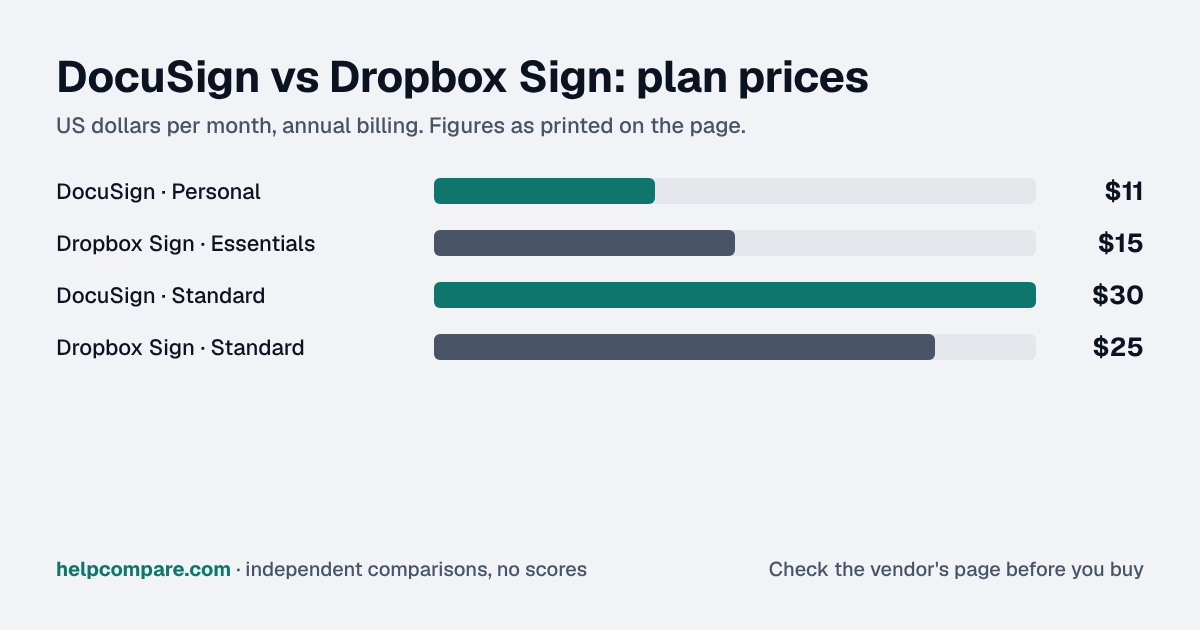
DocuSign is the category leader with per-user plans and envelope limits; Dropbox Sign (formerly HelloSign) sells unlimited signature requests at a lower per-user price. Here is what each costs and what the limits are.
For a team of 2 to 4 senders, Dropbox Sign: Standard is $25 a user a month on yearly billing with unlimited signature requests, against DocuSign Standard at $30. For one light user, DocuSign Personal at $11 a month is cheaper but allows 5 envelopes a month. Five or more senders need a Dropbox Sign Premium quote, where DocuSign keeps list prices.
| At a glance | DocuSign | Dropbox Sign |
|---|---|---|
| Category | E-Signature | |
| Entry price | Personal $11/mo for 1 user; Standard $30/user/mo (annual plan, billed monthly) | Essentials $15/mo (1 user, yearly); Standard $25/user/mo (yearly) |
| Free plan | No — free trial only | Free plan for signing your own documents (limits not listed on the pricing page); 30-day trial of paid plans |
Depends on size. One person: DocuSign Personal at $11 a month (annual) against Dropbox Sign Essentials at $15 (yearly), but DocuSign Personal allows 5 envelopes a month. A team of 2 to 4: Dropbox Sign Standard at $25 a user against DocuSign Standard at $30, so 3 people pay $75 against $90 a month. At 5 or more users Dropbox Sign asks you to contact sales.
| Category | DocuSign | Dropbox Sign |
|---|---|---|
| Entry price | Personal $11/mo (annual), 1 user, 5 envelopes/mo | Essentials $15/mo (yearly), $20 monthly, 1 user |
| Team plan | Standard $30/user/mo (annual) | Standard $25/user/mo (yearly), $30 monthly, 2-4 users |
| Next tier | Business Pro $45/user/mo (annual) | Premium: custom quote (5+ users) |
| Signature requests | Envelope limits by plan (Personal: 5/month) | Unlimited on every paid plan |
| Templates | Reusable templates | 5 (Essentials), 15 (Standard), unlimited (Premium) |
| Free option | Free trial only | Free plan for your own signing; 30-day trial of paid plans |
| SSO | See vendor pricing page | Premium |
Verified September 25, 2026Prices recorded from each vendor’s own pricing page. See sources
Prices in USD from ecom.docusign.com/plans-and-pricing/esignature and sign.dropbox.com pricing, checked September 25, 2026. Dropbox Sign shows introductory discounts at times; list prices are used here.
Editorial assessmentBoth are mainstream e-signature tools that signers never pay for. The differences are request limits, team size and how far each scales.
Dropbox Sign’s pricing page promises unlimited signature requests on paid plans and limits templates instead (5, 15 or unlimited). DocuSign Personal allows 5 envelopes a month; its team plans carry their own envelope allowances.
Dropbox Sign Standard covers 2 to 4 users; at 5 or more you need a Premium quote, which adds SSO, data residency and multi-team admin. DocuSign sells Standard and Business Pro per user with no published cap.
Neither imports the other’s templates or envelopes. Download completed documents with their audit trails, rebuild templates by uploading the blank documents and placing fields, and reconnect integrations such as Google Drive or HubSpot.
List prices on annual/yearly billing, checked September 25, 2026. DocuSign Personal and Dropbox Sign Essentials are single-user; Dropbox Sign Standard covers 2-4 users. Taxes and promotions are not included.
You need enterprise features, more than 4 senders without a sales quote, or DocuSign’s integrations, or you sign 5 or fewer envelopes a month alone.
You are a team of 2 to 4 that sends a lot, want no request limits, or want the lower per-user price.
Uses your selections above. Estimate excludes add-ons, overages, and negotiated discounts.
Count senders and monthly requests. Two to four senders with steady volume points to Dropbox Sign; one light sender or a large team points to DocuSign.
How DocuSign and Dropbox Sign compare on compliance reports, sign-in controls, offline access and the setup details that matter for remote, hybrid and in-office teams. Every value links to the vendor page it came from.
| What we checked | DocuSign | Dropbox Sign |
|---|---|---|
| Security & compliance | ||
| SOC 2 report | SOC 2 Type IIsource | Not published |
| ISO/IEC 27001 | Certifiedsource | Certifiedsource |
| Other certifications | ISO/IEC 27017, ISO/IEC 27018, PCI DSS v4.0, C5 Type II, IRAP (PROTECTED), FedRAMP Moderate, DoD IL4, APEC PRP, Canada Protected B, CSA STAR (CAIQ self-assessment)source | SOC 2 report, SOC 3 report, ISO/IEC 27018source |
| HIPAA (BAA) | BAA availableEnhanced planssource | Not published |
| GDPR data processing agreement | DPA offeredsource | Not published |
| Single sign-on (SAML/OIDC) | YesEnhanced plans (Access Management with SSO add-on)source | YesPremiumsource |
| SCIM user provisioning | YesPlan with Organization Management, or Organization Management add-onsource | Not published |
| Two-factor authentication | YesEnforcement: Docusign organization with a claimed domain (plan not stated)source | Not published |
| Admin audit log | Yessource | Not published |
| Data residency choices | US, Canada, EU, Australia, JapanEnhanced planssource | Not published |
| Encryption | AES-256 at rest; TLS 1.2 in transitsource | Not published |
| Self-hosting option | Not published | Not published |
| Offline access | ||
| Offline mode | PartialIn the Docusign iOS and Android apps, a host can download envelopes that were prepared and sent online, then run in-person signing sessions without an internet connection; sending and preparing envelopes still happens online.source | Not documented |
| Desktop apps | Not published | Not published |
| Mobile apps | iOS, Androidsource | Not published |
| Offline limits | Sending or signing for offline use requires a premium account bought in the app or a web plan; only mobile-supported fields can be used.source | — |
| Remote, hybrid & in-office | ||
| IP allowlisting | YesDocusign organization with a claimed domainsource | Not published |
| Device & session controls | YesNew-device email verification on password logins (can be disabled per domain), required login before opening envelopes, and SSO-only login enforcement for claimed domains.source | Not published |
For teams of 2 to 4, Dropbox Sign: Standard is $25 a user a month (yearly) against DocuSign Standard at $30. For one light user, DocuSign Personal at $11 is cheaper but allows 5 envelopes a month. Prices checked September 25, 2026.
Yes. HelloSign was renamed Dropbox Sign after Dropbox acquired it.
Its pricing page says paid plans include unlimited signature requests; templates are limited to 5 on Essentials and 15 on Standard.
Not automatically. Rebuild templates in the new tool from your blank documents and download completed documents first.
Step-by-step migration guides covering what transfers automatically, what doesn’t, and how to handle the gap — in both directions.
Every “best e-signature tool” listicle tells you why to buy. Here’s the other half: the specific conditions under which DocuSign or Dropbox Sign is the wrong purchase for your team.
Buy DocuSign if:
Do NOT buy DocuSign if:
Buy Dropbox Sign if:
Do NOT buy Dropbox Sign if:
Every pricing fact, rating, AI billing model and switching guide we hold on each tool, on one page, with the date each figure was last verified.
Prices on this page were recorded from each vendor’s own pricing page on the date shown at the top of the page. Vendors change pricing often — check the live source before you buy.
Every figure is also in our open dataset (JSON and CSV, CC BY 4.0), with its source page and verification date. See how we research pricing.
Verified prices costed for your team size, a check against your must-have requirements, the questions to settle before you sign, and a source for every figure. Print it, or paste it into an email to whoever approves the spend.
Built for the leader who owns the selection, answers for the spend, drives the rollout, and lives with the results. HelpCompare covers the whole decision, not just the first step.