Bottom line up front: DocuSign or PandaDoc for a team that sends a lot of contracts?
Check volume before price: DocuSign's Standard and Business Pro plans cap out at 100 envelopes per user a year on annual plans before overage, and its $11/mo Personal plan (annual, billed monthly) allows 5 a month.
PandaDoc Business ($49/seat/mo billed annually) lists unlimited documents, but the same page also cites an overage of $2.60 per extra document on Business Monthly, so get the real limit in writing. Then forecast honestly, because teams count deals and vendors count sends. A proposal that goes out, gets redlined and goes out again, or a contract voided and reissued with the right price, can burn two or three sends for one signature. Pull last year's sent history, not your closed-deal count, and price both tools against that number. Fit follows use: sales teams building quotes from a CRM lean PandaDoc, and legal or procurement teams that value DocuSign's compliance record lean DocuSign.
$11/mo Personal (1 user, annual plan billed monthly); teams from $30/user/mo
Free e-sign, from $19/seat/mo
Is DocuSign cheaper than PandaDoc?
DocuSign starts at $11/mo for a single user on an annual plan billed monthly (teams from $30/user/mo on Standard) and PandaDoc at Free e-sign, from $19/seat/mo. See the full breakdown below for what is included at each tier.
$30/seat/mo (Standard, annual plan billed monthly)
$49/seat/mo billed annually, $65 billed monthly (Business, most popular)
Top self-serve tier
$45/seat/mo (Business Pro, annual plan billed monthly)
Custom (Enterprise)
Core focus
E-signature / agreement lifecycle
Proposals, quotes, CPQ + signature
Template/design tools
Signature-workflow focused
Strong drag-and-drop proposal/quote design
CRM/sales integration
Broad (1,000+ apps), less sales-native
Deep Salesforce/HubSpot + CPQ for sales teams
AI features (2026)
Intelligent Agreement Management + Iris AI Assistant
AI drafting/content tools
G2 rating
4.5/5 (~2,629 reviews)
4.7/5 (~3,697 reviews)
Verified September 12, 2026Prices recorded from each vendor’s own pricing page. See sources
Explore the numbers
DocuSign vs PandaDoc: the prices as a chart
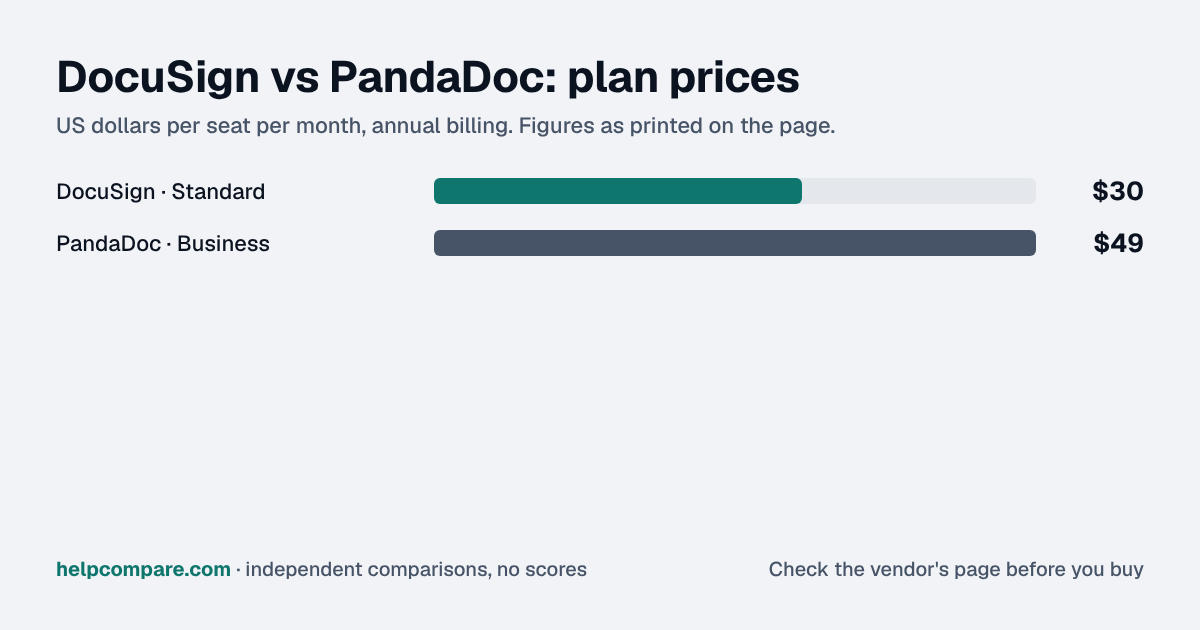
DocuSign and PandaDoc: plan prices side by side
Plan price: US dollars per seat per month, annual billing
DocuSign · Standard$30
PandaDoc · Business$49
DocuSignPandaDoc
Prices exactly as printed in the comparison table on this page (annual billing), in the table’s own tier order: Mid tier.
What DocuSign and PandaDoc cost per month for a team
5 seats: monthly cost = seats × the per-seat price on this page (annual billing)
DocuSign · Standard: 5 × $30$150
PandaDoc · Business: 5 × $49$245
10 seats: monthly cost = seats × the per-seat price on this page (annual billing)
DocuSign · Standard: 10 × $30$300
PandaDoc · Business: 10 × $49$490
25 seats: monthly cost = seats × the per-seat price on this page (annual billing)
DocuSign · Standard: 25 × $30$750
PandaDoc · Business: 25 × $49$1,225
50 seats: monthly cost = seats × the per-seat price on this page (annual billing)
DocuSign · Standard: 50 × $30$1,500
PandaDoc · Business: 50 × $49$2,450
DocuSignPandaDoc
An example, not a quote: team size times the per-seat prices printed on this page. It leaves out tax, add-ons, discounts and any plan limits. Where a plan has a minimum number of seats, the minimum is used.
List prices from this page’s own comparison table, not a quote. Plans differ in what they include.
Per our B2B SaaS Sticker Shock Index, DocuSign holds the cheapest published entry price in the E-Signature & Document Workflow category at $11/mo for a single user, one of the more affordable categories we track, well under Customer Support ($19/seat/mo) or E-commerce ($29/mo).
DocuSign and PandaDoc solve overlapping but distinct problems. DocuSign is built as an agreement-lifecycle platform first: e-signature, contract analytics, and (new in 2026) an “Intelligent Agreement Management” suite with an Iris AI Assistant that can draft, review, and orchestrate agreements, plus early moves to open contract data to external AI agents. PandaDoc is built proposal-first: strong drag-and-drop document design, a content library, deal rooms, and CPQ tooling aimed squarely at sales teams that need to go from quote to signed deal without leaving one tool.
Pricing shape
DocuSign’s tiers run from $11/month (Personal, one user, capped at 5 envelopes/month) through $30/user (Standard) to $45/user (Business Pro), all on an annual plan billed monthly, with enterprise pricing by quote. DocuSign sells each plan three ways: billed annually upfront (Personal $10, Standard $25, Business Pro $40 a user a month), an annual plan billed monthly ($11, $30, $45) or month-to-month ($15, $45, $65). Each DocuSign price on this page names the billing mode it uses. PandaDoc has a genuinely useful free e-signature tier (5 documents/month, unlimited users), then $19 (Starter) and $49 (Business, its most popular tier, which adds CRM integrations and CPQ features) per seat a month, billed annually ($35 and $65 billed monthly). PandaDoc charges per-document overage fees on some plans once a sent-document limit is reached.
Trust and ease of use
DocuSign carries the stronger enterprise/legal brand and longest compliance track record, which is genuinely why large legal and procurement teams default to it. PandaDoc consistently rates higher on ease of use in reviews; it’s the tool sales teams describe as easier to actually build something in.
DocuSign vs PandaDoc: security, offline & remote work
How DocuSign and PandaDoc compare on compliance reports, sign-in controls, offline access and the setup details that matter for remote, hybrid and in-office teams. Every value links to the vendor page it came from.
PartialIn the Docusign iOS and Android apps, a host can download envelopes that were prepared and sent online, then run in-person signing sessions without an internet connection; sending and preparing envelopes still happens online.source
Sending or signing for offline use requires a premium account bought in the app or a web plan; only mobile-supported fields can be used.source
—
Remote, hybrid & in-office
IP allowlisting
YesDocusign organization with a claimed domainsource
Not published
Device & session controls
YesNew-device email verification on password logins (can be disabled per domain), required login before opening envelopes, and SSO-only login enforcement for claimed domains.source
Audit reports: both publish a SOC 2 report, and DocuSign also holds ISO/IEC 27001. Ask each vendor for the report under NDA before you sign; security reviews usually want the latest one.
Single sign-on: DocuSign includes it on Enhanced plans (Access Management with SSO add-on); PandaDoc includes it on Enterprise (Business: paid add-on). If your team signs in through Okta, Microsoft Entra ID or Google, price the plan that includes SSO, not the entry plan.
Health data: DocuSign and PandaDoc will sign a HIPAA business associate agreement (DocuSign: Enhanced plans; PandaDoc: Enterprise (add-on)).
Working offline: DocuSign works offline only in part; PandaDoc doesn’t document an offline mode. Details are in the Offline mode row above.
Office-only access: DocuSign can restrict sign-ins to approved IP ranges on Docusign organization with a claimed domain. That suits an office network or a company VPN; fully remote teams need a VPN for it to work.
Where your data lives: DocuSign lets you choose US, Canada, EU, Australia, Japan on Enhanced plans; PandaDoc lets you choose US, EU on Enterprise. This matters for teams hiring across the EU, UK or Australia.
DocuSign: worth knowing
OfflineFor field or on-site signings with weak connectivity, the Android app has an Offline Mode for hosting in-person signing sessions. source
SecurityThe IP range restriction applies to both password and SSO logins, with up to 30 IPv4 ranges per claimed domain. source
RemoteAgreement data is stored in one of five regions (US, Canada, Europe, Australia, Japan), and Docusign can't move it to another region after the account is provisioned. source
OfficeIn-person signing on a tablet or phone uses a host, who must have a Docusign account, and signers, who don't need one. source
PandaDoc: worth knowing
SecurityPandaDoc can't enforce 2FA for a whole organization natively; the workaround is to require SSO and enforce 2FA at the identity provider. source
SecurityOn the Business plan, SSO costs extra: $20 a month or $240 a year per seat. source
RemoteYou can store document data in the US or the EU; the pricing page lists this under Enterprise. source
Checked September 19, 2026 against each vendor’s own trust center, help docs and app pages. Hover or tap “source” to see the exact wording we relied on. “Not published” means we could not find the vendor saying it on its own site; it doesn’t mean the feature is missing. Plan names are the lowest plan the vendor says includes the feature. Security · Offline · Remote vs office · Download the data
Making the switch?
Read our step-by-step migration guides
We mapped out exactly what transfers automatically and what you will need to rebuild by hand, in both directions.
DocuSign is an e-signature and agreement management platform used to sign, send, and track documents electronically.
What is PandaDoc?
PandaDoc is a document automation platform for creating, e-signing, and tracking proposals, quotes, and contracts.
How much does DocuSign cost compared to PandaDoc?
DocuSign starts at $11/mo for one user (Personal, annual plan billed monthly, 5 envelopes/mo) and $30/user/mo for teams (Standard), while PandaDoc starts at $19/seat/mo billed annually, $35 billed monthly (Starter). DocuSign is the stronger pick for pure e-signature volume, legal/compliance trust, and its new Intelligent Agreement Management AI tools.
You need high-volume, pure e-signature with the strongest legal/compliance trust, and you value DocuSign’s new AI agreement-management tools.
Who should choose PandaDoc?
You’re a sales team that wants to design proposals and quotes, integrate deeply with your CRM, and get signature built into the same tool.
Related
We send 200+ contracts a month (real estate) — which one avoids overage fees?
PandaDoc, clearly. DocuSign’s Standard and Business Pro plans cap out at 100 envelopes per user per year on annual plans before pay-as-you-go overage charges kick in, which a real estate team sending 200+ contracts a month would blow through in the first few days. PandaDoc’s Business plan ($49/seat/mo billed annually) has no envelope cap of that kind (PandaDoc lists unlimited document uploads and e-signatures, though its FAQ describes overage of $2.60 per extra document on Business Monthly once a sent-document limit is reached), which is the better fit for any team whose volume is measured in hundreds of sends a month rather than single digits.
See more E-Signature comparisons
See the full E-Signature hub for more comparisons, including DocuSign vs Adobe Sign.
Prices on this page were recorded from each vendor’s own pricing page on the date shown at the top of the page. Vendors change pricing often — check the live source before you buy.
Verified prices costed for your team size, a check against your must-have requirements, the questions to settle before you sign, and a source for every figure. Print it, or paste it into an email to whoever approves the spend.
Built for the leader who owns the selection, answers for the spend, drives the rollout, and lives with the results. HelpCompare covers the whole decision, not just the first step.
Engineer by training, operator by experience, marketer by choice. Bill spent eight and a half years as an engineer at HP, was COO of Auctiva (the number one third-party selling platform on eBay, past 200,000 users) and ran Google’s $70M/year search syndication partnership at Alot.com. Then he spent 13 years building his own web properties with his own money at stake. He has bought, trialled, integrated and cancelled more SaaS tools than he can count, and started HelpCompare because the real cost of switching tools is the part nobody covers.
“I’ve sat on both sides of the table: the agency recommending the tool and the client paying for it.”
Researched and fact-checked by the HelpCompare team. Pricing on this page was last verified on September 12, 2026. No paid sponsorships, no affiliate commissions.
Squarespace vs WordPressSep 23
Square vs StripeSep 23
Salesforce vs Zoho CRMSep 23
n8n to MakeWorkflow Automation
ZoomInfo to LushaSales Intelligence
Zoho CRM to PipedriveCRM Platforms
WooCommerce to BigCommerceE-commerce Platforms
Trello to ClickUpProject Management
Squarespace to WordPressWebsite Builders
Square to StripePayment Processing
Square to PayPalPayment Processing
 By
By