Skip to content
Start here
Accounting Software

Xero vs FreshBooks: Which Small Business Accounting Tool Fits Your Business in 2026?

A full double-entry ledger with unlimited users against the invoicing-first favourite of freelancers. Here is what each really costs once users, client caps and Xero’s October 1 price rise are counted.

Xero logoFrom $27/mo

Xero

VS
FreshBooks logo$23/mo (Lite, 5 billable clients)

FreshBooks

Bottom line Editorial assessment

Which is better, Xero or FreshBooks?

Choose FreshBooks if you work alone and mainly send invoices to a small number of clients; choose Xero if more than one person needs access or you want a full double-entry ledger. FreshBooks Lite is $23/mo for 5 billable clients and adds $11/mo per extra user. Xero Early is $27/mo with unlimited users but only 20 invoices and 5 bills a month.

Quick verdict: FreshBooks is $4 cheaper at the entry level ($23 vs $27 a month) and is the better fit for a solo freelancer who mainly sends invoices and tracks time and expenses. Xero is the better accounting system once more than one person needs access: every Xero plan includes unlimited users, while FreshBooks charges $11 a month for each extra team member. Watch the caps — Xero Early allows only 20 invoices and 5 bills a month, and FreshBooks Lite only 5 billable clients. Xero’s US prices rose on October 1, 2026 (Early is now $27).
Verified data

Xero vs FreshBooks: quick facts

At a glanceXeroFreshBooks
CategoryAccounting Software
Entry priceFrom $27/mo$23/mo (Lite, 5 billable clients)
Free planNo permanent free plan — free trial availableNo free plan — 30-day free trial, no card required

Is Xero cheaper than FreshBooks?

For one person, yes: FreshBooks Lite is $23/mo against $27/mo for Xero Early (both monthly list prices), and FreshBooks takes 10% off if you pay yearly, while Xero bills monthly only. The picture flips as soon as you add people. Xero includes unlimited users on every plan; FreshBooks adds $11/mo per extra team member, so a three-person team on FreshBooks Lite pays $45/mo against $27/mo on Xero Early. Xero’s US prices rose on October 1, 2026: Early to $27, Growing to $59 and Established to $97.

Verified data

Xero vs FreshBooks at a glance

CategoryXeroFreshBooks
Free planNo, 30-day free trialNo, 30-day free trial, no card required
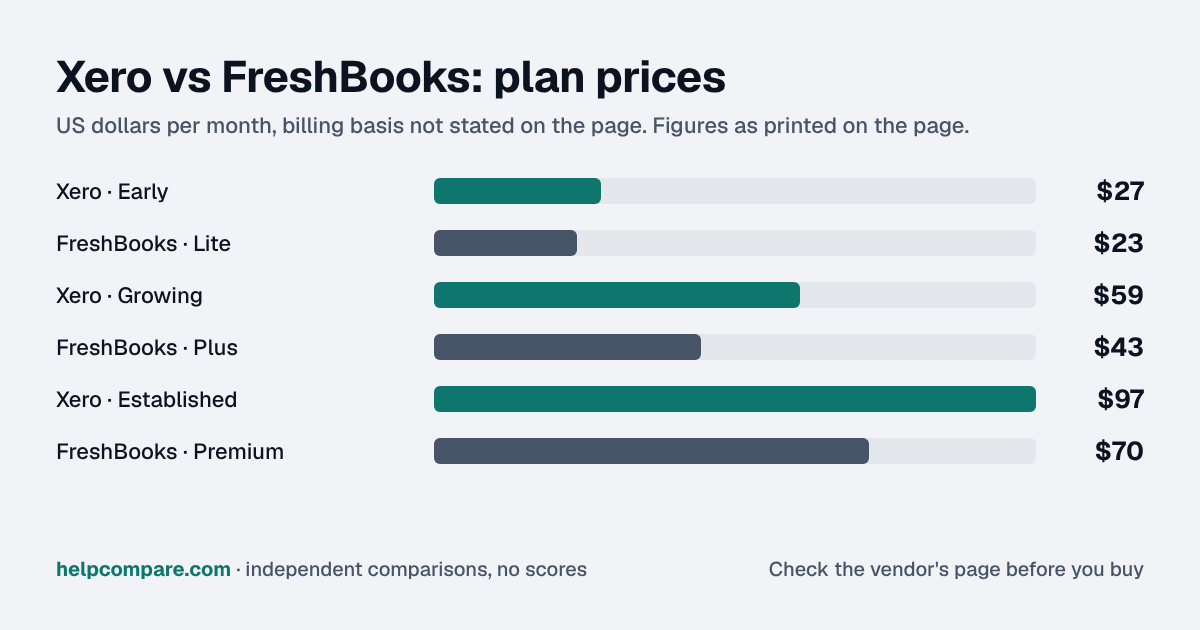
Entry paid tierEarly — $27/mo (20 invoices and quotes, 5 bills a month)Lite — $23/mo (invoices to 5 clients)
Mid tierGrowing — $59/mo (unlimited invoices and bills)Plus — $43/mo (50 clients)
Upper tierEstablished — $97/mo (multi-currency, projects, expense claims)Premium — $70/mo (unlimited clients); Select by quote
Users includedUnlimited on every plan1; extra team members $11/mo each
Annual billing discountNone — billed monthly10% off when paid yearly
Latest price changeOctober 1, 2026: Early $25 to $27, Growing $55 to $59, Established $90 to $97None announced (last change March 2026)
Payroll add-on (US)$36/mo + $6 per person, powered by Gusto$40/mo + $6/mo per person, powered by Gusto
AI assistantJAX — currently no additional chargeNone listed on the pricing page

Verified September 18, 2026Prices recorded from each vendor’s own pricing page. See sources

List prices from xero.com/us/pricing-plans (checked October 1, 2026) and freshbooks.com/pricing (checked September 18, 2026). Introductory promotions (Xero 80% off for the first 3 months; FreshBooks $1 Lite for a year or 80% off Plus/Premium for 3 months) are excluded because they end or expire.

Editorial assessment

How they actually differ

The two are built for different jobs. FreshBooks started as invoicing software for freelancers and service businesses, and its plans are still sized by how many clients you bill: 5 on Lite, 50 on Plus, unlimited on Premium. Xero is a full double-entry accounting system for a small business and its accountant, and its plans are sized by volume and features: Early caps you at 20 invoices and 5 bills a month, Growing removes the caps, Established adds multi-currency, projects and expense claims.

Users are the biggest cost difference

Xero includes unlimited users on every plan. FreshBooks includes one user on Lite, Plus and Premium and charges $11 a month for each additional team member (Select includes two team member accounts). For a sole trader this does not matter; for a business where an owner, a bookkeeper and an office manager all need logins, it decides the price.

Xero’s October 2026 price rise

Xero raised US prices for new and existing subscribers on October 1, 2026: Early from $25 to $27, Growing from $55 to $59 and Established from $90 to $97 a month. Even after the rise, Xero Growing ($59, unlimited invoices and users) sits between FreshBooks Plus ($43) and Premium ($70), but FreshBooks prices assume one user.

Payroll and AI

Both sell US payroll as an add-on powered by Gusto: $36 a month plus $6 per person with Xero, $40 a month plus $6 per person with FreshBooks. Xero’s AI assistant, JAX, is currently included at no additional charge, though Xero reserves the right to price it later. FreshBooks’ pricing page lists no AI assistant; its separately priced bookkeeping service is run by a partner, Kick.

Xero

Pros

  • Unlimited users on every plan at no extra cost
  • Full double-entry accounting with bank reconciliation on every plan
  • Growing removes invoice and bill caps
  • AI assistant JAX currently included at no additional charge

Cons

  • Early caps you at 20 invoices and 5 bills a month
  • Multi-currency and projects only on Established
  • No annual discount — billed monthly
  • Prices rose on October 1, 2026 (Early $27, Growing $59, Established $97)

FreshBooks

Pros

  • Lowest entry price of the two ($23/mo)
  • Invoicing, estimates, proposals and retainers built for service businesses
  • 10% off when you pay yearly
  • 30-day free trial with no card required

Cons

  • Plans capped by billable clients (5 on Lite, 50 on Plus)
  • Each extra team member costs $11/mo
  • Project profitability only from Premium
  • No AI assistant listed on the pricing page
Verified data

Cost calculator: what does your team actually pay?

Xero

 
$0/mo

FreshBooks

 
$0/mo
 

Monthly list prices checked September 18, 2026. Xero includes unlimited users; FreshBooks includes one and charges $11/mo per extra team member. FreshBooks takes 10% off when paid yearly; Xero bills monthly only. Plan caps still apply: Xero Early allows 20 invoices and 5 bills a month, FreshBooks Lite 5 billable clients and Plus 50.

Choose Xero if…

More than one person needs access, you want full accounting with bank reconciliation and your accountant working in the same ledger, or you send more invoices than a client-capped plan comfortably allows.

Choose FreshBooks if…

You are a freelancer or small service business, you bill a limited number of clients, and you care most about fast invoicing, estimates, proposals and time and expense tracking.

Total cost over time

Uses your selections above. Estimate excludes add-ons, overages, and negotiated discounts.

Ready to pick your accounting software?

Both offer a 30-day free trial. Check the live pricing pages before you buy; Xero’s US prices last changed on October 1, 2026.

Verified data

Xero vs FreshBooks: security, offline & remote work

How Xero and FreshBooks compare on compliance reports, sign-in controls, offline access and the setup details that matter for remote, hybrid and in-office teams. Every value links to the vendor page it came from.

What we checkedXeroFreshBooks
Security & compliance
SOC 2 reportSOC 2 reportType not stated by vendorsourceSOC 2 Type Isource
ISO/IEC 27001CertifiedsourceNot published
Other certificationsPCI DSS v4.0 (SAQ A; Level 2 merchant)sourcePCI DSS Level 1source
HIPAA (BAA)Not publishedNot published
GDPR data processing agreementDPA offeredsourceNot published
Single sign-on (SAML/OIDC)Not publishedNot published
SCIM user provisioningNot publishedNot published
Two-factor authenticationYesEnforcement: All plans (MFA is mandatory for all users)sourceYesEnforcement: All plans (2FA is required for email-and-password logins)source
Admin audit logNot publishedNot published
Data residency choicesNot publishedNot published
EncryptionEncryption in transit and at rest (algorithms not stated)source256-bit SSL in transitsource
Self-hosting optionNot publishedNot published
Offline access
Offline modePartialIn the Xero mobile app you can draft invoices and capture receipts offline and they sync when you reconnect; everything else, including the web app, needs an internet connection.sourceNot documented
Desktop appsNot publishedNot published
Mobile appsiOS, AndroidsourceiOS, Androidsource
Remote, hybrid & in-office
IP allowlistingNot publishedNot published
Device & session controlsNot publishedNot published
Office & room hardwareTap to Pay in the Xero Accounting app (powered by Stripe) takes contactless in-person payments for invoices with no extra hardware or terminal.source—
Editorial assessment

What this means for your team

  • Audit reports: both state a SOC 2 report on their own sites, but not the same kind: Xero (type not stated) and FreshBooks (Type I only). Xero also holds ISO/IEC 27001. A Type I report checks controls at a single point in time; a Type II report tests them over months. If your security team requires Type II, confirm it with Xero and FreshBooks, and ask each vendor for the latest report under NDA.
  • Working offline: Xero works offline only in part; FreshBooks doesn’t document an offline mode. Details are in the Offline mode row above.
  • In the office: Xero: Tap to Pay in the Xero Accounting app (powered by Stripe) takes contactless in-person payments for invoices with no extra hardware or terminal.

Xero: worth knowing

  • RemoteXero runs in the browser and mobile apps with multiple users working at the same time, but it needs an internet connection. source
  • SecurityXero's SOC 2 reports and ISO 27001 certificate are available to logged-in customers on request; the SOC 2 report type is not stated publicly. source
  • SecurityPayroll employees and Xero portal/Ask portal users don't have to set up MFA; everyone else with access to a paid subscription does. source

FreshBooks: worth knowing

  • RemoteFreshBooks stays in sync between the web app and the mobile apps, but some features such as reporting are only available on desktop. source
  • SecurityFreshBooks hosts its application on Google Cloud Platform. source

Checked September 19, 2026 against each vendor’s own trust center, help docs and app pages. Hover or tap “source” to see the exact wording we relied on. “Not published” means we could not find the vendor saying it on its own site; it doesn’t mean the feature is missing. Plan names are the lowest plan the vendor says includes the feature. Security · Offline · Remote vs office · Download the data

Frequently Asked Questions

Is Xero or FreshBooks cheaper?

For one user, FreshBooks is cheaper: Lite is $23/mo against $27/mo for Xero Early. With more people it reverses, because Xero includes unlimited users and FreshBooks charges $11/mo for each extra team member, so three users cost $45/mo on FreshBooks Lite against $27/mo on Xero Early.

Did Xero raise its prices?

Yes. Xero raised US prices for new and existing subscribers on October 1, 2026: Early $25 to $27, Growing $55 to $59 and Established $90 to $97 a month.

Do Xero or FreshBooks have a free plan?

Neither has a permanent free plan. Both offer a 30-day free trial; FreshBooks does not ask for a card.

How many users do I get?

Xero includes unlimited users on every plan. FreshBooks Lite, Plus and Premium include one user, with extra team members at $11/mo each; Select includes two team member accounts.

What are the limits on the cheapest plans?

Xero Early lets you send quotes and 20 invoices and enter 5 bills a month. FreshBooks Lite lets you send invoices to 5 clients.

Do both offer payroll?

Yes, as US add-ons powered by Gusto: Xero Payroll is $36/mo plus $6 per person; FreshBooks Payroll is $40/mo plus $6/mo per person.

Can I move from FreshBooks to Xero, or back?

Yes. Xero imports contacts, unpaid invoices and unpaid bills from files; FreshBooks imports clients, expenses, items and vendors from CSV and offers a paid Easy Switch service that lists Xero as a source. See our migration guides for both directions.

Migration Guides

Already decided? Here’s how to actually switch.

Step-by-step migration guides covering what transfers automatically, what doesn’t, and how to handle the gap, in both directions.

Editorial assessment

When to Buy — and When to Walk Away

Every “best accounting software” listicle tells you why to buy. Here’s the other half: the specific conditions under which Xero or FreshBooks is the wrong purchase for your team.

Xero

Buy Xero if:

  • Two or more people need their own login
  • Your accountant or bookkeeper wants a full double-entry ledger
  • You send more than a handful of invoices and bills a month and can budget for Growing

Do NOT buy Xero if:

  • You send more than 20 invoices a month but only budgeted for Early
  • You need multi-currency but not the $97 Established plan
  • You want a discount for paying yearly; Xero bills monthly only

FreshBooks

Buy FreshBooks if:

  • You work alone and bill a small number of clients
  • Invoicing, estimates, proposals and time tracking are most of what you need
  • You want the lowest entry price and a trial with no card

Do NOT buy FreshBooks if:

  • Several people need logins; each extra user is $11/mo
  • You bill more than 50 clients but do not want Premium
  • You need inventory, multi-currency or a full accountant-grade ledger

Sources

Prices on this page were recorded from each vendor’s own pricing page on the date shown at the top of the page. Vendors change pricing often — check the live source before you buy.

Every figure is also in our open dataset (JSON and CSV, CC BY 4.0), with its source page and verification date. See how we research pricing.

Cite this page: HelpCompare, “Xero vs FreshBooks”, helpcompare.com/xero-vs-freshbooks/ (updated ).

Source links on this site are checked every month; last check . How sources are checked.

Start with the job

Guides for the jobs this software does

Plain-language guides: the steps, what to check before you buy, common mistakes, and every tool it takes with verified prices.

Need sign-off?

Turn this into a one-page decision brief

Verified prices costed for your team size, a check against your must-have requirements, the questions to settle before you sign, and a source for every figure. Print it, or paste it into an email to whoever approves the spend.

Build a decision brief

From shortlist to switched

Built for the leader who owns the selection, answers for the spend, drives the rollout, and lives with the results. HelpCompare covers the whole decision, not just the first step.

Bill Belcamino, founder of HelpCompare
About the author

Bill Belcamino

Founder and author, HelpCompare

Engineer by training, operator by experience, marketer by choice. Bill spent eight and a half years as an engineer at HP, was COO of Auctiva (the number one third-party selling platform on eBay, past 200,000 users) and ran Google’s $70M/year search syndication partnership at Alot.com. Then he spent 13 years building his own web properties with his own money at stake. He has bought, trialled, integrated and cancelled more SaaS tools than he can count, and started HelpCompare because the real cost of switching tools is the part nobody covers.

“I’ve sat on both sides of the table: the agency recommending the tool and the client paying for it.”

Researched and fact-checked by the HelpCompare team. Pricing on this page was last verified on September 18, 2026. No paid sponsorships, no affiliate commissions.