Accounting & Invoicing

QuickBooks vs FreshBooks: Which Accounting Software Fits Your Business in 2026?

Full double-entry bookkeeping vs. simple, invoice-first accounting built for freelancers — here is how QuickBooks and FreshBooks actually compare on cost and capability.

From $38/mo (list)

QuickBooks Online

VS
From $23/mo (list)

FreshBooks

QuickBooks Online vs FreshBooks at a glance

CategoryQuickBooks OnlineFreshBooks
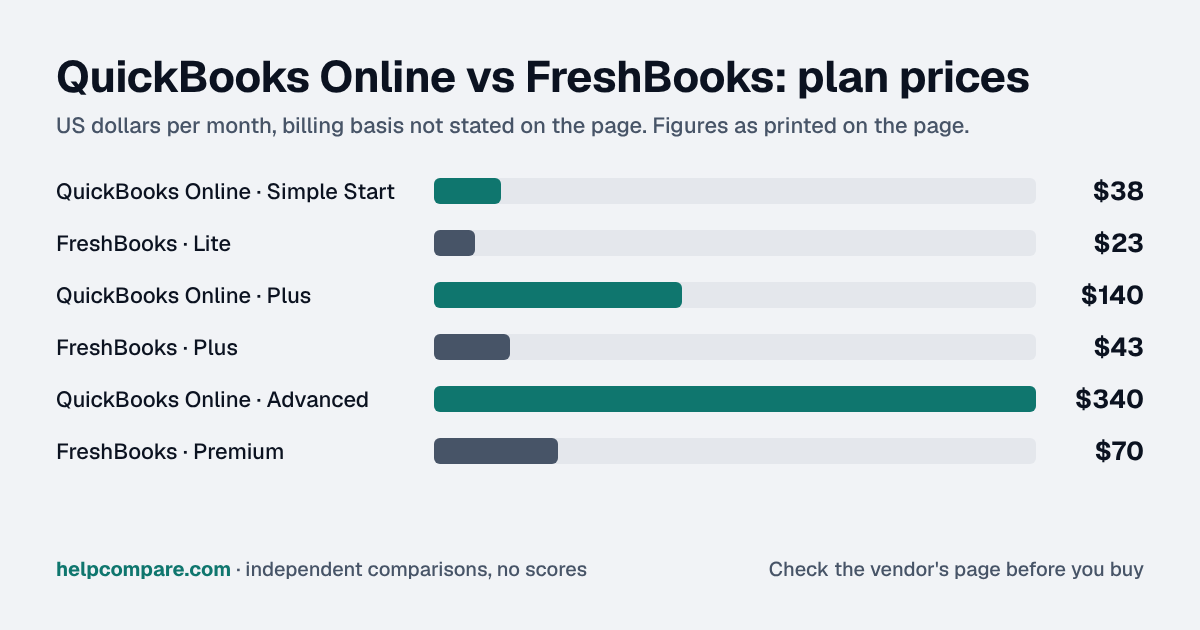
Entry plan (list price)$38/mo — Simple Start, 1 user + 2 accountants$23/mo — Lite, 5 billable clients
Most popular tier$140/mo — Plus, 5 users, inventory, budgeting$43/mo — Plus, 50 billable clients
Top published tier$340/mo — Advanced, 25 users, custom dashboards$70/mo — Premium, unlimited clients
Inventory trackingYes, from Plus tier upNot offered
Integrations750+ apps, incl. payroll & tax software (TurboTax)~100+ apps, plus Zapier and its own add-on payroll
AI featuresIntuit Intelligence — auto-categorization, insights, ChatGPT/Claude integration, free on all tiersLimited — mainly automated receipt/expense scanning
Free trialFree trial or promo pricing (not usually both at once)30-day free trial, no card required
Best suited forSmall businesses with employees, inventory, or multiple usersFreelancers and solopreneurs billing by client or project

From our original research

Neither QuickBooks nor FreshBooks holds the cheapest published entry price in the Accounting Software category in our B2B SaaS Sticker Shock Index — that distinction goes to Xero at $25/mo, useful context for where this pair’s pricing sits against the category as a whole.

How they actually differ

QuickBooks Online is a full double-entry, GAAP-ready accounting system — the kind your accountant can work with directly — with inventory tracking and multi-user support from the Plus tier up, plus 750+ integrations spanning payroll and tax software. FreshBooks skips most of that depth in favor of a simpler, invoice-first design built for people who bill clients rather than manage a general ledger, at a noticeably lower price across every matching tier.

Who actually needs the extra depth

If you have employees, track inventory, or need real accounting depth your accountant relies on, QuickBooks’ extra complexity earns its keep. If you’re a freelancer or service-based solopreneur whose main job is invoicing clients and tracking expenses, FreshBooks’ simpler design and lower learning curve tend to be worth more than QuickBooks’ extra features.

2025–2026 moves

Intuit raised QuickBooks Essentials, Plus, and Advanced pricing effective August 1, 2026 (Simple Start, Free, Lite, and Ledger were unaffected), while rolling out “Intuit Intelligence” — a free AI layer across all tiers that now includes direct ChatGPT and Claude integration for querying your books. FreshBooks’ plan structure and per-seat add-on pricing have stayed stable through 2026, with the company continuing to run deep introductory discounts.

Pros & cons

QuickBooks Online

Pros

  • Full double-entry, GAAP-ready accounting your accountant can work with directly
  • Inventory tracking and multi-user support from the Plus tier up
  • 750+ integrations, including payroll and tax software like TurboTax
  • Free “Intuit Intelligence” AI layer with ChatGPT/Claude integration on all tiers

Cons

  • Meaningfully more expensive than FreshBooks at every matching tier
  • August 2026 price increase affected Essentials, Plus, and Advanced
  • Steeper learning curve for non-accountants
  • More features than a solo freelancer typically needs

FreshBooks

Pros

  • Cheaper than QuickBooks at every tier — Lite is $23/mo vs. Simple Start’s $38/mo
  • Simpler, invoice-first design built for non-accountants
  • 30-day free trial, no credit card required
  • Lower learning curve for freelancers and service-based businesses

Cons

  • No inventory tracking at any tier
  • No true double-entry bookkeeping depth for more complex businesses
  • Client-based plan limits (not user limits) can force an upgrade as you grow
  • Smaller integration library (~100+ apps) than QuickBooks’ 750+

Cost calculator: what does your team actually pay?

QuickBooks Online

 
$0/mo

FreshBooks

 
$0/mo
 

Illustrative estimate based on publicly listed pricing as of September 2026. Always confirm current rates before purchasing.

Choose QuickBooks Online if…

You run a small business with employees, inventory, or multiple users, and need real double-entry bookkeeping your accountant can work with directly.

Choose FreshBooks if…

You’re a freelancer or solopreneur who mainly needs to invoice clients, track expenses, and get paid, without a general ledger’s worth of accounting overhead.

Related

Comparing more accounting tools?

See how QuickBooks stacks up against Xero too.

Ready to pick your accounting & invoicing platform?

Both offer a free trial or demo — confirm current pricing directly with the vendor before you sign.

Frequently Asked Questions

How much does FreshBooks cost compared to QuickBooks?

FreshBooks undercuts QuickBooks at every matching tier — Lite is $23/mo versus Simple Start’s $38/mo, and the gap grows further up each ladder, with FreshBooks Premium at $70/mo versus QuickBooks Advanced at $340/mo.

Which is better for freelancers?

FreshBooks, due to its simpler invoicing, client-based billing limits instead of user limits, and a notably lower learning curve for non-accountants.

Which is better for a business with employees and inventory?

QuickBooks, since only its Plus and Advanced tiers include inventory tracking, and it supports more users with dedicated payroll integrations that FreshBooks doesn’t match natively.

Does QuickBooks have a free trial?

QuickBooks typically offers either a free trial or a discounted-price promotion, not usually both at once. FreshBooks offers a straightforward 30-day free trial with no credit card required.

Does either offer AI bookkeeping tools?

Yes. QuickBooks bundles “Intuit Intelligence” free across all plans — auto-categorization, financial insights, and ChatGPT/Claude integration for querying your books. FreshBooks’ AI features are more limited, focused mainly on automated receipt and expense scanning.

Can FreshBooks handle inventory?

No. Inventory tracking is a QuickBooks-only feature on this list, available from the Plus tier up; FreshBooks doesn’t offer it at any tier.

Which is easier to learn for a non-accountant?

FreshBooks. Its invoice-first design and simpler interface are built for business owners without an accounting background, while QuickBooks’ fuller double-entry system has a steeper learning curve, offset somewhat by more built-in guidance at higher tiers.