The simplest Kanban board in the category against a full project-planning platform. Here is what each costs, and the point at which a team outgrows Trello.
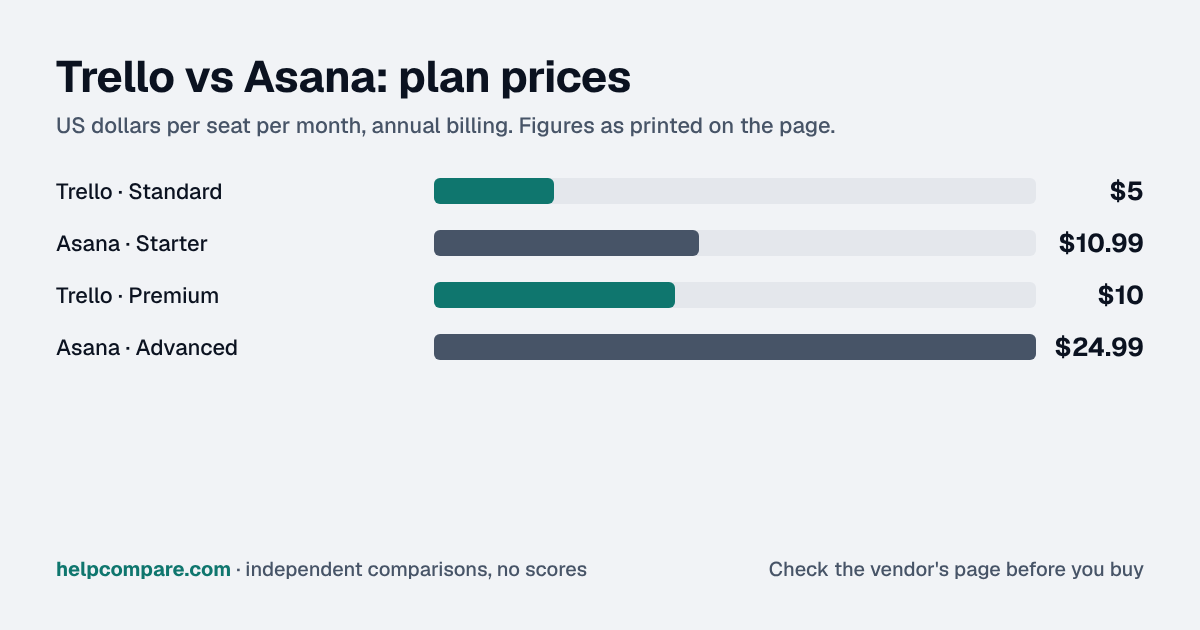
Choose Trello if your team works mostly within individual boards and wants the lowest cost; choose Asana if you coordinate several projects and need timelines, dependencies, and reporting. Trello Standard is $5/user/mo billed annually versus $10.99/seat/mo for Asana Starter, and Trello's free plan covers up to 10 collaborators per Workspace, compared with 2 users on Asana's free plan.
| At a glance | Trello | Asana |
|---|---|---|
| Category | Project Management | |
| Entry price | Free, from $5/user/mo | Free (2 users), from $10.99/seat/mo |
| Free plan | Yes, up to 10 collaborators per Workspace | Yes, Personal plan, up to 2 users |
Yes. Trello Standard is $5/user/mo and Premium $10/user/mo billed annually; Asana Starter is $10.99/seat/mo and Advanced $24.99/seat/mo. Trello’s free plan also covers up to 10 collaborators per Workspace, where Asana’s free Personal plan stops at 2 users.
| Category | Trello | Asana |
|---|---|---|
| Free plan | Yes, up to 10 collaborators per Workspace | Yes, Personal plan, up to 2 users |
| Entry paid tier | Standard — $5/user/mo annual ($6 monthly) | Starter — $10.99/seat/mo annual ($13.49 monthly) |
| Mid tier | Premium — $10/user/mo annual ($12.50 monthly) | Advanced — $24.99/seat/mo annual ($30.49 monthly) |
| Top tier | Enterprise — $17.50/user/mo, billed annually | Enterprise — contact sales |
| Free plan limits | Up to 10 boards per Workspace, unlimited cards, 10MB per file | 2 users, unlimited tasks and projects |
| CSV export | Premium Workspaces only (JSON export on all plans) | Available |
| Native import from the other tool | None — Trello has no generic import tool | CSV importer, with documented steps for Trello exports |
Verified September 17, 2026Prices recorded from each vendor’s own pricing page. See sources
Prices from trello.com/pricing and asana.com/pricing, checked September 17, 2026. Trello Enterprise is shown at the per-user rate Trello lists; Enterprise pricing varies with the number of users.
Editorial assessmentTrello is a Kanban board with add-ons; Asana is a project-planning system that also has boards. That difference drives everything else. Trello is faster to learn and cheaper to run, and its free plan comfortably covers a small team. Asana gives you timelines, Gantt views, dependencies and reporting dashboards from its first paid tier.
The usual trigger is coordination across projects rather than within one board: needing to see deadlines across several teams, map dependencies, or report on progress. Trello’s Premium plan adds views and admin controls, but Asana is designed for that cross-project layer from the start.
Check exports before you commit. Trello exports boards to CSV only in Premium Workspaces; every plan can export JSON. Trello has no generic import tool of its own, so moving into Trello later relies on copy-paste, its API or third-party Power-Ups. Asana’s CSV importer is available on every plan and has documented steps for Trello data.
Illustrative estimate using list prices billed annually, checked September 17, 2026. Trello Enterprise pricing varies with user count. Always confirm current rates before purchasing.
Your team works mostly within individual boards, values speed and simplicity, and wants the lowest cost, or can stay on the free plan with up to 10 collaborators.
You coordinate several projects at once and need timelines, dependencies and reporting that a board alone does not give you.
Uses your selections above. Estimate excludes add-ons, overages, and negotiated discounts.
Both have free plans. Try your real workflow in each before you pay.
How Trello and Asana compare on compliance reports, sign-in controls, offline access and the setup details that matter for remote, hybrid and in-office teams. Every value links to the vendor page it came from.
| What we checked | Trello | Asana |
|---|---|---|
| Security & compliance | ||
| SOC 2 report | SOC 2 Type IIsource | SOC 2 Type IIsource |
| ISO/IEC 27001 | Certifiedsource | Certifiedsource |
| Other certifications | ISO/IEC 27018, CSA STAR, TISAXsource | ISO/IEC 27017, ISO/IEC 27018, ISO/IEC 27701, CSA STAR Level 1, SOC 3source |
| HIPAA (BAA) | Not published | BAA availableEnterprise+source |
| GDPR data processing agreement | DPA offeredsource | DPA offeredsource |
| Single sign-on (SAML/OIDC) | YesAny plan with Atlassian Guard Standard (add-on); included in Enterprisesource | YesEnterprisesource |
| SCIM user provisioning | YesAny plan with Atlassian Guard Standard (add-on); included in Enterprisesource | YesEnterprisesource |
| Two-factor authentication | YesEnforcement: All plans (managed accounts)source | YesEnforcement: Enterprisesource |
| Admin audit log | YesAny plan with Atlassian Guard Standard (add-on); included in Enterprisesource | YesEnterprise+ (or Enterprise with Compliance Management add-on)source |
| Data residency choices | Not published | US, EU, Japan, AustraliaEnterprise (add-on); included in Enterprise+source |
| Encryption | AES-256 full-disk encryption at rest; TLS 1.2+ in transitsource | 256-bit encryption at rest and in transitsource |
| Self-hosting option | Cloud onlysource | Not published |
| Offline access | ||
| Offline mode | Works offlineThe iOS and Android apps let you create and edit boards, lists and cards offline and sync automatically on reconnect; the web and desktop apps need an internet connection.source | PartialThe iOS app works offline for checking notifications, commenting, changing due dates or assignees, completing tasks and adding tasks; pending actions sync when you are back online.source |
| Desktop apps | Windows, macOSsource | Windows, macOSsource |
| Mobile apps | iOS, Androidsource | iOS, Androidsource |
| Offline limits | Mobile apps only; the desktop apps and web need an active connectionsource | Tasks and conversations in projects never opened on the device are not visible offline (new tasks can still be added to them)source |
| Remote, hybrid & in-office | ||
| IP allowlisting | Not published | YesEnterprise+source |
| Device & session controls | YesFreeBuilt-in mobile device management (MDM) support for the iOS and Android apps, listed on every plan.source | YesEnterpriseSAML session timeout (1 hour to 30 days) plus an optional mobile session timeout; mobile app controls (limit downloads, screenshots, copy/paste) are sold as a Permissions Management add-on.source |
Yes. Trello Standard is $5/user/mo billed annually against $10.99/seat/mo for Asana Starter, and Trello’s free plan covers up to 10 collaborators versus 2 users on Asana’s free Personal plan.
Unlimited cards, up to 10 boards per Workspace, unlimited Power-Ups, 10MB per file uploads and up to 10 collaborators per Workspace.
Yes, through Asana’s CSV importer. Trello exports boards to CSV only in Premium Workspaces; without Premium, Asana points to a browser-extension export or third-party migration apps.
Not natively. Trello says it has no generic import tool; the options are pasting a list (each line becomes a card), the Trello API, or third-party Power-Ups.
Trello, if your work fits on boards: it is cheaper and its free plan covers up to 10 people. Asana is better once you need timelines, dependencies and cross-project reporting.
Step-by-step migration guides covering what transfers automatically, what doesn’t, and how to handle the gap, in both directions.
Every “best project management tool” listicle tells you why to buy. Here’s the other half: the specific conditions under which Trello or Asana is the wrong purchase for your team.
Buy Trello if:
Do NOT buy Trello if:
Buy Asana if:
Do NOT buy Asana if:
Every pricing fact, rating, AI billing model and switching guide we hold on each tool, on one page, with the date each figure was last verified.
Prices on this page were recorded from each vendor’s own pricing page on the date shown at the top of the page. Vendors change pricing often — check the live source before you buy.
Every figure is also in our open dataset (JSON and CSV, CC BY 4.0), with its source page and verification date. See how we research pricing.
Cite this page: HelpCompare, “Trello vs Asana: Which Project Management Tool Should You Choose in 2026?”, helpcompare.com/trello-vs-asana/ (updated ).
Source links on this site are checked every month; last check . How sources are checked.
Plain-language guides: the steps, what to check before you buy, common mistakes, and every tool it takes with verified prices.
Verified prices costed for your team size, a check against your must-have requirements, the questions to settle before you sign, and a source for every figure. Print it, or paste it into an email to whoever approves the spend.
Built for the leader who owns the selection, answers for the spend, drives the rollout, and lives with the results. HelpCompare covers the whole decision, not just the first step.