Project Management

Asana vs Monday.com: Which Work Management Platform Wins in 2026?

Two of the most-used work management platforms, priced very differently for small teams. Here is what each actually costs once seat bundles, AI credits and plan limits are counted.

Asana logoFree (2 users), from $10.99/seat/mo

Asana

VS
Monday.com logoFrom $9/seat/mo (3-seat min)

Monday.com

Quick verdict: Monday.com has the lower per-seat list price ($9 vs $10.99 on annual billing), but it sells paid seats in fixed bundles starting at 3, so small or oddly sized teams often pay for seats they do not use. Asana charges per seat with no bundle rounding and includes timeline and Gantt views from its first paid tier. Monday.com is the more visual, board-first tool; Asana is the more structured task-and-dependency tool.

Asana vs Monday.com: quick facts

At a glanceAsanaMonday.com
CategoryProject Management
Entry priceFree (2 users), from $10.99/seat/moFrom $9/seat/mo (3-seat min)
Free planYes — Personal plan, up to 2 usersYes — up to 2 seats

Is Asana cheaper than Monday.com?

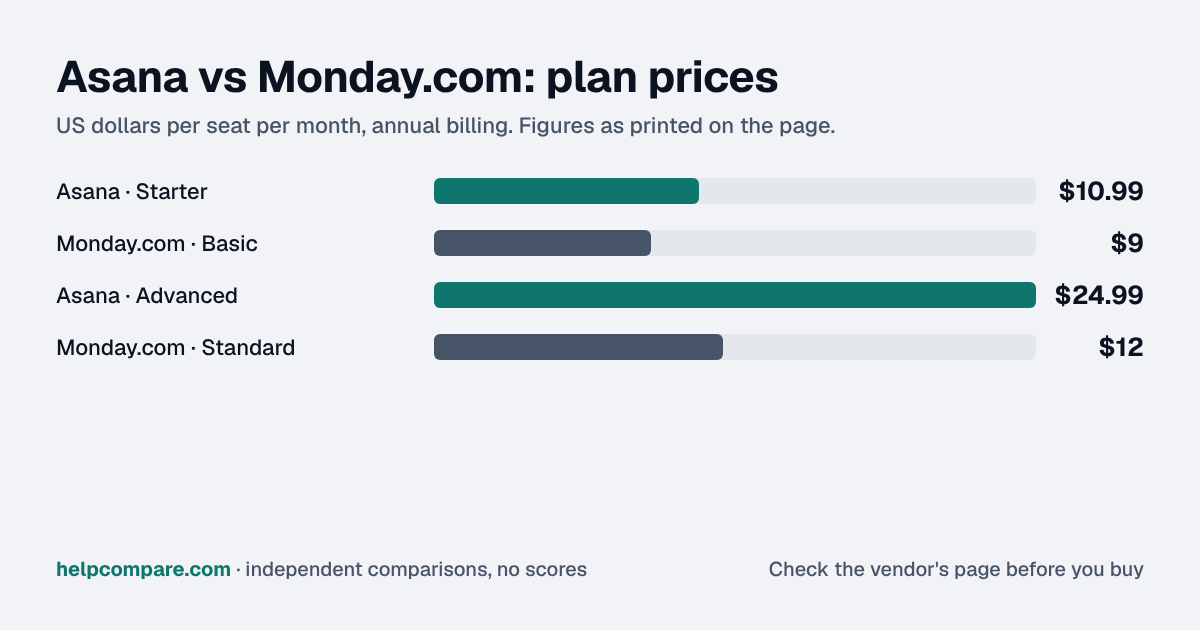
Per seat, Monday.com is cheaper: Basic is $9/seat/mo and Standard $12/seat/mo billed annually, against Asana Starter at $10.99/seat/mo. But Monday.com bills in seat bundles of 3, 5, 10, 15, 20, 25, 30, 40, 50, 100 and 200+, so a 12-person team pays for 15 seats. At that size Monday.com Standard costs $180/mo against $131.88/mo for Asana Starter — use the calculator below with your exact headcount.

Asana vs Monday.com at a glance

CategoryAsanaMonday.com
Free planYes — Personal plan, up to 2 usersYes — up to 2 seats
Entry paid tierStarter — $10.99/seat/mo annual ($13.49 monthly)Basic — $9/seat/mo annual ($12 monthly)
Mid tierAdvanced — $24.99/seat/mo annual ($30.49 monthly)Standard — $12/seat/mo annual ($14 monthly)
Upper tierEnterprise — contact salesPro — $19/seat/mo annual ($24 monthly)
How seats are soldPer seat, no bundle roundingSeat bundles: 3, 5, 10, 15, 20, 25, 30, 40, 50, 100, 200+
Timeline / Gantt viewsIncluded from StarterIncluded from Standard
AI pricingAI Studio credits included from Starter; extra AI requests $0.50 prepaid or $0.60 on demandAI credits bundled per plan: 1,000 (Basic), 2,000 (Standard), 3,000 (Pro) per month

Prices are list prices published on asana.com/pricing and monday.com/pricing, checked September 17, 2026. Monday.com monthly prices assume monthly billing; its credit allowance is shown per plan for a 10-seat account.

How they actually differ

The headline prices hide the biggest structural difference: how you are charged for seats. Asana bills each seat. Monday.com sells paid plans in fixed seat bundles, starting at 3 and stepping through 5, 10, 15, 20, 25, 30, 40, 50, 100 and 200+. A 3-person team pays exactly for 3 seats; an 11-person team pays for 15.

Where each tool is strongest

Asana is built around tasks, dependencies and portfolios. Timeline and Gantt views, reporting dashboards and no user-seat limits arrive on its first paid tier (Starter); portfolios, goals and resource management arrive on Advanced.

Monday.com is built around boards of items and columns that you shape into whatever workflow you need, which makes it popular outside of pure project management — CRM-style pipelines, content calendars, request intake. Its Standard plan adds timeline and Gantt views, a calendar view, guest access, and automations and integrations capped at 250 actions per month each; Pro raises those caps to 25,000.

How AI is billed

Both vendors now meter AI. Monday.com bundles a monthly AI credit allowance into each plan — 1,000 credits on Basic, 2,000 on Standard and 3,000 on Pro — and lets you buy more. Asana includes AI Studio credits from Starter and sells additional AI requests at $0.50 each prepaid or $0.60 each on demand. If AI agents are central to your plans, estimate usage before you choose; neither vendor makes heavy AI use free.

Pros & cons

Asana

Pros

  • Per-seat billing with no bundle rounding — you pay for the people you have
  • Timeline, Gantt views and dashboards on the first paid tier
  • Strong dependencies, portfolios and goals for multi-project planning
  • Free Personal plan for one or two people

Cons

  • Higher entry per-seat price than Monday.com ($10.99 vs $9)
  • Advanced is a steep jump to $24.99/seat/mo
  • Enterprise pricing is quote-only
  • Extra AI requests are metered on top of the included allowance

Monday.com

Pros

  • Lowest per-seat list price of the two ($9/seat/mo annual)
  • Highly visual, flexible boards that suit non-project workflows
  • AI credit allowance bundled into every paid plan
  • Free plan for up to 2 seats

Cons

  • Seat bundles mean paying for unused seats at many team sizes
  • Paid plans start at 3 seats
  • Timeline and Gantt views need Standard, not Basic
  • Monthly billing costs 17–33% more than annual

Cost calculator: what does your team actually pay?

Asana

 
$0/mo

Monday.com

 
$0/mo
 

Illustrative estimate using list prices billed annually, checked September 17, 2026. Monday.com seats are rounded up to its published seat bundles; teams over 200 seats are priced at the exact count. Always confirm current rates before purchasing.

Choose Asana if…

You want structured project planning — dependencies, timelines and portfolios — and you want to pay for exactly the number of people using it.

Choose Monday.com if…

You want a flexible, visual board tool that also runs non-project workflows, and your headcount lands close to one of Monday.com’s seat bundles.

Total cost over time

Uses your selections above. Estimate excludes add-ons, overages, and negotiated discounts.

Ready to pick your work management platform?

Both offer a free plan and a free trial of paid tiers — confirm current pricing directly with the vendor before you commit.

Frequently Asked Questions

Is Asana or Monday.com cheaper?

Per seat, Monday.com is cheaper: $9/seat/mo (Basic) versus $10.99/seat/mo for Asana Starter, both billed annually. But Monday.com sells seats in bundles (3, 5, 10, 15, 20, 25, 30, 40, 50, 100, 200+), so teams that fall between bundles often pay more in total with Monday.com.

Do Asana and Monday.com have free plans?

Yes. Asana’s Personal plan is free for up to 2 users. Monday.com’s Free plan covers up to 2 seats with up to 3 boards.

Does Monday.com have a minimum number of seats?

Paid Monday.com plans start at 3 seats and are sold in fixed bundles — 3, 5, 10, 15, 20, 25, 30, 40, 50, 100 and 200+.

Which has timeline and Gantt views on the cheapest paid plan?

Asana. Timeline and Gantt views are included from Asana Starter. On Monday.com they start at the Standard plan, not Basic.

How do the two charge for AI?

Monday.com bundles a monthly AI credit allowance into each plan (1,000 on Basic, 2,000 on Standard, 3,000 on Pro). Asana includes AI Studio credits from Starter and sells extra AI requests at $0.50 each prepaid or $0.60 on demand.

Can I move my projects from Asana to Monday.com?

Yes. Monday.com has a built-in Asana importer that brings over task name, assignee, completion status, notes, due date and parent task. See our migration guides for the details in both directions.

Migration Guides

Already decided? Here’s how to actually switch.

Step-by-step migration guides covering what transfers automatically, what doesn’t, and how to handle the gap — in both directions.

When to Buy — and When to Walk Away

Every “best project management tool” listicle tells you why to buy. Here’s the other half: the specific conditions under which Asana or Monday.com is the wrong purchase for your team.

Asana

Buy Asana if:

  • Your projects have real dependencies and deadlines that need a timeline or Gantt view on day one
  • Your headcount sits between Monday.com’s seat bundles (for example 6–9 or 11–14 people)
  • You need portfolios and goals to track many projects at once

Do NOT buy Asana if:

  • You mainly need flexible boards for non-project work like sales pipelines or request intake
  • You need a self-serve tier above Advanced — Enterprise is quote-only
  • Your team will lean heavily on AI and has not budgeted for metered requests

Monday.com

Buy Monday.com if:

  • Your team size lands on or just under a seat bundle (3, 5, 10, 15, 20…)
  • You want one visual tool for projects, CRM-style pipelines and intake forms
  • You want a predictable AI credit allowance bundled into the plan

Do NOT buy Monday.com if:

  • You are a team of 1–2 that needs paid features — paid plans start at 3 seats
  • Your headcount keeps landing just above a bundle, so you pay for idle seats
  • You need Gantt views but only budgeted for the Basic plan