A polished, visual work OS vs. a deeply configurable all-in-one platform. Here is what each costs and who they actually fit.
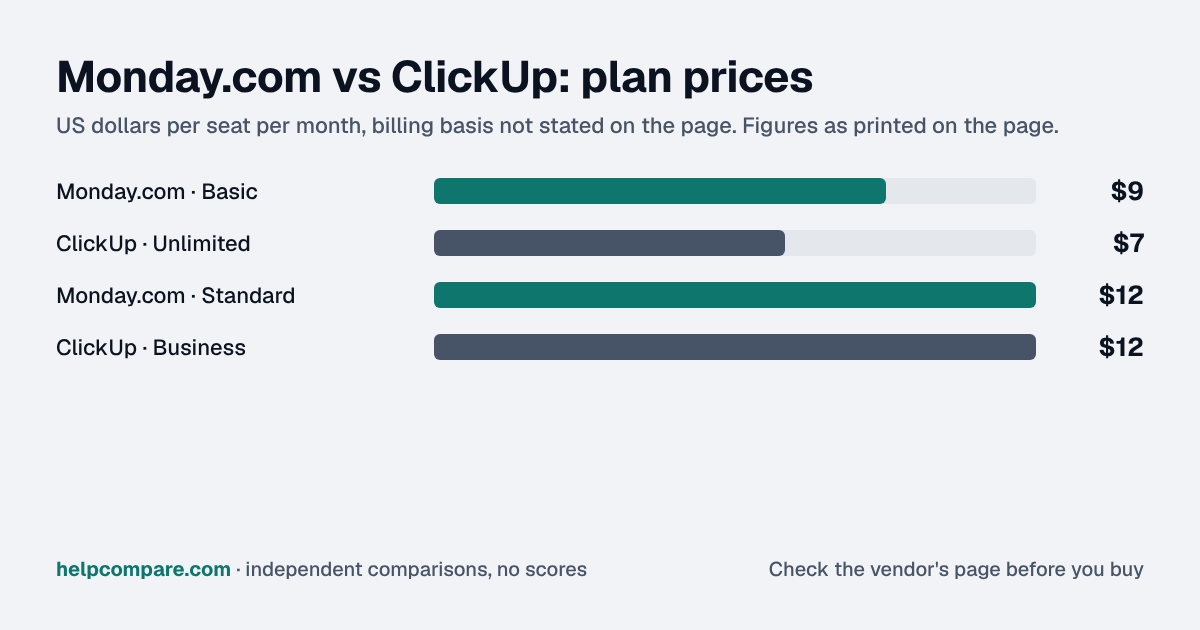
Metered extras: ClickUp starts lower at $7/seat/mo with no seat minimum against Monday.com's $9 with a 3-seat minimum, but its AI is a separate add-on, while Monday.com bundles capped AI credits.
Automations are the other meter. Monday.com's run from 250 to 25,000 a month across tiers, and ClickUp caps them at 5,000 a month even on Business. The mistake is counting rules instead of runs: one rule that fires on every status change across a busy board can use up a low cap fast, and when it stops, handoffs quietly stop with it. Before choosing, list the three or four automations you'd build first, estimate how often each fires in a month, and set that against each plan's cap. Do the same for AI with a few real users before paying for it across every seat.
My read of the verified data on this page, checked against vendor sources on September 12, 2026. Disagree or spot an error? Tell Bill
| At a glance | Monday.com | ClickUp |
|---|---|---|
| Category | Project Management | |
| Entry price | From $9/seat/mo (3-seat min) | Free, from $7/seat/mo |
| Free plan | Yes, up to 2 seats | Yes, Free Forever |
Monday.com is priced at From $9/seat/mo (3-seat min) and ClickUp at Free, from $7/seat/mo. See the full breakdown below for what is included at each tier.
| Category | Monday.com | ClickUp |
|---|---|---|
| Free plan | Yes, up to 2 seats | Yes, Free Forever |
| Entry paid price | $9/seat/mo (Basic, 3-seat min) | $7/seat/mo (Unlimited, no min) |
| Mid tier | $12/seat/mo (Standard) | $12/seat/mo (Business) |
| Top self-serve tier | $19/seat/mo (Pro) | Custom (Enterprise) |
| AI | Bundled credits per plan (capped) | Separate add-on: Brain AI $9/user/month or Everything AI $28/user/month |
| Native docs/whiteboards/chat | Added, newer/thinner | Native across most tiers |
| Customization depth | Simpler, board/column-based | Deep — 15+ view types, nested spaces |
| Ease of use | Rated more polished, faster onboarding | Steeper learning curve, more “feature bloat” complaints |
| G2 rating | 4.7/5 (~17,200 reviews) | 4.6/5 (~14,254 reviews) |
Verified September 12, 2026Prices recorded from each vendor’s own pricing page. See sources
Monday.com requires a 3-seat minimum on every paid plan and bundles a capped AI-credit allowance into each tier (1,000 credits on Basic, up to 3,000 on Pro). ClickUp has no seat minimum at all (you can pay for a single user), but its AI layer, ClickUp Brain, is sold separately: $9/user/month on its own (Brain AI), or bundled into an “Everything AI” plan at $28/user/month. That changes the real, AI-inclusive cost comparison more than the sticker prices suggest.
Independent G2 review data consistently shows the same pattern: Monday.com is rated more visually polished and faster to onboard, while ClickUp offers more views, deeper customization (nested spaces, folders, custom fields), and native docs/whiteboards/chat, at the cost of a steeper learning curve. Reviewers on both platforms report performance lag on large, complex boards.
Monday has been expanding its AI-credit system and spinning up separately-priced CRM, Service, and Dev product lines. ClickUp shipped “Brain2” in June 2026, adding shared org memory and multi-model AI routing across Claude, GPT, and Gemini.
Illustrative estimate based on publicly listed pricing as of September 2026. Always confirm current rates before purchasing.
You want the most polished, easiest-to-onboard tool for a cross-functional team, and bundled (if capped) AI is enough for your needs.
You want maximum configurability, no seat minimum, and native docs/chat/whiteboards, and you’re willing to pay separately for deeper AI.
Uses your selections above. Estimate excludes add-ons, overages, and negotiated discounts.
Both offer a free plan. See current pricing directly from the source.
How Monday.com and ClickUp compare on compliance reports, sign-in controls, offline access and the setup details that matter for remote, hybrid and in-office teams. Every value links to the vendor page it came from.
| What we checked | Monday.com | ClickUp |
|---|---|---|
| Security & compliance | ||
| SOC 2 report | SOC 2 Type IIsource | SOC 2 Type IIsource |
| ISO/IEC 27001 | Certifiedsource | Certifiedsource |
| Other certifications | ISO/IEC 27017, ISO/IEC 27018, ISO/IEC 27032, ISO/IEC 27701, CSA STAR, TX-RAMP, SOC 1 Type II, SOC 3source | ISO/IEC 27017, ISO/IEC 27018, ISO/IEC 27701, ISO/IEC 42001, SOC 1 Type 2, SOC 3source |
| HIPAA (BAA) | BAA availableEnterprisesource | BAA availableEnterprisesource |
| GDPR data processing agreement | DPA offeredsource | DPA offeredsource |
| Single sign-on (SAML/OIDC) | YesEnterprisesource | YesEnterprisesource |
| SCIM user provisioning | YesEnterprisesource | YesEnterprisesource |
| Two-factor authentication | YesEnforcement: All planssource | YesEnforcement: Businesssource |
| Admin audit log | YesEnterprisesource | YesEnterprisesource |
| Data residency choices | US, EU, Australiasource | US, EU, Australia, SingaporeEnterprisesource |
| Encryption | AES-256 at rest; TLS 1.3 (minimum TLS 1.2) in transitsource | AES-256 at rest; TLS 1.2 in transitsource |
| Self-hosting option | Cloud onlysource | Not published |
| Offline access | ||
| Offline mode | PartialThe mobile apps work offline: Android can create, rename, delete and move items and change column values, iOS can change column values, and changes upload once you reconnect.source | PartialOn web, desktop and mobile you can create new tasks (and reminders, except on mobile) and view previously opened tasks and notes offline, but cannot edit existing tasks or notes; new items sync on reconnect.source |
| Desktop apps | Windows, macOSsource | Windows, macOS, Linuxsource |
| Mobile apps | iOS, Androidsource | iOS, Androidsource |
| Offline limits | Mobile apps only; about 70% of board actions, with fewer supported on iOS than Androidsource | Available on all plans; existing tasks and notes can't be edited offline, subtasks can't be created, and reminders can't be created offline in the mobile appAll planssource |
| Remote, hybrid & in-office | ||
| IP allowlisting | YesEnterprisesource | YesEnterprise (early version; request access via account manager)source |
| Device & session controls | YesSession duration (automatic log-out), a Panic Button that locks down the account, and tenant-level restrictions on which monday.com accounts can be reached from your network.source | YesEnterpriseSession duration and idle timeout limits that apply to every account with access to the Workspace.source |
We mapped out exactly what transfers automatically and what you will need to rebuild by hand, in both directions.
Monday.com is a work operating system (Work OS) used to build project trackers, workflows, and team dashboards.
ClickUp is an all-in-one project management and productivity platform combining tasks, docs, goals, and chat.
Monday.com starts at $9/seat/mo (Basic, 3-seat min), while ClickUp starts at $7/seat/mo (Unlimited, no min). Monday.com is the more polished, faster-to-onboard option, with AI credits bundled into every plan, but it enforces a 3-seat minimum and its own CRM/Service/Dev products are priced separately.
Monday.com’s free plan: Yes — up to 2 seats. ClickUp’s free plan: Yes — Free Forever.
You want the most polished, easiest-to-onboard tool for a cross-functional team, and bundled (if capped) AI is enough for your needs.
You want maximum configurability, no seat minimum, and native docs/chat/whiteboards, and you’re willing to pay separately for deeper AI.
Every pricing fact, rating, AI billing model and switching guide we hold on each tool, on one page, with the date each figure was last verified.
Prices on this page were recorded from each vendor’s own pricing page on the date shown at the top of the page. Vendors change pricing often — check the live source before you buy.
Every figure is also in our open dataset (JSON and CSV, CC BY 4.0), with its source page and verification date. See how we research pricing.
Cite this page: HelpCompare, “Monday.com vs ClickUp”, helpcompare.com/monday-vs-clickup/ (updated ).
Source links on this site are checked every month; last check . How sources are checked.
Plain-language guides: the steps, what to check before you buy, common mistakes, and every tool it takes with verified prices.
Verified prices costed for your team size, a check against your must-have requirements, the questions to settle before you sign, and a source for every figure. Print it, or paste it into an email to whoever approves the spend.
Built for the leader who owns the selection, answers for the spend, drives the rollout, and lives with the results. HelpCompare covers the whole decision, not just the first step.