Skip to content
Start here
Project Management

Asana vs ClickUp: Which Project Management Tool Should You Choose in 2026?

A clean, reliable standard vs. an all-in-one, highly configurable platform. Here is what each costs and which one fits your team.

Asana logoFree (2 users), from $10.99/seat/mo

Asana

VS
ClickUp logoFree, from $7/seat/mo

ClickUp

Bill Belcamino
Bottom line up frontby Bill Belcamino, founder of HelpCompare
Editorial assessment

Bottom line up front: Is Asana worth paying more than ClickUp for?

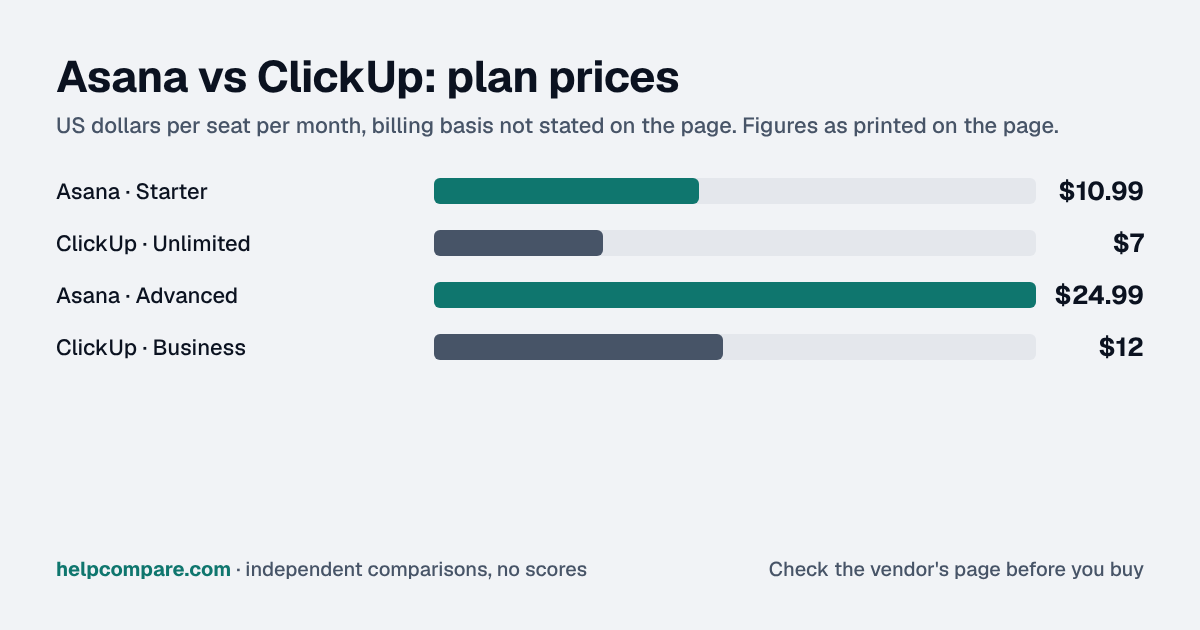
Only if easy adoption matters more than breadth: ClickUp is cheaper at both comparable tiers, $7 and $12 per seat a month against Asana's $10.99 and $24.99.

Asana's free plan also shrank to 2 users in late 2025, so it won't carry a small team. The question I'd ask is who will own ClickUp's setup. Highly configurable tools rarely fail on features, they fail on sprawl: every team invents its own statuses, custom fields and spaces, and within months the reports don't line up and people drift back to spreadsheets. If you pick ClickUp, name one owner, agree the statuses and fields once, and limit who can create new spaces before you invite everyone. If nobody has that time, Asana's lower learning curve is what the extra money buys.

My read of the verified data on this page, checked against vendor sources on September 12, 2026. Disagree or spot an error? Tell Bill

Verified data

Asana vs ClickUp: quick facts

At a glanceAsanaClickUp
CategoryProject Management
Entry priceFree (2 users), from $10.99/seat/moFree, from $7/seat/mo

Is Asana cheaper than ClickUp?

Asana is priced at Free (2 users), from $10.99/seat/mo and ClickUp at Free, from $7/seat/mo. See the full breakdown below for what is included at each tier.

Verified data

Asana vs ClickUp at a glance

CategoryAsanaClickUp
Free plan2 users (tightened late 2025)Free Forever, more generous limits
Entry paid price$10.99/seat/mo (Starter)$7/seat/mo (Unlimited)
Advanced/Business tier$24.99/seat/mo (Advanced)$12/seat/mo (Business)
EnterpriseNot published (quote only)Custom
Goals / PortfoliosMature, first-class featureMore customizable, less opinionated
AIAI Studio, credit-based (50k–200k credits/mo by tier)Brain2 (June 2026): shared org memory, multi-model routing
Native docs/whiteboards/chatPresent but thinnerNative and deep across most tiers
Learning curveLower — cited less often as a complaintHigher — most-cited complaint in reviews
G2 rating4.4/5 (~13,900 reviews)4.6/5 (~14,254 reviews)

Verified September 12, 2026Prices recorded from each vendor’s own pricing page. See sources

Editorial assessment

How they actually differ

Asana tightened its free plan to just 2 users in late 2025 (down from the 10–15 collaborators long-time users remember), which matters if you were counting on it for a small team. Its paid tiers (Starter at $10.99/seat and Advanced at $24.99/seat) add Timeline/Gantt views, unlimited automation rules, and AI Studio credits as you move up. ClickUp’s Unlimited ($7/seat) and Business ($12/seat) tiers are cheaper at every comparable level, though its AI layer (Brain2) is priced and bundled differently.

Reliability vs. breadth

The pattern in reviews is consistent: Asana is described as “just works,” with fewer surprises but occasionally missing a feature you’d have to upgrade for. ClickUp is described as able to replace several point tools at once (docs, whiteboards, chat, sprints) but with a real learning curve: G2 review data shows roughly three times as many “learning curve” mentions for ClickUp as for Asana.

AI in 2026

ClickUp shipped Brain2 in June 2026, adding “multiplayer AI” with shared organizational memory and multi-model routing across Claude, GPT, and Gemini. Asana’s AI Studio is credit-based and embedded directly into workflows, scaling from 50,000 credits/month at Starter to 200,000+ at Enterprise.

Asana

Pros

  • Mature, first-class Goals and Portfolios features
  • Rated more reliable and polished at scale
  • Lower learning curve — fewer complexity complaints
  • AI Studio embeds credit-based AI directly into workflows

Cons

  • Free plan tightened to just 2 users in late 2025
  • Advanced tier ($24.99/seat) costs more than ClickUp’s Business tier
  • Thinner native docs/whiteboards/chat than ClickUp
  • Seats sold in brackets (5/10/25/50), so cost can jump in steps

ClickUp

Pros

  • Cheaper at every comparable tier ($7 and $12/seat)
  • More generous free plan, no seat brackets
  • Leads on customization and native docs/chat/whiteboards
  • Brain2 (2026) adds multi-model AI with shared org memory

Cons

  • Steeper learning curve, the most-cited complaint in reviews
  • Described by some reviewers as cluttered/overwhelming to configure
  • Goals/Dashboards less opinionated than Asana’s native Portfolios
  • AI bundling and tiering can be confusing across plans
Verified data

Cost calculator: what does your team actually pay?

Asana

 
$0/mo

ClickUp

 
$0/mo
 

Illustrative estimate based on publicly listed pricing as of September 2026. Always confirm current rates before purchasing.

Choose Asana if…

You want a clean, reliable, standard project tool with mature Goals/Portfolios features and a lower learning curve for the whole team.

Choose ClickUp if…

You want to consolidate docs, chat, whiteboards, and sprints into one highly configurable platform, and you’re willing to invest time in setup.

Total cost over time

Uses your selections above. Estimate excludes add-ons, overages, and negotiated discounts.

Ready to pick your project management tool?

Both offer a free plan. See current pricing directly from the source.

Verified data

Asana vs ClickUp: security, offline & remote work

How Asana and ClickUp compare on compliance reports, sign-in controls, offline access and the setup details that matter for remote, hybrid and in-office teams. Every value links to the vendor page it came from.

What we checkedAsanaClickUp
Security & compliance
SOC 2 reportSOC 2 Type IIsourceSOC 2 Type IIsource
ISO/IEC 27001CertifiedsourceCertifiedsource
Other certificationsISO/IEC 27017, ISO/IEC 27018, ISO/IEC 27701, CSA STAR Level 1, SOC 3sourceISO/IEC 27017, ISO/IEC 27018, ISO/IEC 27701, ISO/IEC 42001, SOC 1 Type 2, SOC 3source
HIPAA (BAA)BAA availableEnterprise+sourceBAA availableEnterprisesource
GDPR data processing agreementDPA offeredsourceDPA offeredsource
Single sign-on (SAML/OIDC)YesEnterprisesourceYesEnterprisesource
SCIM user provisioningYesEnterprisesourceYesEnterprisesource
Two-factor authenticationYesEnforcement: EnterprisesourceYesEnforcement: Businesssource
Admin audit logYesEnterprise+ (or Enterprise with Compliance Management add-on)sourceYesEnterprisesource
Data residency choicesUS, EU, Japan, AustraliaEnterprise (add-on); included in Enterprise+sourceUS, EU, Australia, SingaporeEnterprisesource
Encryption256-bit encryption at rest and in transitsourceAES-256 at rest; TLS 1.2 in transitsource
Self-hosting optionNot publishedNot published
Offline access
Offline modePartialThe iOS app works offline for checking notifications, commenting, changing due dates or assignees, completing tasks and adding tasks; pending actions sync when you are back online.sourcePartialOn web, desktop and mobile you can create new tasks (and reminders, except on mobile) and view previously opened tasks and notes offline, but cannot edit existing tasks or notes; new items sync on reconnect.source
Desktop appsWindows, macOSsourceWindows, macOS, Linuxsource
Mobile appsiOS, AndroidsourceiOS, Androidsource
Offline limitsTasks and conversations in projects never opened on the device are not visible offline (new tasks can still be added to them)sourceAvailable on all plans; existing tasks and notes can't be edited offline, subtasks can't be created, and reminders can't be created offline in the mobile appAll planssource
Remote, hybrid & in-office
IP allowlistingYesEnterprise+sourceYesEnterprise (early version; request access via account manager)source
Device & session controlsYesEnterpriseSAML session timeout (1 hour to 30 days) plus an optional mobile session timeout; mobile app controls (limit downloads, screenshots, copy/paste) are sold as a Permissions Management add-on.sourceYesEnterpriseSession duration and idle timeout limits that apply to every account with access to the Workspace.source
Editorial assessment

What this means for your team

  • Audit reports: both publish a SOC 2 report, and Asana and ClickUp also hold ISO/IEC 27001. Ask each vendor for the report under NDA before you sign; security reviews usually want the latest one.
  • Single sign-on: Asana includes it on Enterprise; ClickUp includes it on Enterprise. If your team signs in through Okta, Microsoft Entra ID or Google, price the plan that includes SSO, not the entry plan.
  • Health data: Asana and ClickUp will sign a HIPAA business associate agreement (Asana: Enterprise+; ClickUp: Enterprise).
  • Working offline: Asana and ClickUp work offline only in part. Details are in the Offline mode row above.
  • Office-only access: Asana can restrict sign-ins to approved IP ranges on Enterprise+; ClickUp can restrict sign-ins to approved IP ranges on Enterprise (early version; request access via account manager). That suits an office network or a company VPN; fully remote teams need a VPN for it to work.
  • Where your data lives: Asana lets you choose US, EU, Japan, Australia on Enterprise (add-on); included in Enterprise+; ClickUp lets you choose US, EU, Australia, Singapore on Enterprise. This matters for teams hiring across the EU, UK or Australia.

Asana: worth knowing

  • RemoteAsana's IP allowlist can be applied to all users, only organization members, or only guests, and optionally to API traffic. source
  • SecurityMandatory 2FA on Enterprise tiers can be enforced for guests as well as domain members, useful for outside collaborators not on your SSO. source
  • RemoteWith data residency, all of an organization's Asana data must sit in one region (US, Frankfurt, Tokyo or Sydney). source
  • SecurityMobile app controls that limit downloads, screenshots and copy/paste are listed on the pricing page as a Permissions Management add-on. source

ClickUp: worth knowing

  • RemoteA ClickUp staff reply on its feedback board says the early-access full-traffic IP restriction limits all traffic, not just login, to allowed ranges such as an office network or VPN. source
  • SecurityIf someone belongs to several Workspaces that enforce session management, the strictest (shortest) limit applies to their account. source
  • OfflineClickUp stores tasks pinned to the Tray offline automatically. source
  • SecurityAudit log history is kept for 60 days. source

Checked September 19, 2026 against each vendor’s own trust center, help docs and app pages. Hover or tap “source” to see the exact wording we relied on. “Not published” means we could not find the vendor saying it on its own site; it doesn’t mean the feature is missing. Plan names are the lowest plan the vendor says includes the feature. Security · Offline · Remote vs office · Download the data

Frequently Asked Questions

What is Asana?

Asana is a project and task management platform used by teams to plan, track, and coordinate work.

What is ClickUp?

ClickUp is an all-in-one project management and productivity platform combining tasks, docs, goals, and chat.

How much does Asana cost compared to ClickUp?

Asana starts at $10.99/seat/mo (Starter), while ClickUp starts at $7/seat/mo (Unlimited). Asana feels more polished and reliable at scale, with mature Goals and Portfolios features, but its free plan was tightened to just 2 users in late 2025 and its Advanced tier ($24.99/seat) costs meaningfully more than ClickUp’s comparable Business tier.

Does Asana or ClickUp have a free plan?

Asana’s free plan: 2 users (tightened late 2025). ClickUp’s free plan: Free Forever, more generous limits.

Who should choose Asana?

You want a clean, reliable, standard project tool with mature Goals/Portfolios features and a lower learning curve for the whole team.

Who should choose ClickUp?

You want to consolidate docs, chat, whiteboards, and sprints into one highly configurable platform, and you’re willing to invest time in setup.

Migration Guides

Already decided? Here’s how to actually switch.

Step-by-step migration guides covering what transfers automatically, what doesn’t, and how to handle the gap, in both directions.

Sources

Prices on this page were recorded from each vendor’s own pricing page on the date shown at the top of the page. Vendors change pricing often — check the live source before you buy.

Every figure is also in our open dataset (JSON and CSV, CC BY 4.0), with its source page and verification date. See how we research pricing.

Cite this page: HelpCompare, “Asana vs ClickUp”, helpcompare.com/asana-vs-clickup/ (updated ).

Source links on this site are checked every month; last check . How sources are checked.

Start with the job

Guides for the jobs this software does

Plain-language guides: the steps, what to check before you buy, common mistakes, and every tool it takes with verified prices.

Need sign-off?

Turn this into a one-page decision brief

Verified prices costed for your team size, a check against your must-have requirements, the questions to settle before you sign, and a source for every figure. Print it, or paste it into an email to whoever approves the spend.

Build a decision brief

From shortlist to switched

Built for the leader who owns the selection, answers for the spend, drives the rollout, and lives with the results. HelpCompare covers the whole decision, not just the first step.

Bill Belcamino, founder of HelpCompare
About the author

Bill Belcamino

Founder and author, HelpCompare

Engineer by training, operator by experience, marketer by choice. Bill spent eight and a half years as an engineer at HP, was COO of Auctiva (the number one third-party selling platform on eBay, past 200,000 users) and ran Google’s $70M/year search syndication partnership at Alot.com. Then he spent 13 years building his own web properties with his own money at stake. He has bought, trialled, integrated and cancelled more SaaS tools than he can count, and started HelpCompare because the real cost of switching tools is the part nobody covers.

“I’ve sat on both sides of the table: the agency recommending the tool and the client paying for it.”

Researched and fact-checked by the HelpCompare team. Pricing on this page was last verified on September 12, 2026. No paid sponsorships, no affiliate commissions.