Asana is general-purpose work management for cross-functional teams; Jira is Atlassian’s issue tracker built around software development. Here is what each costs and who they are actually built for.
Choose Jira if your team runs software development and needs sprints and a backlog; choose Asana for general cross-department work with no engineering-specific ticketing. Jira Standard is $9.05/user/mo (1-10 user band) versus Asana Starter's $10.99/seat/mo, and Jira's free plan covers up to 10 users against Asana's 2.
| At a glance | Asana | Jira |
|---|---|---|
| Category | Project Management | |
| Entry price | Starter — $10.99/seat/mo (annual), $13.49 monthly | Standard — $9.05/user/mo (monthly, 1-10 user band); ~$7.50/user/mo effective on the $900/yr annual band |
| Free plan | Free — 2 users, unlimited tasks and projects, list/board/calendar views | Free forever — up to 10 users, unlimited projects, backlog/board/timeline/calendar views |
Jira, on paper: $9.05 a seat a month (monthly billing, 1-10 user band) against Asana Starter’s $10.99 (annual) or $13.49 (monthly). Jira’s free plan also stretches to 10 users against Asana’s 2. But Jira’s pricing is banded by team size rather than a flat linear per-seat rate — at 300 users Atlassian’s own calculator showed an effective $7.91/user/mo — so check the exact band for your headcount on Atlassian’s pricing page before assuming the number above holds at scale.
| Category | Asana | Jira |
|---|---|---|
| Entry price | Starter $10.99/seat/mo (annual) | Standard $9.05/user/mo (monthly, 1-10 users) |
| Free plan | 2 users, unlimited tasks and projects | 10 users, unlimited projects |
| Built for | Cross-functional work: marketing, ops, HR, general projects | Software and engineering teams: sprints, backlogs, issue tracking |
| Views | List, board, calendar, Timeline/Gantt (paid) | Backlog, board, timeline, calendar |
| Automation | Unlimited automations on Starter | 400 automation steps/user/mo on Standard |
| AI features | 5 AI requests/user/mo on paid plans | Rovo AI search, chat and agents on Standard |
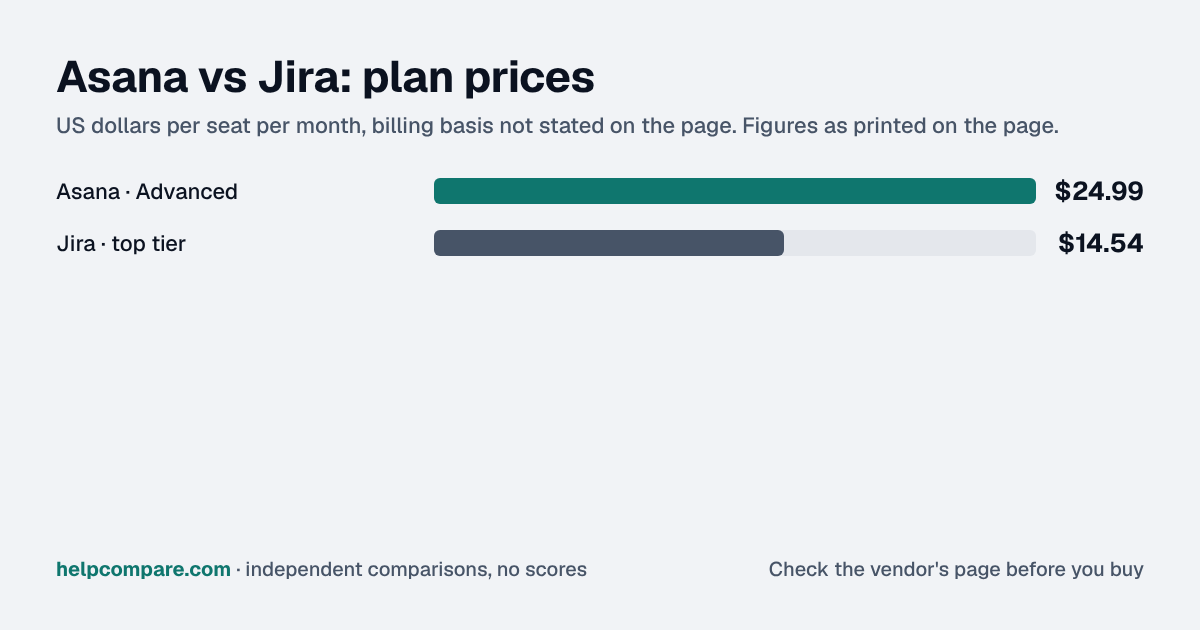
| Top tier | Advanced $24.99/seat/mo — Portfolios, Goals, resource management | Premium ~$14.54/user/mo (10-user band) — cross-team dependencies, unlimited storage |
| Storage | Unlimited (100MB max per file) | 250GB on Standard |
Verified September 23, 2026Prices recorded from each vendor’s own pricing page. See sources
Prices in USD from asana.com/pricing and atlassian.com/software/jira/pricing, both checked September 23, 2026. Jira’s price is for the 1-10 user monthly-billing band; larger teams see a different effective rate.
Editorial assessmentBoth let a team plan, assign and track work, with boards, calendars and automation. The real difference is what kind of work each is shaped around.
Asana is built for the work most departments do: campaigns, launches, hiring pipelines, ops checklists. It has no concept of a sprint, backlog or issue type out of the box. Jira is built around the software development lifecycle — backlogs, sprints, issue hierarchies (epics, stories, bugs, subtasks) and agile boards — and while teams do stretch it to general project work, that flexibility comes with a steeper learning curve and a more technical permission model.
Jira’s Standard plan includes Rovo, Atlassian’s AI search, chat and agent layer, plus 400 automation steps per user a month. Asana includes unlimited automations on Starter but caps AI to 5 requests per seat a month on paid plans — noticeably thinner than Jira’s AI allotment at a similar price.
Atlassian publishes an official importer that pulls Asana data directly into Jira, mapping standard and custom fields automatically. There is no equivalent import tool in the other direction — moving from Jira to Asana means exporting and rebuilding by hand.
Asana Starter is a flat per-seat annual rate. Jira Standard’s $9.05/user/mo applies to the 1-10 user monthly-billing band; larger teams get a different effective per-seat rate on Atlassian’s own calculator. Checked September 23, 2026.
Your team spans multiple departments, you want automations included without an add-on, or you do not need sprints, backlogs or issue hierarchies.
Your team is doing software development and needs sprints, backlogs and issue tracking, or you want a free plan for up to 10 people.
Uses your selections above. Estimate excludes add-ons, overages, and negotiated discounts.
Both publish a genuine free plan. Run one real project or sprint through each with your actual team before committing.
At the entry tier, yes on paper: $9.05/user/mo (1-10 user band, monthly billing) against Asana Starter’s $10.99 (annual) or $13.49 (monthly). Jira’s pricing is banded by team size, so the effective rate changes as headcount grows.
Yes, many teams do, but it is built around sprints, backlogs and issue types that add setup overhead a general-purpose tool like Asana does not require.
Yes — Atlassian publishes an official importer that maps Asana’s standard and custom fields directly into a new Jira space. There is no equivalent tool for importing Jira data into Asana.
Jira’s free plan covers up to 10 users; Asana’s free plan is capped at 2.
Step-by-step migration guides covering what transfers automatically, what doesn’t, and how to handle the gap — in both directions.
Every “best project management tool” listicle tells you why to buy. Here’s the other half: the specific conditions under which Asana or Jira is the wrong purchase for your team.
Buy Asana if:
Do NOT buy Asana if:
Buy Jira if:
Do NOT buy Jira if:
Every pricing fact, rating, AI billing model and switching guide we hold on each tool, on one page, with the date each figure was last verified.
Prices on this page were recorded from each vendor’s own pricing page on the date shown at the top of the page. Vendors change pricing often — check the live source before you buy.
Every figure is also in our open dataset (JSON and CSV, CC BY 4.0), with its source page and verification date. See how we research pricing.
Plain-language guides: the steps, what to check before you buy, common mistakes, and every tool it takes with verified prices.
Verified prices costed for your team size, a check against your must-have requirements, the questions to settle before you sign, and a source for every figure. Print it, or paste it into an email to whoever approves the spend.
Built for the leader who owns the selection, answers for the spend, drives the rollout, and lives with the results. HelpCompare covers the whole decision, not just the first step.