A docs-and-databases workspace against Microsoft’s free digital notebook. Here is what each costs per person, what moves between them, and which one a team should standardise on.
Choose OneNote if you want free-form notes, ink and offline notebooks at no extra cost: the app is free and it is included in Microsoft 365. Choose Notion if you want a structured team wiki with databases and linked pages; Plus is $10 per member per month billed annually.
| At a glance | Notion | Microsoft OneNote |
|---|---|---|
| Category | Knowledge Management | |
| Entry price | From $10/mo | Free; in Microsoft 365 Business Basic $7/user/mo (annual) |
| Free plan | No hard seat cap, but collaboration features gated behind paid tiers | Yes — the OneNote app is free |
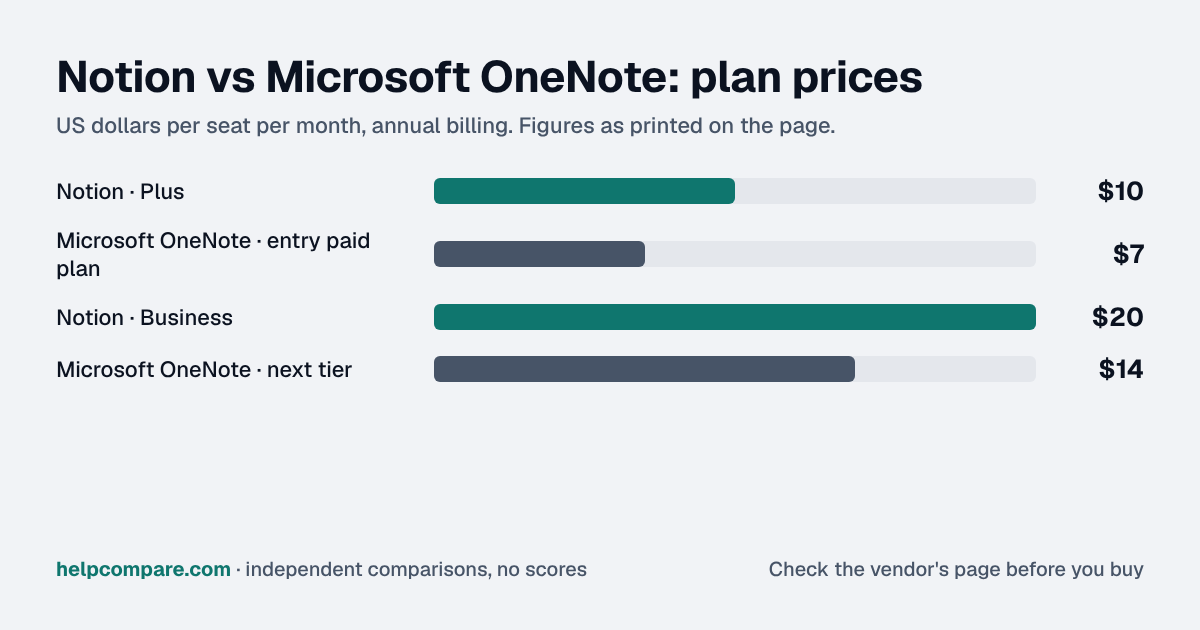
OneNote. The app is free, and OneNote on the web is included in Microsoft 365 Business Basic at $7/user/mo billed annually. Notion Plus is $10 per member per month billed annually ($12 monthly), and Business is $20 ($24 monthly).
| Category | Notion | Microsoft OneNote |
|---|---|---|
| Free plan | No hard seat cap, but collaboration features gated behind paid tiers | Yes — the OneNote app is free |
| Entry paid plan | Plus — $10/member/mo annual ($12 monthly) | None needed; OneNote on the web is in Microsoft 365 Business Basic $7/user/mo (annual) |
| Next tier | Business — $20/member/mo annual ($24 monthly) | Microsoft 365 Business Standard $14/user/mo (annual) |
| Structure | Pages, blocks and databases | Notebooks, sections and free-form pages |
| Offline | Not covered on the pages we checked | All versions keep a cached copy for offline use |
| Where content lives | Notion workspace | OneDrive or SharePoint |
| Import from the other | OneNote is not in Notion’s import list | No Notion importer; notebook import is deprecated |
| G2 rating | 4.6/5 (13,836 reviews) | Not listed |
Verified September 24, 2026Prices recorded from each vendor’s own pricing page. See sources
Notion prices from notion.com/pricing (annual and monthly toggles); OneNote availability from the Mac App Store listing and Microsoft 365 Business Basic page; offline and storage behaviour from Microsoft’s OneNote FAQ; import and export paths from Notion’s and Microsoft’s help centres. All checked September 24, 2026.
Editorial assessmentOneNote works like a paper notebook that syncs: notebooks, sections and pages where you can type, draw, paste or clip anything anywhere on the page. Notion works like a set of linked documents and databases: every page is built from blocks, and any list can become a database with properties, filters and views.
OneNote is free as an app, and OneNote on the web is included in Microsoft 365 Business Basic, so for most Microsoft shops the cost is zero. Notion charges per member: Plus is $10 a month billed annually and Business $20, which adds features such as SAML single sign-on.
Microsoft says every version of OneNote keeps a cached copy of your notebooks on the device, so notes open without a connection and sync later to OneDrive or SharePoint.
Neither tool imports the other. Notion’s import list covers Evernote, Confluence, Trello, Asana, Monday.com, Google Docs and files such as Word, Markdown, HTML, CSV and PDF, but not OneNote. Microsoft has deprecated OneNote’s notebook import and points users to PDF export instead, so expect to move pages as PDF or by copy and paste.
List prices checked September 24, 2026. OneNote is free; the Microsoft 365 options show the cost of a business licence that includes OneNote on the web plus email, Teams and 1 TB storage. Notion prices are per member. Taxes and promotions not included.
You want a structured team wiki with databases, templates and linked pages, and you are willing to pay per member for it.
You want free-form note-taking with ink and offline access, or your team already runs on Microsoft 365 and does not want another bill.
Uses your selections above. Estimate excludes add-ons, overages, and negotiated discounts.
OneNote costs nothing to try; Notion has a free plan. Move one real team notebook into each and see which structure your team keeps up to date.
How Notion and Microsoft OneNote compare on compliance reports, sign-in controls, offline access and the setup details that matter for remote, hybrid and in-office teams. Every value links to the vendor page it came from.
| What we checked | Notion | Microsoft OneNote |
|---|---|---|
| Security & compliance | ||
| SOC 2 report | SOC 2 Type IIsource | SOC 2 Type IIsource |
| ISO/IEC 27001 | Certifiedsource | Certifiedsource |
| Other certifications | ISO/IEC 27701, ISO/IEC 27017, ISO/IEC 27018source | ISO/IEC 27017, ISO/IEC 27018source |
| HIPAA (BAA) | BAA availableEnterprisesource | BAA availablesource |
| GDPR data processing agreement | DPA offeredsource | DPA offeredsource |
| Single sign-on (SAML/OIDC) | YesBusinesssource | Yessource |
| SCIM user provisioning | YesEnterprisesource | Not published |
| Two-factor authentication | Yessource | Yessource |
| Admin audit log | YesEnterprisesource | Yessource |
| Data residency choices | US, EU, Japan, South KoreaEnterprisesource | Australia, AT, Brazil, Canada, CL, DK, France, Germany, India, Indonesia, Israel, IT, Japan, MY, MX, NZ, NO, PL, QA, South Africa, South Korea, ES, SE, Switzerland, TW, UAE, UKAdvanced Data Residency (add-on)source |
| Encryption | AES-256 at rest; TLS 1.2+ in transitsource | BitLocker disk encryption plus per-file AES-256 encryption at rest (OneDrive/SharePoint); SSL/TLS in transitsource |
| Self-hosting option | Not published | Not published |
| Offline access | ||
| Offline mode | Works offlineIn the desktop and mobile apps you can view, edit and create pages offline once they are downloaded to that device; changes save locally and sync automatically when you reconnect.source | Works offlineAll OneNote apps keep a cached copy of notebooks on the device so notes can be used offline, and changes made offline sync to OneDrive when you next connect.source |
| Desktop apps | Windows, macOSsource | Windows, macOSsource |
| Mobile apps | iOS, Androidsource | iOS, Androidsource |
| Offline limits | Pages must be marked Available offline per device; automatic download of recent and favorited pages only on Business and Enterprise; databases download the first 50 rowsBusiness (auto-download)source | — |
| Remote, hybrid & in-office | ||
| IP allowlisting | Not published | YesMicrosoft 365 Business Premium (or Entra ID P1)source |
| Device & session controls | Not published | YesMicrosoft 365 Business Premium (or Entra ID P1)Entra Conditional Access can require MFA, compliant or hybrid-joined devices, approved client apps or app protection policies; SharePoint/OneDrive can block unmanaged devices or limit them to browser-only access with no download, print or sync.source |
Yes. The OneNote app is free (the Mac App Store lists it as “Free”), and OneNote on the web is included in Microsoft 365 Business Basic at $7/user/mo billed annually. Checked September 24, 2026.
Notion Plus is $10 per member per month billed annually ($12 monthly). Business is $20 per member per month annually ($24 monthly). Enterprise is priced by sales.
Not directly. OneNote is not in Notion’s list of import sources. Notion does import PDF, Word, Markdown and HTML files, so export OneNote pages as PDF or copy and paste them.
Yes. Microsoft says all versions of OneNote keep a cached copy of your notebooks on the device and sync changes when you reconnect.
No. Export from Notion as PDF, HTML or Markdown and rebuild the pages in OneNote; there is no importer in either direction.
Step-by-step migration guides covering what transfers automatically, what doesn’t, and how to handle the gap — in both directions.
Every “best note-taking and knowledge tool” listicle tells you why to buy. Here’s the other half: the specific conditions under which Notion or Microsoft OneNote is the wrong purchase for your team.
Buy Notion if:
Do NOT buy Notion if:
Buy Microsoft OneNote if:
Do NOT buy Microsoft OneNote if:
Every pricing fact, rating, AI billing model and switching guide we hold on each tool, on one page, with the date each figure was last verified.
Prices on this page were recorded from each vendor’s own pricing page on the date shown at the top of the page. Vendors change pricing often — check the live source before you buy.
Every figure is also in our open dataset (JSON and CSV, CC BY 4.0), with its source page and verification date. See how we research pricing.
Plain-language guides: the steps, what to check before you buy, common mistakes, and every tool it takes with verified prices.
Verified prices costed for your team size, a check against your must-have requirements, the questions to settle before you sign, and a source for every figure. Print it, or paste it into an email to whoever approves the spend.
Built for the leader who owns the selection, answers for the spend, drives the rollout, and lives with the results. HelpCompare covers the whole decision, not just the first step.