Airtable vs Notion: Database or Workspace for Your Team in 2026?
Notion is a workspace with databases inside it; Airtable is a database with interfaces on top. They overlap enough that teams compare them, and differ enough that most teams end up clearly on one side.
By Bill Belcamino · Last updated September 24, 2026 · Our methodologyResearched and fact-checked by the HelpCompare team
Bottom line up front: Should our team's tracker live in Airtable or Notion?
Put it in Airtable if other work depends on that table being right, and in Notion if the tracker mainly sits next to the docs and notes your team writes.
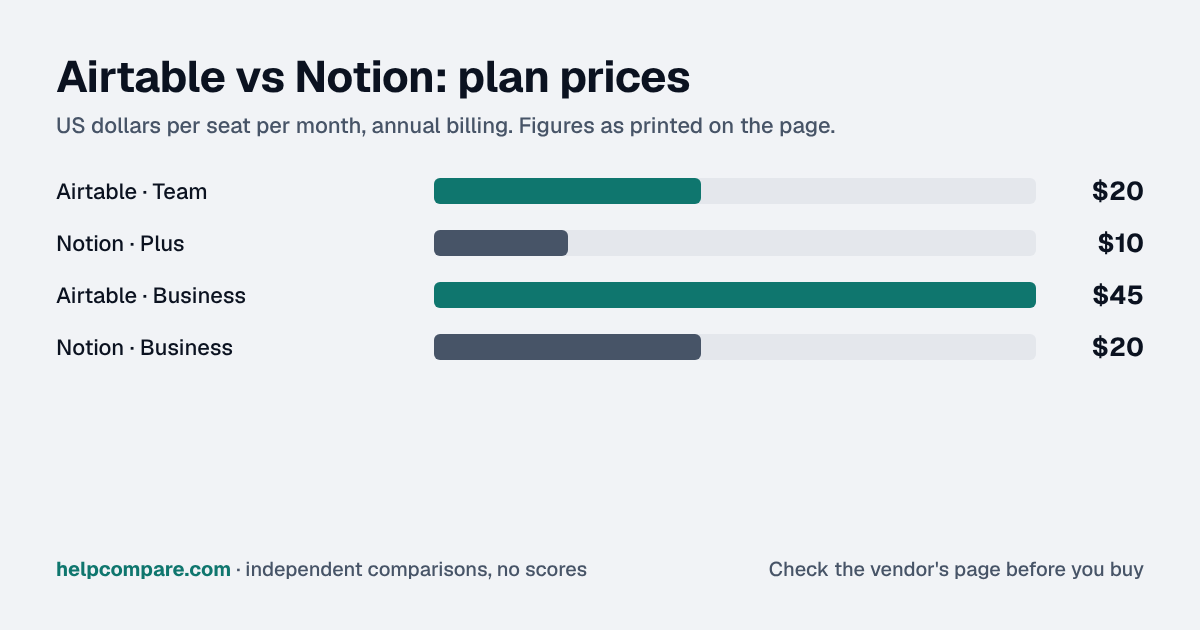
Notion Plus is $10/member/mo against Airtable Team at $20/seat/mo, both billed yearly, but Notion bills every member while Airtable bills editors only, so the page's own example of 3 editors and 7 viewers pays Airtable $60 and Notion $100. The deeper question is who controls the structure. When reports, invoices or other tools read from a table, someone has to own its fields, because a database anyone can add columns to drifts into three versions of the same status within months. Airtable is built around that kind of controlled schema; Notion is built for flexible pages. Name the owner of the data first, then pick the tool that lets them keep it clean.
No hard seat cap, but collaboration features gated behind paid tiers
Is Airtable cheaper than Notion?
Notion, by $10 a person at the entry tier: Plus is $10/member/mo billed yearly against Airtable Team at $20/seat/mo billed annually. At 10 people that is $100 a month against $200. Airtable only bills editors, so a team of 3 editors and 7 viewers pays Airtable $60 and Notion $100, which is where the ranking flips. Both offer free plans; Airtable’s allows 5 editors and 1,000 records per base.
Trial on Plus; Notion Agent and AI Meeting Notes on Business
SAML SSO
Business and Enterprise Scale
Business
Import from the other tool
CSV import (no Notion importer)
CSV import creates a database (no Airtable importer)
G2 rating
4.6/5 (3,296 reviews)
4.6/5 (13,836 reviews)
Verified September 24, 2026Prices recorded from each vendor’s own pricing page. See sources
Explore the numbers
Airtable vs Notion: the prices as a chart
Airtable and Notion: plan prices side by side
Plan price: US dollars per seat per month, annual billing
Airtable · Team$20
Notion · Plus$10
Airtable · Business$45
Notion · Business$20
AirtableNotion
Prices exactly as printed in the comparison table on this page (annual billing), in the table’s own tier order: Entry price, Next tier.
What Airtable and Notion cost per month for a team
5 seats: monthly cost = seats × the per-seat price on this page (annual billing)
Airtable · Team: 5 × $20$100
Notion · Plus: 5 × $10$50
Airtable · Business: 5 × $45$225
Notion · Business: 5 × $20$100
10 seats: monthly cost = seats × the per-seat price on this page (annual billing)
Airtable · Team: 10 × $20$200
Notion · Plus: 10 × $10$100
Airtable · Business: 10 × $45$450
Notion · Business: 10 × $20$200
25 seats: monthly cost = seats × the per-seat price on this page (annual billing)
Airtable · Team: 25 × $20$500
Notion · Plus: 25 × $10$250
Airtable · Business: 25 × $45$1,125
Notion · Business: 25 × $20$500
50 seats: monthly cost = seats × the per-seat price on this page (annual billing)
Airtable · Team: 50 × $20$1,000
Notion · Plus: 50 × $10$500
Airtable · Business: 50 × $45$2,250
Notion · Business: 50 × $20$1,000
AirtableNotion
An example, not a quote: team size times the per-seat prices printed on this page. It leaves out tax, add-ons, discounts and any plan limits. Where a plan has a minimum number of seats, the minimum is used.
List prices from this page’s own comparison table, not a quote. Plans differ in what they include.
Prices in USD from airtable.com/pricing and notion.com/pricing, checked September 24, 2026, using each page’s annual/yearly and monthly toggle. Airtable bills editors only: workspace, base or interface collaborators with Owner, Creator or Editor permissions are billable; read-only and commenter collaborators are not. Notion bills per member on Plus and Business.
Both tools give a team tables that link to each other, but Airtable treats the table as the product and Notion treats the page as the product.
Database or workspace
Airtable bases are relational: tables link to tables, views filter them, interfaces turn them into simple apps and automations run against them (25,000 runs a month on Team). Notion databases live inside pages and are strong for tracking work next to the writing about it, with subtasks, dependencies and custom properties, but they are not built for 50,000-record datasets or cross-base sync.
Who you pay for
Airtable bills editors only: workspace, base or interface collaborators with Owner, Creator or Editor permissions are billable; read-only and commenter collaborators are not. Notion bills every member of a paid workspace. A read-heavy team can be cheaper on Airtable despite the higher list price; an all-editors team is cheaper on Notion at every size.
AI and admin
Airtable Team includes 15,000 AI credits per paid user a month and moves SAML SSO to Business ($45). Notion includes a trial of Notion AI on Plus, and bundles Notion Agent, AI Meeting Notes and SAML SSO into Business ($20).
Moving between them
Neither tool imports the other directly. From Notion, export a full-page database as CSV (Settings, Export) and import it into Airtable as a new table, then rebuild links between tables. From Airtable, export each table as CSV and use Notion’s Settings, Import, CSV, which creates a Notion database per file; split large files first.
Cost calculator: what does your team actually pay?
Airtable
$0/mo
Notion
$0/mo
List prices billed annually, checked September 24, 2026. Airtable bills editor seats only, so enter your editor count for Airtable and your full member count for Notion to compare like with like. Promotions and taxes are not included.
Choose Airtable if…
Your team runs structured data that other systems depend on, most people only view it, or you need records and automations at scale.
Choose Notion if…
Your team writes as much as it tracks, everyone edits, or you want AI and SSO included at $20 rather than $45.
Total cost over time
Uses your selections above. Estimate excludes add-ons, overages, and negotiated discounts.
Ready to pick between Airtable and Notion?
Both are free to start. Rebuild your most important table in each; if you keep reaching for links between tables, choose Airtable; if you keep writing around the table, choose Notion.
Airtable vs Notion: security, offline & remote work
How Airtable and Notion compare on compliance reports, sign-in controls, offline access and the setup details that matter for remote, hybrid and in-office teams. Every value links to the vendor page it came from.
Needs a connectionAirtable says offline access is not supported in any app; the web, desktop and mobile apps all require internet access, and data can only be exported for offline reference.source
Works offlineIn the desktop and mobile apps you can view, edit and create pages offline once they are downloaded to that device; changes save locally and sync automatically when you reconnect.source
Pages must be marked Available offline per device; automatic download of recent and favorited pages only on Business and Enterprise; databases download the first 50 rowsBusiness (auto-download)source
YesBusinessAdmin-set web session length (4 hours to 1 year) on Business and Enterprise Scale; Enterprise Scale can also restrict printing, CSV downloads and copying to clipboard from apps (desktop only).source
Audit reports: both publish a SOC 2 report, and Airtable and Notion also hold ISO/IEC 27001. Ask each vendor for the report under NDA before you sign; security reviews usually want the latest one.
Single sign-on: Airtable includes it on Business; Notion includes it on Business. If your team signs in through Okta, Microsoft Entra ID or Google, price the plan that includes SSO, not the entry plan.
Health data: Airtable and Notion will sign a HIPAA business associate agreement (Airtable: Enterprise Scale; Notion: Enterprise).
Working offline: Notion lets you keep working without a connection; Airtable needs an internet connection. Details are in the Offline mode row above.
Office-only access: Airtable can restrict sign-ins to approved IP ranges on Enterprise Scale. That suits an office network or a company VPN; fully remote teams need a VPN for it to work.
Where your data lives: Airtable lets you choose US, EU; Notion lets you choose US, EU, Japan, South Korea on Enterprise. This matters for teams hiring across the EU, UK or Australia.
Airtable: worth knowing
RemoteOn Enterprise Scale, admins can limit sign-in to approved IP addresses or CIDR blocks (e.g. office or VPN ranges). source
OfflineAirtable has no offline mode; teams needing offline access must export data (e.g. CSV) beforehand. source
SecurityCustomers can choose EU data residency, with the EU data center in Frankfurt, Germany. source
SecurityEnterprise customers can encrypt data at rest with their own keys (Enterprise Key Management). source
Notion: worth knowing
OfflineSharing and permission changes are unavailable offline, so set access before disconnecting. source
OfflineOffline databases download only the first 50 rows automatically; other rows must be downloaded individually. source
RemoteOffline text edits merge automatically with collaborators' changes; non-text changes may need review. source
SecurityGuests cannot use SAML SSO; only workspace members can sign in with it. source
Checked September 24, 2026 against each vendor’s own trust center, help docs and app pages. Hover or tap “source” to see the exact wording we relied on. “Not published” means we could not find the vendor saying it on its own site; it doesn’t mean the feature is missing. Plan names are the lowest plan the vendor says includes the feature.
Notion at list price: Plus is $10/member/mo billed yearly against Airtable Team at $20/seat/mo billed annually. Airtable bills only editors, so read-heavy teams can pay less on Airtable. Prices checked September 24, 2026.
Can I import Airtable into Notion?
Only by CSV. Export each Airtable table as CSV, then use Notion’s Settings, Import, CSV; each file becomes a Notion database.
Can I import Notion into Airtable?
Only by CSV. Export the Notion database as CSV and import it into Airtable as a new table (100MB CSV limit), then rebuild links between tables.
Which one has a real free plan?
Both have free plans. Airtable’s allows up to 5 editors, 1,000 records per base and 100 automation runs a month; Notion’s is built for individuals, with team features on paid tiers.
Migration Guides
Already decided? Here’s how to actually switch.
Step-by-step migration guides covering what transfers automatically, what doesn’t, and how to handle the gap — in both directions.
Every “best work management tool” listicle tells you why to buy. Here’s the other half: the specific conditions under which Airtable or Notion is the wrong purchase for your team.
Airtable
✓
Buy Airtable if:
Your data is relational and large
Most of your team only views records
You need automations and sync between bases
✕
Do NOT buy Airtable if:
Your team is mostly writing documents
Everyone on the team edits
You want SSO and AI at the $20 tier
Notion
✓
Buy Notion if:
You want docs and databases in one workspace
Everyone on the team edits
You want AI and SSO bundled at $20
✕
Do NOT buy Notion if:
You need 50,000-record tables or cross-base sync
Most of your team only views data
You need a database other systems read from
Canonical data for the tools on this page
Every pricing fact, rating, AI billing model and switching guide we hold on each tool, on one page, with the date each figure was last verified.
Prices on this page were recorded from each vendor’s own pricing page on the date shown at the top of the page. Vendors change pricing often — check the live source before you buy.
Verified prices costed for your team size, a check against your must-have requirements, the questions to settle before you sign, and a source for every figure. Print it, or paste it into an email to whoever approves the spend.
Built for the leader who owns the selection, answers for the spend, drives the rollout, and lives with the results. HelpCompare covers the whole decision, not just the first step.
Engineer by training, operator by experience, marketer by choice. Bill spent eight and a half years as an engineer at HP, was COO of Auctiva (the number one third-party selling platform on eBay, past 200,000 users) and ran Google’s $70M/year search syndication partnership at Alot.com. Then he spent 13 years building his own web properties with his own money at stake. He has bought, trialled, integrated and cancelled more SaaS tools than he can count, and started HelpCompare because the real cost of switching tools is the part nobody covers.
“I’ve sat on both sides of the table: the agency recommending the tool and the client paying for it.”
Researched and fact-checked by the HelpCompare team. Pricing on this page was last verified on September 24, 2026. No paid sponsorships, no affiliate commissions.
Squarespace vs WordPressSep 23
Square vs StripeSep 23
Salesforce vs Zoho CRMSep 23
n8n to MakeWorkflow Automation
ZoomInfo to LushaSales Intelligence
Zoho CRM to PipedriveCRM Platforms
WooCommerce to BigCommerceE-commerce Platforms
Trello to ClickUpProject Management
Squarespace to WordPressWebsite Builders
Square to StripePayment Processing
Square to PayPalPayment Processing