Skip to content
Start here
CRM Platforms

HubSpot vs Zoho CRM: Which CRM Should You Choose in 2026?

HubSpot starts cheaper per seat, but Zoho CRM stays far cheaper once you need automation. Here is where the price lines cross, and what each charges on top.

HubSpot logoFree tier, from $20/seat/mo

HubSpot

VS
Zoho CRM logoFree (3 users), from $14/user/mo

Zoho CRM

Bottom line Editorial assessment

Which is better, HubSpot or Zoho CRM?

Choose HubSpot if you want marketing, sales and service in one easy platform and can stay on Starter; choose Zoho CRM if you will need automation and reporting soon at lower cost. On annual billing HubSpot Starter is $7/seat/mo, but Professional is $90/seat/mo plus a $1,500 onboarding fee, against $23/user/mo for Zoho CRM Professional, which includes AI agents in the seat price.

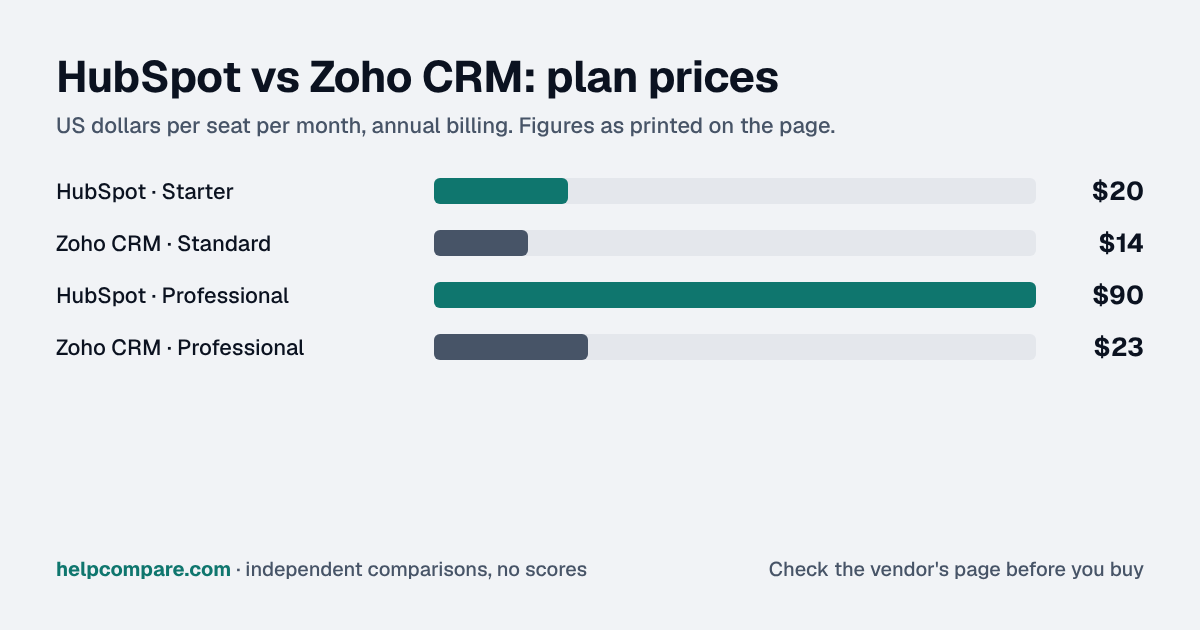
Quick verdict: HubSpot’s free CRM is excellent, but its paid Starter tier lists at $20/seat/mo — more than Zoho CRM Standard at $14/user/mo. The gap widens further up: Professional is $90/seat/mo plus a required $1,500 onboarding fee, against $23/user/mo for Zoho CRM Professional. Teams that are price-sensitive at every tier usually spend far less on Zoho; teams that want marketing, sales and service in one easy platform often find HubSpot worth the premium.
Verified data

HubSpot vs Zoho CRM: quick facts

At a glanceHubSpotZoho CRM
CategoryCRM Platforms
Entry priceFree tier, from $20/seat/moFree (3 users), from $14/user/mo
Free planYes, free CRM for up to 2 users, no card requiredYes, up to 3 users

Is HubSpot cheaper than Zoho CRM?

No, not at any published tier. HubSpot Starter is $20/seat/mo against $14/user/mo for Zoho CRM Standard, both billed annually. The gap widens further up: HubSpot Professional is $90/seat/mo plus a one-time $1,500 onboarding fee, while Zoho CRM Professional is $23/user/mo and Enterprise $40/user/mo. A 10-seat team on HubSpot Professional pays $900/mo; on Zoho CRM Professional it pays $230/mo. HubSpot is currently offering new customers a promotional $7/seat/mo rate on Starter for a limited time, which would undercut Zoho at entry while it lasts.

Verified data

HubSpot vs Zoho CRM at a glance

CategoryHubSpotZoho CRM
Free planYes, free CRM for up to 2 users, no card requiredYes, up to 3 users
Entry paid tierStarter — $20/seat/mo annual (standard price)Standard — $14/user/mo annual ($20 monthly)
Mid tierProfessional — $90/seat/mo annual ($100 monthly) + $1,500 one-time onboardingProfessional — $23/user/mo annual ($35 monthly)
Top tierEnterprise — from $150/seat/mo + $3,500 one-time onboardingEnterprise — $40/user/mo annual ($50 monthly)
Required onboarding feesYes, at Professional and EnterpriseNone listed — Zoho advertises free onboarding
AI pricingHubSpot Credits: 500 (Starter), 3,000 (Professional), 5,000 (Enterprise); extra credits $9 per 1,000 billed annuallyAI agents included from Professional; extended AI capabilities on Enterprise
Native import from the other toolZoho CRM data sync app (one- or two-way)API-based migration from HubSpot built in

Verified September 17, 2026Prices recorded from each vendor’s own pricing page. See sources

Prices from hubspot.com/pricing/sales and zoho.com/crm/zohocrm-pricing.html, checked September 17, 2026. HubSpot prices shown are Sales Hub; Marketing Hub Starter is also $20/seat/mo (standard price) and includes 1,000 marketing contacts.

Editorial assessment

How they actually differ

Both are seat-priced CRMs with a genuinely usable free tier: HubSpot for up to 2 users, Zoho CRM for up to 3. The difference is the shape of the price ladder. HubSpot is cheap to start and expensive to grow; Zoho CRM starts a little higher and climbs much more gently.

The Professional-tier gap

Most growing sales teams eventually need the Professional tier on either platform for automation, process management and fuller reporting. That is where the two diverge: HubSpot Professional is $90/seat/mo billed annually plus a required one-time $1,500 onboarding fee, while Zoho CRM Professional is $23/user/mo with AI agents, process management, inventory management and CPQ included.

Metered AI on HubSpot

HubSpot now runs AI features on HubSpot Credits: Starter includes 500, Professional 3,000 and Enterprise 5,000, with more at $9 per 1,000 credits on annual billing. Its published examples include 50 credits per conversation resolved by the Customer Agent and 100 credits per recommended outreach from the Prospecting Agent. Zoho CRM includes AI agents from Professional as part of the seat price.

HubSpot

Pros

  • Free CRM for up to 2 users with no card required
  • Marketing, sales and service tools unified in one platform
  • Easy to run without a dedicated CRM admin

Cons

  • Starter is not the cheapest entry tier — Zoho CRM Standard costs less ($14 vs $20/seat/mo)
  • Steep jump from Starter ($20) to Professional ($90/seat)
  • Required onboarding fees of $1,500 (Professional) and $3,500 (Enterprise)
  • AI usage is metered through HubSpot Credits

Zoho CRM

Pros

  • Cheaper entry-level tier than HubSpot Starter ($14 vs $20/seat/mo)
  • Far cheaper at Professional and Enterprise ($23 and $40/user/mo annual)
  • Free plan for up to 3 users
  • AI agents, process management and CPQ included from Professional
  • Built-in, API-based migration from HubSpot

Cons

  • Less unified marketing tooling than HubSpot’s suite
  • Monthly billing adds 25–52% over annual
  • Custom modules do not transfer in its HubSpot migration
Verified data

Cost calculator: what does your team actually pay?

HubSpot

 
$0/mo

Zoho CRM

 
$0/mo
 

Illustrative monthly estimate using annual-billing list prices, checked September 17, 2026. Excludes HubSpot’s one-time onboarding fees ($1,500 Professional, $3,500 Enterprise), extra HubSpot Credits and marketing-contact tiers. Always confirm current rates before purchasing.

Choose HubSpot if…

You want marketing, sales and service in one easy platform, you can stay on Starter or absorb Professional’s price, and you value a large ecosystem over the lowest cost.

Choose Zoho CRM if…

You expect to need automation, process management and full reporting soon, and you want Professional-tier capability at roughly a quarter of HubSpot’s seat price.

Total cost over time

Uses your selections above. Estimate excludes add-ons, overages, and negotiated discounts.

Ready to pick your CRM?

Both have free plans. Confirm current pricing directly with the vendor before you commit.

Verified data

HubSpot vs Zoho CRM: security, offline & remote work

How HubSpot and Zoho CRM compare on compliance reports, sign-in controls, offline access and the setup details that matter for remote, hybrid and in-office teams. Every value links to the vendor page it came from.

What we checkedHubSpotZoho CRM
Security & compliance
SOC 2 reportSOC 2 Type IIsourceSOC 2 Type IIsource
ISO/IEC 27001Not publishedCertifiedsource
Other certificationsSOC 1 Type II, SOC 3, HIPAA attestation, EU Cloud Code of Conduct, TRUSTe Certified PrivacysourceISO/IEC 27017, ISO/IEC 27018, ISO/IEC 27701, SOC 1 Type II, SOC 2 + HIPAA Type 2, PCI DSS (self-assessment SAQ-D), CSA STAR Self-Assessmentsource
HIPAA (BAA)BAA availableEnterprisesourceBAA availablesource
GDPR data processing agreementDPA offeredsourceDPA offeredsource
Single sign-on (SAML/OIDC)YesProfessionalsourceYessource
SCIM user provisioningYesProfessionalsourceNot published
Two-factor authenticationYesEnforcement: Free (optional to require); mandatory on Starter, Professional, EnterprisesourceYessource
Admin audit logYesStartersourceYessource
Data residency choicesUS, EU, Canada, AustraliaStartersourceUS, EU, India, Australia, Japan, Canada, Saudi Arabia, UAE, Singapore, Chinasource
EncryptionAES-256 at rest; TLS 1.2 or 1.3 in transitsourceAES-256 at rest for sensitive data; TLS 1.2/1.3 in transit; optional field-level encryption (Enterprise and up)source
Self-hosting optionNot publishedNot published
Offline access
Offline modePartialCRM records cannot be created, edited, or viewed in the mobile app without a connection; only Mobile Notetaker can record meetings offline and link them to CRM records once back online.sourceWorks offlineThe Zoho CRM iPhone app keeps working on data stored on the device when connectivity drops, and changes sync to the online account automatically on reconnect.source
Desktop appsBrowser onlysourceNot published
Mobile appsiOS, AndroidsourceiOS, Androidsource
Offline limitsOffline meeting recording (Mobile Notetaker) is available on Sales Hub or Service Hub Professional and EnterpriseSales Hub / Service Hub Professionalsource—
Remote, hybrid & in-office
IP allowlistingYesStartersourceYessource
Device & session controlsYesAll plansAdmin-set inactive session timeout (15 minutes to 3 days); users can review and remotely log out their own sessions on other devices.sourceNot published
Editorial assessment

What this means for your team

  • Audit reports: both publish a SOC 2 report, and Zoho CRM also holds ISO/IEC 27001. Ask each vendor for the report under NDA before you sign; security reviews usually want the latest one.
  • Single sign-on: HubSpot includes it on Professional; Zoho CRM includes it. If your team signs in through Okta, Microsoft Entra ID or Google, price the plan that includes SSO, not the entry plan.
  • Health data: HubSpot and Zoho CRM will sign a HIPAA business associate agreement (HubSpot: Enterprise).
  • Working offline: Zoho CRM lets you keep working without a connection; HubSpot works offline only in part. Details are in the Offline mode row above.
  • Office-only access: HubSpot can restrict sign-ins to approved IP ranges on Starter; Zoho CRM can restrict sign-ins to approved IP ranges. That suits an office network or a company VPN; fully remote teams need a VPN for it to work.
  • Where your data lives: HubSpot lets you choose US, EU, Canada, Australia on Starter; Zoho CRM lets you choose US, EU, India, Australia, Japan, Canada, Saudi Arabia, UAE, Singapore, China. This matters for teams hiring across the EU, UK or Australia.

HubSpot: worth knowing

  • RemoteHubSpot's trusted-IP login restriction also applies to the mobile app, so reps logging in from outside the allowed range on a phone are blocked. source
  • SecurityEach HubSpot account is hosted in one data center (US, EU, Canada or Australia); paid accounts can migrate to another region. source
  • RemoteUsers can see every device, browser and app where they are signed in and log out of lost devices remotely. source

Zoho CRM: worth knowing

  • OfficeZoho CRM admins can limit logins to office IPs per user, role or group, and the restriction then also applies to every other Zoho app those users sign in to. source
  • SecurityThe Zoho datacenter (US, EU, India, Australia, Japan, Canada, Saudi Arabia, UAE, Singapore or China) is assigned from the country chosen at sign-up. source
  • SecurityZoho CRM's HIPAA settings let admins mark health-data fields and block that data from exports and API access. source

Checked September 19, 2026 against each vendor’s own trust center, help docs and app pages. Hover or tap “source” to see the exact wording we relied on. “Not published” means we could not find the vendor saying it on its own site; it doesn’t mean the feature is missing. Plan names are the lowest plan the vendor says includes the feature. Security · Offline · Remote vs office · Download the data

Frequently Asked Questions

Is HubSpot cheaper than Zoho CRM?

No, not at any published tier. HubSpot Starter is $20/seat/mo versus $14/user/mo for Zoho CRM Standard (annual billing; a promotional $7/seat/mo new-customer rate may apply for a limited time). At Professional, HubSpot is $90/seat/mo plus a one-time $1,500 onboarding fee, against $23/user/mo for Zoho CRM Professional.

Do HubSpot and Zoho CRM have free plans?

Yes. HubSpot’s free CRM covers up to 2 users with no credit card required. Zoho CRM is free for up to 3 users.

Does HubSpot charge onboarding fees?

Yes, at the higher tiers: a required one-time Professional Onboarding fee of $1,500 and Enterprise Onboarding fee of $3,500.

How does HubSpot charge for AI?

Through HubSpot Credits. Starter includes 500, Professional 3,000 and Enterprise 5,000, with more at $9 per 1,000 credits on annual billing.

Can Zoho CRM import my HubSpot data?

Yes. Zoho CRM has an API-based migration from HubSpot that moves contacts, companies, deals, tasks, meetings, calls, notes, owners, products and quotes. Custom modules are not supported.

Can I move from Zoho CRM to HubSpot?

Yes. HubSpot’s Zoho CRM data sync app can sync data one way or both ways; activities and custom modules do not sync, so plan a separate import for those.

Migration Guides

Already decided? Here’s how to actually switch.

Step-by-step migration guides covering what transfers automatically, what doesn’t, and how to handle the gap, in both directions.

Editorial assessment

When to Buy — and When to Walk Away

Every “best CRM” listicle tells you why to buy. Here’s the other half: the specific conditions under which HubSpot or Zoho CRM is the wrong purchase for your team.

HubSpot

Buy HubSpot if:

  • You want marketing, sales and service in one login and will stay on Starter for a while
  • You need a free CRM for 1–2 people with a clear self-serve upgrade path
  • Inbound marketing is central and you want native forms, pages and nurture

Do NOT buy HubSpot if:

  • You will need Professional-tier automation within a year on a tight budget
  • Your AI usage will be heavy and you have not budgeted for metered credits
  • You cannot absorb a $1,500–$3,500 onboarding fee

Zoho CRM

Buy Zoho CRM if:

  • You need workflow automation, process management and reporting at low per-seat cost
  • Your team is 3 or fewer and can run on the free plan
  • You want AI agents included in the seat price from Professional

Do NOT buy Zoho CRM if:

  • Marketing automation is your main need and you want it tightly unified with sales
  • You rely on HubSpot custom objects, since Zoho’s HubSpot migration does not move custom modules
  • You need the lowest possible entry price for a single paid seat

Sources

Prices on this page were recorded from each vendor’s own pricing page on the date shown at the top of the page. Vendors change pricing often — check the live source before you buy.

Every figure is also in our open dataset (JSON and CSV, CC BY 4.0), with its source page and verification date. See how we research pricing.

Cite this page: HelpCompare, “HubSpot vs Zoho CRM: Which CRM Should You Choose in 2026?”, helpcompare.com/hubspot-vs-zoho-crm/ (updated ).

Source links on this site are checked every month; last check . How sources are checked.

Start with the job

Guides for the jobs this software does

Plain-language guides: the steps, what to check before you buy, common mistakes, and every tool it takes with verified prices.

Need sign-off?

Turn this into a one-page decision brief

Verified prices costed for your team size, a check against your must-have requirements, the questions to settle before you sign, and a source for every figure. Print it, or paste it into an email to whoever approves the spend.

Build a decision brief

From shortlist to switched

Built for the leader who owns the selection, answers for the spend, drives the rollout, and lives with the results. HelpCompare covers the whole decision, not just the first step.

Bill Belcamino, founder of HelpCompare
About the author

Bill Belcamino

Founder and author, HelpCompare

Engineer by training, operator by experience, marketer by choice. Bill spent eight and a half years as an engineer at HP, was COO of Auctiva (the number one third-party selling platform on eBay, past 200,000 users) and ran Google’s $70M/year search syndication partnership at Alot.com. Then he spent 13 years building his own web properties with his own money at stake. He has bought, trialled, integrated and cancelled more SaaS tools than he can count, and started HelpCompare because the real cost of switching tools is the part nobody covers.

“I’ve sat on both sides of the table: the agency recommending the tool and the client paying for it.”

Researched and fact-checked by the HelpCompare team. Pricing on this page was last verified on September 17, 2026. No paid sponsorships, no affiliate commissions.