Skip to content
Start here
Video Conferencing

Google Meet vs Microsoft Teams: Which Video Tool Fits Your Business in 2026?

Google Meet is sold bundled into Google Workspace; Microsoft Teams has a standalone meetings-only tier that undercuts it on price but leaves out the rest of the office suite. Here is what each actually costs and includes.

Google Meet logoGoogle Workspace Business Starter — $7/user/mo (annual commitment)

Google Meet

VS
Microsoft Teams logoTeams Essentials — $4/user/mo (paid yearly)

Microsoft Teams

Bill Belcamino
Bottom line up frontby Bill Belcamino, founder of HelpCompare
Editorial assessment

Bottom line up front: Is Teams Essentials at $4 really cheaper than Google Meet?

Only if meetings are all you need: Teams Essentials is $4/user/mo paid yearly for meetings and chat, while Google's $7 Business Starter includes Gmail, Docs, Sheets and Slides with Meet.

The like-for-like match is Microsoft 365 Business Basic at the same $7, so for a full suite the price is a wash. The real split is recording: Teams Essentials includes recording, transcripts and captions at entry, and Google holds recording back until Business Standard at $14/user/mo. Before you pay for recording, decide what you'll do with it. Recorded calls are company records, so set who may record, tell participants when you do, and decide how long recordings are kept, because a pile of old sales and HR calls is a liability more than an asset. If nobody would rewatch a meeting, don't pay extra to record it.

My read of the verified data on this page, checked against vendor sources on September 23, 2026. Disagree or spot an error? Tell Bill

Verified data

Google Meet vs Microsoft Teams: quick facts

At a glanceGoogle MeetMicrosoft Teams
CategoryVideo Conferencing
Entry priceGoogle Workspace Business Starter — $7/user/mo (annual commitment)Teams Essentials — $4/user/mo (paid yearly)
Free planPersonal Google account: 1:1 calls up to 24 hrs; group calls (3+) capped at 60 minMicrosoft Teams Free — 100 participants, meetings capped at 60 min

Is Google Meet cheaper than Microsoft Teams?

Microsoft Teams Essentials, by $3 a seat a month: $4 against Google Workspace Business Starter’s $7. But that comparison is not quite apples-to-apples — Teams Essentials is a meetings-only product, while the $7 Workspace price already includes Gmail, Docs, Sheets and Slides on top of Meet. The closer bundle match is Microsoft 365 Business Basic at $7/user/mo (paid yearly), which adds web/mobile Office apps and 1TB storage to full Teams — at that point the two are priced identically.

Verified data

Google Meet vs Microsoft Teams at a glance

CategoryGoogle MeetMicrosoft Teams
Entry priceBusiness Starter $7/user/mo (annual)Teams Essentials $4/user/mo (paid yearly)
What it includes beyond meetingsGmail, Docs, Sheets, Slides, 30GB pooled storageMeetings and chat only — no Office apps
Free planPersonal account: 60-min cap on group callsTeams Free: 100 participants, 60-min cap
Recording at entry tierNo — starts at Business Standard ($14/user)Yes — recording, transcripts, live captions included
Participant cap (paid)100 (Starter), scales to 500 on PlusFlat 300 on every paid tier
Max meeting length (paid)Up to 24 hoursUp to 30 hours
Closest full-suite matchBusiness Starter already bundles the suite at $7Microsoft 365 Business Basic, $7/user/mo (adds Office apps + full Teams)
Storage included30GB pooled per user10GB per user (1TB on M365 Business Basic)

Verified September 23, 2026Prices recorded from each vendor’s own pricing page. See sources

Explore the numbers

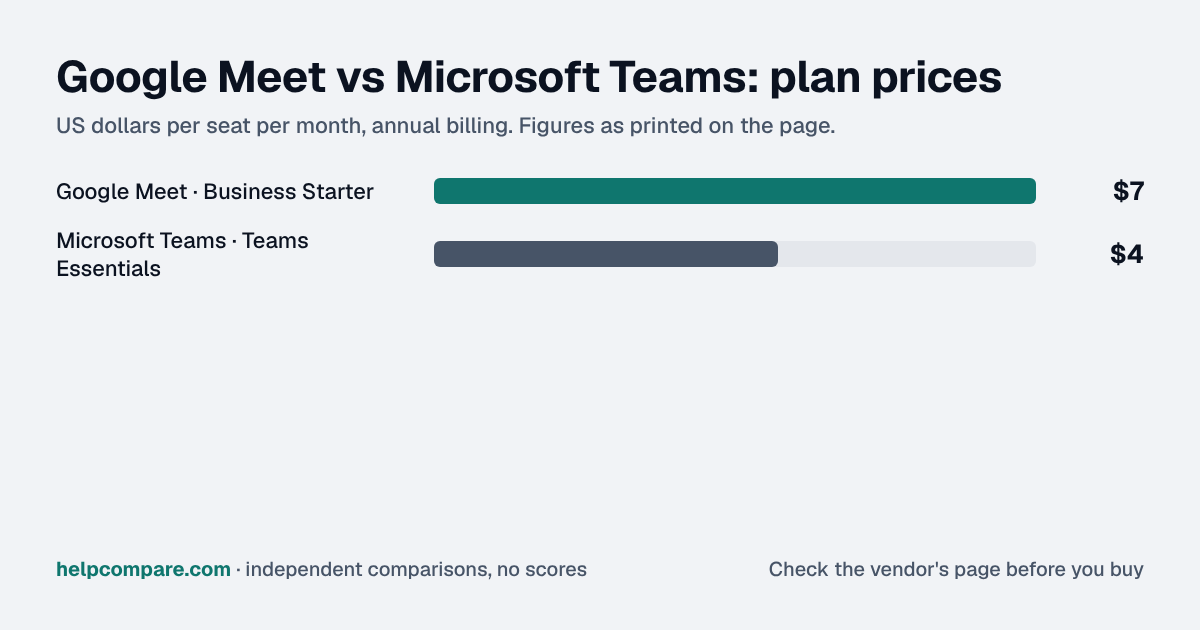
Google Meet vs Microsoft Teams: the prices as a chart

Google Meet and Microsoft Teams: plan prices side by side

Plan price: US dollars per seat per month, annual billing

  • Google Meet · Business Starter$7
  • Microsoft Teams · Teams Essentials$4

Google MeetMicrosoft Teams

Prices exactly as printed in the comparison table on this page (annual billing), in the table’s own tier order: Entry price.

What Google Meet and Microsoft Teams cost per month for a team

5 seats: monthly cost = seats × the per-seat price on this page (annual billing)

  • Google Meet · Business Starter: 5 × $7$35
  • Microsoft Teams · Teams Essentials: 5 × $4$20

10 seats: monthly cost = seats × the per-seat price on this page (annual billing)

  • Google Meet · Business Starter: 10 × $7$70
  • Microsoft Teams · Teams Essentials: 10 × $4$40

25 seats: monthly cost = seats × the per-seat price on this page (annual billing)

  • Google Meet · Business Starter: 25 × $7$175
  • Microsoft Teams · Teams Essentials: 25 × $4$100

50 seats: monthly cost = seats × the per-seat price on this page (annual billing)

  • Google Meet · Business Starter: 50 × $7$350
  • Microsoft Teams · Teams Essentials: 50 × $4$200

Google MeetMicrosoft Teams

An example, not a quote: team size times the per-seat prices printed on this page. It leaves out tax, add-ons, discounts and any plan limits. Where a plan has a minimum number of seats, the minimum is used.

List prices from this page’s own comparison table, not a quote. Plans differ in what they include.

Prices in USD from workspace.google.com/pricing and microsoft.com/en-us/microsoft-teams/compare-microsoft-teams-options, both checked September 23, 2026.

Editorial assessment

How they actually differ

Both cover the core job — scheduled video meetings with screen share and chat — but they are sold as very different bundles.

Bundled suite vs. meetings-only

Google sells Meet as part of Google Workspace; there is no standalone “just Meet” business plan, so the $7 Business Starter price already includes Gmail on your domain, Docs, Sheets and Slides. Microsoft sells Teams Essentials as a meetings-and-chat-only product with no Office apps — to get Word, Excel and PowerPoint alongside full Teams, you need Microsoft 365 Business Basic at the same $7/user/mo Workspace charges for its full bundle.

Recording is inverted from what you might expect

Microsoft includes meeting recording, transcripts and live captions in its cheapest paid tier (Teams Essentials, $4). Google withholds recording entirely from Business Starter — you need to upgrade to Business Standard at $14/user/mo to record a Google Meet call, a real gap if recording matters to your team.

Meeting limits

Both free tiers cap group calls at 60 minutes. On paid plans, Microsoft allows longer individual meetings (up to 30 hours vs Google’s 24), while Google’s participant caps scale higher on its upper tiers (500 on Plus) against Microsoft’s flat 300-participant cap across all its paid tiers.

Google Meet

Pros

  • Full office suite (Gmail, Docs, Sheets, Slides) bundled at the same $7 price
  • 30GB pooled storage per user at entry, vs Teams Essentials’ 10GB
  • Participant caps scale higher on upper tiers (500 on Plus)
  • Meetings run up to 24 hours on paid plans

Cons

  • No recording, transcripts or captions until Business Standard ($14/user)
  • $3/seat more than Teams Essentials for meetings alone
  • Free tier caps group calls at 60 minutes, same as Teams Free
  • No standalone meetings-only plan at a lower price

Microsoft Teams

Pros

  • $3/seat cheaper for meetings-only use
  • Recording, transcripts and live captions included at entry
  • Meetings run up to 30 hours on paid plans
  • Microsoft 365 Business Basic matches Workspace’s $7 bundle price exactly

Cons

  • Teams Essentials has no Office apps — email and documents need a separate plan
  • Only 10GB storage per user at the Essentials tier
  • Flat 300-participant cap on every paid tier, no higher option
  • Live captions are English-only at this tier
Verified data

Cost calculator: what does your team actually pay?

Google Meet

 
$0/mo

Microsoft Teams

 
$0/mo
 

Google Workspace Business Starter already bundles Gmail, Docs, Sheets and Slides at $7/user/mo; Microsoft Teams Essentials at $4/user/mo is meetings and chat only, with no Office apps included. Checked September 23, 2026.

Choose Google Meet if…

You want a full office suite (email, docs, spreadsheets) bundled with your video tool at one price, or need meetings up to 24 hours with scaling participant caps.

Choose Microsoft Teams if…

You only need video meetings and chat, want recording and transcripts included at the entry tier, or already have Office apps from elsewhere.

Total cost over time

Uses your selections above. Estimate excludes add-ons, overages, and negotiated discounts.

Ready to pick your video conferencing tool?

Both offer a free tier capped at 60-minute group calls. Run a real team meeting on each before committing your organization’s domain email to one.

Verified data

Google Meet vs Microsoft Teams: security, offline & remote work

How Google Meet and Microsoft Teams compare on compliance reports, sign-in controls, offline access and the setup details that matter for remote, hybrid and in-office teams. Every value links to the vendor page it came from.

What we checkedGoogle MeetMicrosoft Teams
Security & compliance
SOC 2 reportSOC 2 Type IIsourceSOC 2 Type IIsource
ISO/IEC 27001CertifiedsourceCertifiedsource
Other certificationsISO/IEC 27017, ISO/IEC 27018, ISO/IEC 27701, SOC 3sourceISO/IEC 27017, ISO/IEC 27018, ISO/IEC 27701, SOC 1source
HIPAA (BAA)BAA availablesourceBAA availablesource
GDPR data processing agreementDPA offeredsourceDPA offeredsource
Single sign-on (SAML/OIDC)YessourceYessource
SCIM user provisioningNot publishedNot published
Two-factor authenticationYessourceYesEnforcement: Microsoft Entra ID Free (security defaults)source
Admin audit logYessourceYessource
Data residency choicesUS, EUBusiness StandardsourceAustralia, Brazil, Canada, France, Germany, India, IT, Japan, NO, PL, QA, South Korea, South Africa, SE, Switzerland, UAE, UK, Americas, APAC, EMEAsource
EncryptionEncrypted in transit by default (DTLS/SRTP); Meet recordings in Google Drive encrypted at restsourceTLS 1.2+ with AES-256 in transit; BitLocker plus per-file encryption at rest; optional end-to-end encryption and Customer Keysource
Self-hosting optionNot publishedNot published
Offline access
Offline modeNeeds a connectionMeet is a live video service with no offline mode; Google lists a broadband internet connection as a requirement.sourceNot documented
Desktop appsBrowser onlysourceWindows, macOSsource
Mobile appsiOS, AndroidsourceiOS, Androidsource
Remote, hybrid & in-office
IP allowlistingYesEnterprise StandardsourceYesMicrosoft Entra ID P1 (included in Microsoft 365 Business Premium)source
Device & session controlsYesEnterprise StandardContext-Aware Access policies by device security status, OS, IP range and country (Enterprise Standard and up, Frontline Standard, Education Standard, Cloud Identity Premium).sourceYesMicrosoft Entra Conditional Access policies apply to Teams sign-ins (device compliance, location); Intune mobile application management; Conditional Access requires Entra ID P1.source
Office & room hardwareGoogle Meet hardware kits turn conference rooms into Meet video-conference spaces; they need a display with HDMI, DVI or DisplayPort input.sourceMicrosoft Teams Rooms turn meeting spaces from huddle areas to large conference rooms into one-touch-join Teams rooms, sold as Windows and Android devices from partners.source
Editorial assessment

What this means for your team

  • Audit reports: both publish a SOC 2 report, and Google Meet and Microsoft Teams also hold ISO/IEC 27001. Ask each vendor for the report under NDA before you sign; security reviews usually want the latest one.
  • Single sign-on: Google Meet includes it; Microsoft Teams includes it. If your team signs in through Okta, Microsoft Entra ID or Google, price the plan that includes SSO, not the entry plan.
  • Health data: Google Meet and Microsoft Teams will sign a HIPAA business associate agreement.
  • Working offline: Google Meet needs an internet connection; Microsoft Teams doesn’t document an offline mode. Details are in the Offline mode row above.
  • Office-only access: Google Meet can restrict sign-ins to approved IP ranges on Enterprise Standard; Microsoft Teams can restrict sign-ins to approved IP ranges on Microsoft Entra ID P1 (included in Microsoft 365 Business Premium). That suits an office network or a company VPN; fully remote teams need a VPN for it to work.
  • Where your data lives: Google Meet lets you choose US, EU on Business Standard; Microsoft Teams lets you choose Australia, Brazil, Canada, France, Germany, India, IT, Japan, NO, PL, QA, South Korea, South Africa, SE, Switzerland, UAE, UK, Americas, APAC, EMEA. This matters for teams hiring across the EU, UK or Australia.
  • In the office: Google Meet: Google Meet hardware kits turn conference rooms into Meet video-conference spaces; they need a display with HDMI, DVI or DisplayPort input. Microsoft Teams: Microsoft Teams Rooms turn meeting spaces from huddle areas to large conference rooms into one-touch-join Teams rooms, sold as Windows and Android devices from partners.

Google Meet: worth knowing

  • RemoteGoogle's planning figure for large organizations is about 1 Mbps out / 1.3 Mbps in per video participant; audio-only is about 12/18 Kbps. source
  • RemotePhone dial-in for Meet must be turned on by an administrator. source
  • SecurityData-region policies only cover users on a supported Workspace edition. source
  • SecurityMeet recordings saved to Google Drive are encrypted at rest by default. source

Microsoft Teams: worth knowing

  • RemoteMicrosoft says Teams can deliver HD video in under 1.5 Mbps; actual use varies per call. source
  • RemotePhone dial-in (Audio Conferencing) needs an add-on license for each organizer; people who dial in need none. source
  • RemoteExternal guests with any business or consumer email address can be added to teams. source
  • OfficeThere is no native Linux desktop app; Linux users use Teams on the web or as a PWA. source

Checked September 19, 2026 against each vendor’s own trust center, help docs and app pages. Hover or tap “source” to see the exact wording we relied on. “Not published” means we could not find the vendor saying it on its own site; it doesn’t mean the feature is missing. Plan names are the lowest plan the vendor says includes the feature. Security · Offline · Remote vs office · Download the data

Frequently Asked Questions

Is Google Meet or Microsoft Teams cheaper?

For meetings alone, Microsoft Teams Essentials is cheaper at $4/user/mo against Google Workspace Business Starter’s $7. But Workspace’s $7 already includes Gmail, Docs, Sheets and Slides, which Teams Essentials does not — the closer bundle match, Microsoft 365 Business Basic, is priced the same $7/user/mo.

Does Google Meet include call recording?

Not at the Business Starter tier. Recording is withheld until Business Standard ($14/user/mo). Microsoft Teams Essentials includes recording, transcripts and live captions at its $4 entry tier.

How long can meetings run?

Up to 24 hours on Google Workspace paid plans and up to 30 hours on Microsoft Teams paid plans. Both free tiers cap group calls (3+ participants) at 60 minutes.

Does Teams Essentials include Office apps?

No — it is meetings and chat only. Microsoft 365 Business Basic adds web/mobile Word, Excel and PowerPoint plus 1TB storage for the same $7/user/mo Workspace charges for its bundle.

Migration Guides

Already decided? Here’s how to actually switch.

Step-by-step migration guides covering what transfers automatically, what doesn’t, and how to handle the gap — in both directions.

Editorial assessment

When to Buy — and When to Walk Away

Every “best video conferencing tool” listicle tells you why to buy. Here’s the other half: the specific conditions under which Google Meet or Microsoft Teams is the wrong purchase for your team.

Google Meet

Buy Google Meet if:

  • You want email, docs and spreadsheets bundled with your video tool
  • You need meetings up to 24 hours or scaling participant caps
  • You are already on Google Workspace for other reasons

Do NOT buy Google Meet if:

  • You need call recording at the entry tier
  • You only need meetings and chat, nothing else
  • You want the lowest possible per-seat price

Microsoft Teams

Buy Microsoft Teams if:

  • You only need video meetings and chat
  • You want recording, transcripts and captions included at entry
  • You already have Office apps or email from elsewhere

Do NOT buy Microsoft Teams if:

  • You want a full office suite bundled at the same price
  • You need more than 10GB of storage per user without upgrading
  • You need participant caps above 300 on a paid tier

Sources

Prices on this page were recorded from each vendor’s own pricing page on the date shown at the top of the page. Vendors change pricing often — check the live source before you buy.

Every figure is also in our open dataset (JSON and CSV, CC BY 4.0), with its source page and verification date. See how we research pricing.

Cite this page: HelpCompare, “Google Meet vs Microsoft Teams”, helpcompare.com/google-meet-vs-microsoft-teams/ (updated ).

Source links on this site are checked every month; last check . How sources are checked.

Start with the job

Guides for the jobs this software does

Plain-language guides: the steps, what to check before you buy, common mistakes, and every tool it takes with verified prices.

Need sign-off?

Turn this into a one-page decision brief

Verified prices costed for your team size, a check against your must-have requirements, the questions to settle before you sign, and a source for every figure. Print it, or paste it into an email to whoever approves the spend.

Build a decision brief

From shortlist to switched

Built for the leader who owns the selection, answers for the spend, drives the rollout, and lives with the results. HelpCompare covers the whole decision, not just the first step.

Bill Belcamino, founder of HelpCompare
About the author

Bill Belcamino

Founder and author, HelpCompare

Engineer by training, operator by experience, marketer by choice. Bill spent eight and a half years as an engineer at HP, was COO of Auctiva (the number one third-party selling platform on eBay, past 200,000 users) and ran Google’s $70M/year search syndication partnership at Alot.com. Then he spent 13 years building his own web properties with his own money at stake. He has bought, trialled, integrated and cancelled more SaaS tools than he can count, and started HelpCompare because the real cost of switching tools is the part nobody covers.

“I’ve sat on both sides of the table: the agency recommending the tool and the client paying for it.”

Researched and fact-checked by the HelpCompare team. Pricing on this page was last verified on September 23, 2026. No paid sponsorships, no affiliate commissions.