Both are per-seat booking tools with unlimited event types and calendar sync. Cal.com is the open-source challenger with a genuinely free single-user plan; Calendly is the established default with the deeper integration and workflow library.
Choose Calendly if you want the cheapest published seat price ($10/mo annual) and the deepest native CRM sync and workflow automation. Choose Cal.com if you want a genuinely free single-user plan, open-source/self-hosting, or built-in payment collection — its Teams plan is $12/seat/mo (annual).
| At a glance | Cal.com | Calendly |
|---|---|---|
| Category | Scheduling Software | |
| Entry price | Free (1 user); Teams $12/user/mo (annual), $15 monthly | From $10/seat/mo (annual, Standard) |
| Free plan | Free forever — 1 user, unlimited event types and calendars, 100+ app integrations | 1 event type; unlimited event types on paid plans |
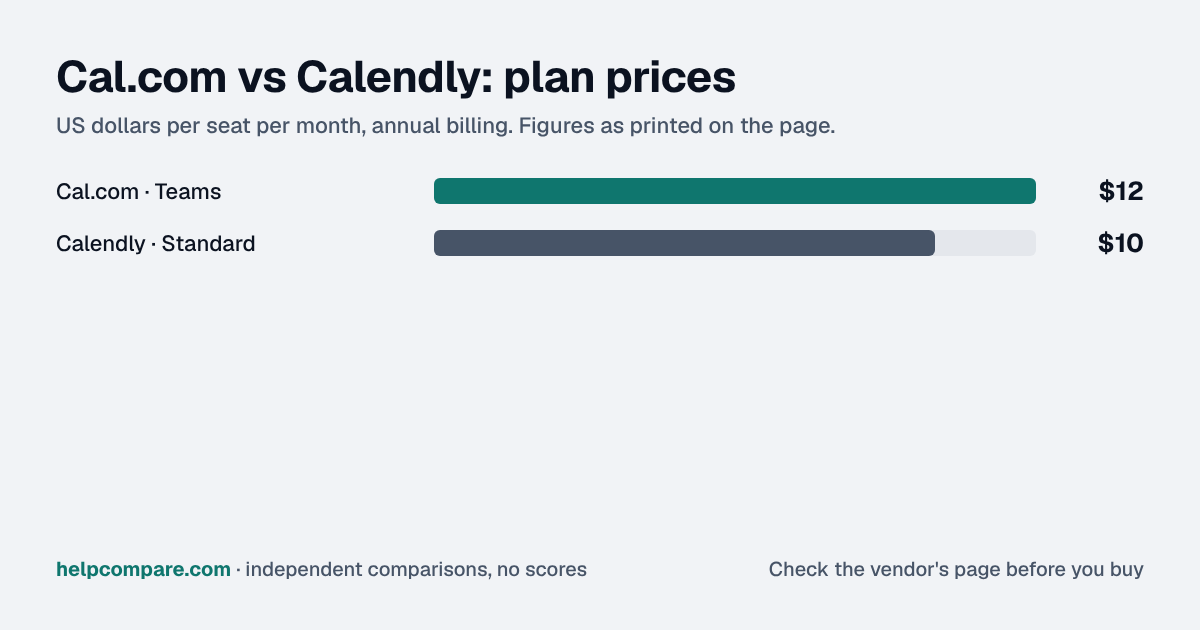
Calendly, by $2 a seat a month at the entry tier: $10 against Cal.com’s $12 (both annual billing). At 10 seats that is $100 a month for Calendly versus $120 for Cal.com Teams. Cal.com’s free plan has no per-seat cost at all for a single user, which Calendly’s does not match feature-for-feature.
| Category | Cal.com | Calendly |
|---|---|---|
| Entry price | Teams $12/seat/mo (annual); $15 monthly | Standard $10/seat/mo (annual) |
| Free plan | 1 user, unlimited event types and calendars | 1 event type only |
| Open source | Yes — self-hostable free, or pay for hosted cloud | No |
| Payment collection | Built-in Stripe and PayPal | Stripe integration |
| Enterprise tier | Organizations $28/seat/mo (annual): SSO, SCIM, unlimited sub-teams | Enterprise: custom quote |
| CRM sync | App integrations (100+) | Salesforce, HubSpot native sync on paid tiers |
| Workflow automation | Basic reminders and notifications | Deep workflow builder (reminders, follow-ups, routing) |
| Mobile app | Yes | Yes |
Verified September 23, 2026Prices recorded from each vendor’s own pricing page. See sources
Prices in USD from cal.com/pricing and calendly.com/pricing, both checked September 23, 2026.
Editorial assessmentBoth let a visitor book time on your calendar without back-and-forth email, sync to Google/Outlook/Apple calendars, and support round-robin and collective scheduling on paid tiers.
Cal.com’s core product is open source under an AGPLv3-style license, so a technical team can self-host it for free; the $12/seat price above is for using Cal.com’s own hosted cloud instead of running your own servers. Calendly has no self-hosted option and no published source.
Calendly’s decade in the category shows in its workflow builder: multi-step reminders, post-meeting follow-ups, and native two-way sync with Salesforce and HubSpot on its higher tiers. Cal.com covers the core booking and reminder flow well but has a thinner native CRM integration story, leaning on its general app-integration marketplace instead.
Scheduling links live at a URL, and event types define what a booker sees, so switching means recreating event types and re-sharing new links — nothing to “import” in the traditional sense, since neither vendor reads the other one’s account.
Standard list prices, both billed annually, checked September 23, 2026. Cal.com Teams and Calendly Standard are each priced per seat. Promotions and taxes are not included.
You want a genuinely free plan for a solo user, care about open-source/self-hosting, or want built-in payment collection.
You want the cheapest per-seat price, deep native CRM sync, or the most mature workflow-automation library.
Uses your selections above. Estimate excludes add-ons, overages, and negotiated discounts.
Both publish a free tier — Cal.com’s free plan has no time limit, Calendly’s free trial runs 14 days on paid features. Try booking a real meeting through each before you commit a team to one.
No — Calendly Standard is $10/seat/mo against Cal.com Teams at $12/seat/mo, both billed annually. Cal.com’s free plan is more generous for a single user, with no feature cap. Prices checked September 23, 2026.
Yes. Its core product is open source and self-hostable for free; the price on this page is for Cal.com’s hosted cloud version, which most teams use instead of running their own servers.
Yes, natively, on its paid tiers. Cal.com connects to CRMs through its general app-integration marketplace instead of a dedicated native sync.
Cal.com has built-in Stripe and PayPal payment collection. Calendly integrates with Stripe on paid plans.
Step-by-step migration guides covering what transfers automatically, what doesn’t, and how to handle the gap — in both directions.
Every “best scheduling tool” listicle tells you why to buy. Here’s the other half: the specific conditions under which Cal.com or Calendly is the wrong purchase for your team.
Buy Cal.com if:
Do NOT buy Cal.com if:
Buy Calendly if:
Do NOT buy Calendly if:
Every pricing fact, rating, AI billing model and switching guide we hold on each tool, on one page, with the date each figure was last verified.
Prices on this page were recorded from each vendor’s own pricing page on the date shown at the top of the page. Vendors change pricing often — check the live source before you buy.
Every figure is also in our open dataset (JSON and CSV, CC BY 4.0), with its source page and verification date. See how we research pricing.
Plain-language guides: the steps, what to check before you buy, common mistakes, and every tool it takes with verified prices.
Verified prices costed for your team size, a check against your must-have requirements, the questions to settle before you sign, and a source for every figure. Print it, or paste it into an email to whoever approves the spend.
Built for the leader who owns the selection, answers for the spend, drives the rollout, and lives with the results. HelpCompare covers the whole decision, not just the first step.