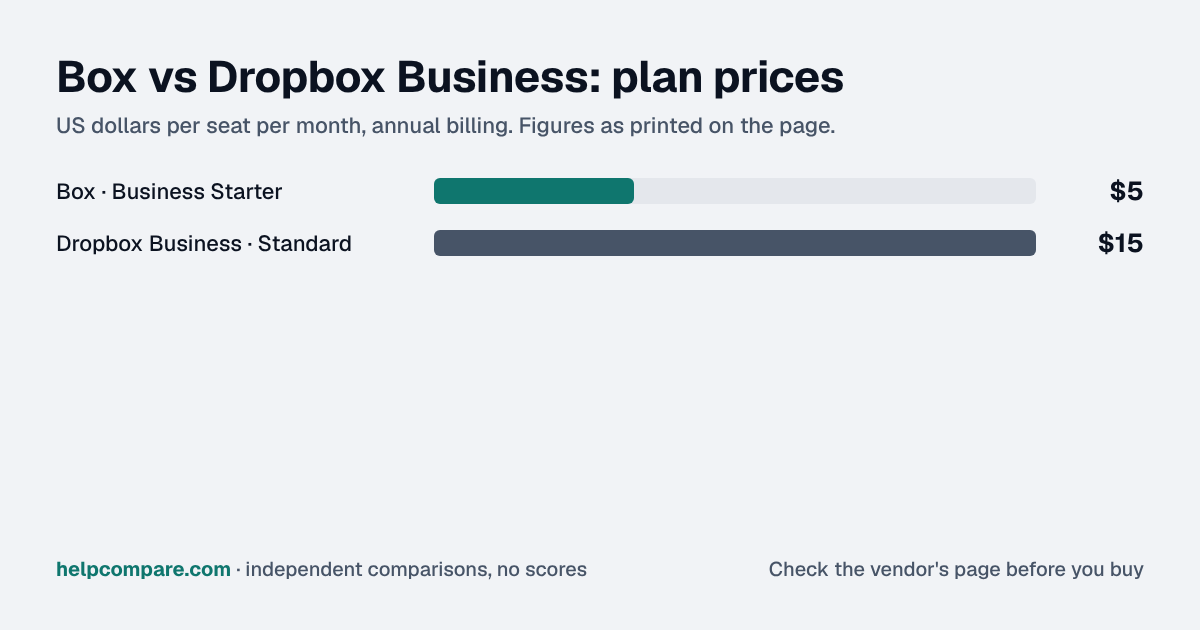
Both are per-user business storage plans, not consumer file sync. Box starts cheaper per seat but caps its entry tier at 10 users; Dropbox Business Standard costs more per seat with no seat minimum or cap, and a 3 TB shared pool from the first user.
For 3 to 10 users, Box Business Starter fits on price at $5/user/mo against $15 for Dropbox Business Standard, both annual, but outside that range the answer changes.
Box Starter needs at least 3 users and stops at 10, and past that Box Business is $15/user, the same as Dropbox. Storage splits the other way: Box Starter gives 100 GB per user, while Dropbox gives the whole team 3 TB pooled from the first user, which matters if you handle video or big design files. Whichever you pick, decide now where company files live when someone leaves. Put shared work in team-owned folders from day one, not in personal accounts, because offboarding is quick when files already belong to the company and messy when they sit in an ex-employee's space. Also check whether you'd really use Box Sign, since Dropbox sells e-signature separately.
My read of the verified data on this page, checked against vendor sources on September 23, 2026. Disagree or spot an error? Tell Bill
| At a glance | Box | Dropbox Business |
|---|---|---|
| Category | Cloud Storage | |
| Entry price | Business Starter $5/user/mo (annual, 3-user minimum, up to 10 users) | Standard $15/user/mo (annual), no seat minimum |
| Free plan | No business free plan — 10 GB personal-only free tier exists separately | No free plan for Dropbox Business — Dropbox Basic (personal, 2 GB) is a separate product |
Box, for teams of 3 to 10 users: $5 a seat a month against $15 for Dropbox. Above 10 users, Box moves to its Business plan at $15/seat — the same price as Dropbox Business Standard — so the gap closes once a team outgrows Box Starter.
| Category | Box | Dropbox Business |
|---|---|---|
| Entry price | Business Starter $5/user/mo (annual) | Standard $15/user/mo (annual) |
| Seat minimum / cap | 3-user minimum, capped at 10 on Starter | None |
| Storage | Business Starter: 100 GB per user pool | 3 TB pooled team storage from the first user |
| Admin console | Yes, all business tiers | Yes, all business tiers |
| Higher tier | Business $15/user (unlimited storage, no user cap) | Advanced $24/user/mo (annual, 3+ users; checked Oct 5, 2026) |
| E-signature | Box Sign included | Not a core feature; DocSend/HelloSign are separate Dropbox products |
| Built for | Content management, workflow, e-signature | File sync and sharing for teams |
| G2 rating | 4.2/5 (5,256 reviews) | Not recorded on this site |
Verified September 23, 2026Prices recorded from each vendor’s own pricing page. See sources
Explore the numbers
Box and Dropbox Business: plan prices side by side
Plan price: US dollars per seat per month, annual billing
BoxDropbox Business
Prices exactly as printed in the comparison table on this page (annual billing), in the table’s own tier order: Entry price.
What Box and Dropbox Business cost per month for a team
5 seats: monthly cost = seats × the per-seat price on this page (annual billing)
10 seats: monthly cost = seats × the per-seat price on this page (annual billing)
25 seats: monthly cost = seats × the per-seat price on this page (annual billing)
50 seats: monthly cost = seats × the per-seat price on this page (annual billing)
BoxDropbox Business
An example, not a quote: team size times the per-seat prices printed on this page. It leaves out tax, add-ons, discounts and any plan limits. Where a plan has a minimum number of seats, the minimum is used.
List prices from this page’s own comparison table, not a quote. Plans differ in what they include.
Business-plan prices in USD from box.com/pricing and dropbox.com/business/pricing, both checked September 23, 2026. Business/team plan prices, not personal plans — Dropbox and Google Drive are tracked elsewhere on this site at their cheaper personal-plan prices, which do not include shared team storage or an admin console. For every Dropbox plan side by side (Plus, Standard, Advanced and the older names), see Dropbox Business vs Personal vs Standard.
Editorial assessmentBoth are per-user business storage with an admin console, but Box leans toward content management and workflow, while Dropbox Business is closer to a straightforward team file-sync product.
Box Business Starter bundles Box Sign (e-signature) and workflow automation tools at its entry tier; Dropbox Business Standard is centered on file sync, sharing and a shared team storage pool, with e-signature and other document tools sold as separate Dropbox products rather than bundled into Standard.
Box Starter gives each of your (3–10) users 100 GB in a pooled allowance; Dropbox Business Standard gives the whole team 3 TB pooled from day one, regardless of headcount, which can be more generous for a small team with large files.
Files themselves rarely have to be re-uploaded by hand: all three offer a desktop sync client, so once the new account is set up, moving the working copies means downloading from the old provider and uploading to the new one, or using a third-party cloud-to-cloud transfer tool if the folder tree is large. Sharing links and permissions do not carry over and are rebuilt by hand.
Business-plan list prices, billed annually, checked September 23, 2026. Box Business Starter is not available above 10 users; Dropbox Business Standard has no published user cap. Promotions and taxes are not included.
Your team is 3–10 people, you want e-signature and workflow tools bundled in, or you want the lower per-seat price.
Your team is 1–2 people or larger than 10, you want a large shared storage pool from day one, or you want a simpler file-sync-first product.
Uses your selections above. Estimate excludes add-ons, overages, and negotiated discounts.
Both offer a trial of their business plans. Upload a real folder structure with your actual sharing permissions to each before committing a team.
How Box and Dropbox Business compare on compliance reports, sign-in controls, offline access and the setup details that matter for remote, hybrid and in-office teams. Every value links to the vendor page it came from.
| What we checked | Box | Dropbox Business |
|---|---|---|
| Security & compliance | ||
| SOC 2 report | SOC 2 Type IIsource | SOC 2 Type IIsource |
| ISO/IEC 27001 | Certifiedsource | Certifiedsource |
| Other certifications | ISO/IEC 27017, ISO/IEC 27018, ISO/IEC 27701, FedRAMP High, DoD IL4, C5, IRAP, ISMAP, HDS, PCI DSS, HIPAA/HITECH, SOC 3, FIPS 140-2source | ISO/IEC 27017, ISO/IEC 27018, ISO/IEC 27701, ISO 22301, CSA STAR Level 2, SOC 3, ISMAPsource |
| HIPAA (BAA) | BAA availableEnterprisesource | BAA availableStandardsource |
| GDPR data processing agreement | DPA offeredsource | DPA offeredsource |
| Single sign-on (SAML/OIDC) | YesBusinesssource | YesAdvancedsource |
| SCIM user provisioning | Not published | Yessource |
| Two-factor authentication | Yessource | Yessource |
| Admin audit log | Yessource | YesStandardsource |
| Data residency choices | Australia, Canada, EU, France, Israel, Japan, Singapore, Switzerland, UK, USEnterprise Plus (add-on)source | US, Australia, EU, Japan, UKStandardsource |
| Encryption | 256-bit AES at rest (with AES-256 key wrapping); TLS 1.2 in transitsource | 256-bit AES at rest; SSL/TLS in transitsource |
| Self-hosting option | Not published | Not published |
| Offline access | ||
| Offline mode | Works offlineIn Box Drive (desktop), folders marked 'Always keep on device' are downloaded and can be edited offline; changes upload automatically when back online, and conflicting edits by collaborators must be resolved manually.source | Works offlineFiles and folders marked 'Make available offline' in the desktop app (and files, or whole folders on eligible plans, in the mobile app) can be opened and edited offline; changes sync to all devices automatically when you reconnect.source |
| Desktop apps | Windows, macOSsource | Windows, macOS, Linuxsource |
| Mobile apps | iOS, Androidsource | iOS, Androidsource |
| Offline limits | Admins control Mark for Offline: on for all managed users by default, or limited to select users (up to 100), or disabled.source | Whole-folder offline on mobile requires Plus, Family, Professional, Standard, Advanced or Enterprise; single files can be made offline on any plan.Standardsource |
| Remote, hybrid & in-office | ||
| IP allowlisting | Not published | Not published |
| Device & session controls | YesDevice Trust minimum requirements (OS version, antivirus, firewall, full disk encryption), device pinning, EDR-triggered session termination and device blocking, and EMM/MDM support for the mobile apps.source | YesStandardDevice approvals let admins limit how many desktop and mobile devices each member can link (Standard and above); Dropbox help also documents remote wipe of a member's device.source |
At the entry tier, yes: $5/user/mo against $15/user/mo, both billed annually. Box Starter requires 3–10 users; above 10, Box’s Business plan is $15/user, matching Dropbox. Prices checked September 23, 2026.
Yes, Box Sign is bundled into Business Starter. Dropbox sells e-signature as a separate product, not bundled into Business Standard.
Box Starter pools 100 GB per user (3–10 users); Dropbox Business Standard gives the whole team 3 TB pooled, regardless of headcount.
Not on Business Starter — it requires a 3-user minimum. Dropbox Business Standard has no seat minimum.
Step-by-step migration guides covering what transfers automatically, what doesn’t, and how to handle the gap — in both directions.
Every “best cloud storage tool” listicle tells you why to buy. Here’s the other half: the specific conditions under which Box or Dropbox Business is the wrong purchase for your team.
Buy Box if:
Do NOT buy Box if:
Buy Dropbox Business if:
Do NOT buy Dropbox Business if:
Every pricing fact, rating, AI billing model and switching guide we hold on each tool, on one page, with the date each figure was last verified.
Prices on this page were recorded from each vendor’s own pricing page on the date shown at the top of the page. Vendors change pricing often — check the live source before you buy.
Every figure is also in our open dataset (JSON and CSV, CC BY 4.0), with its source page and verification date. See how we research pricing.
Cite this page: HelpCompare, “Box vs Dropbox Business”, helpcompare.com/box-vs-dropbox-business/ (updated ).
Source links on this site are checked every month; last check . How sources are checked.
Plain-language guides: the steps, what to check before you buy, common mistakes, and every tool it takes with verified prices.
Verified prices costed for your team size, a check against your must-have requirements, the questions to settle before you sign, and a source for every figure. Print it, or paste it into an email to whoever approves the spend.
Built for the leader who owns the selection, answers for the spend, drives the rollout, and lives with the results. HelpCompare covers the whole decision, not just the first step.