Pipedrive is a simple, visual pipeline CRM built to be self-serve; Salesforce is the full platform, with a genuinely free tier and much deeper customization once you need it. Here is what each costs and who outgrows which one.
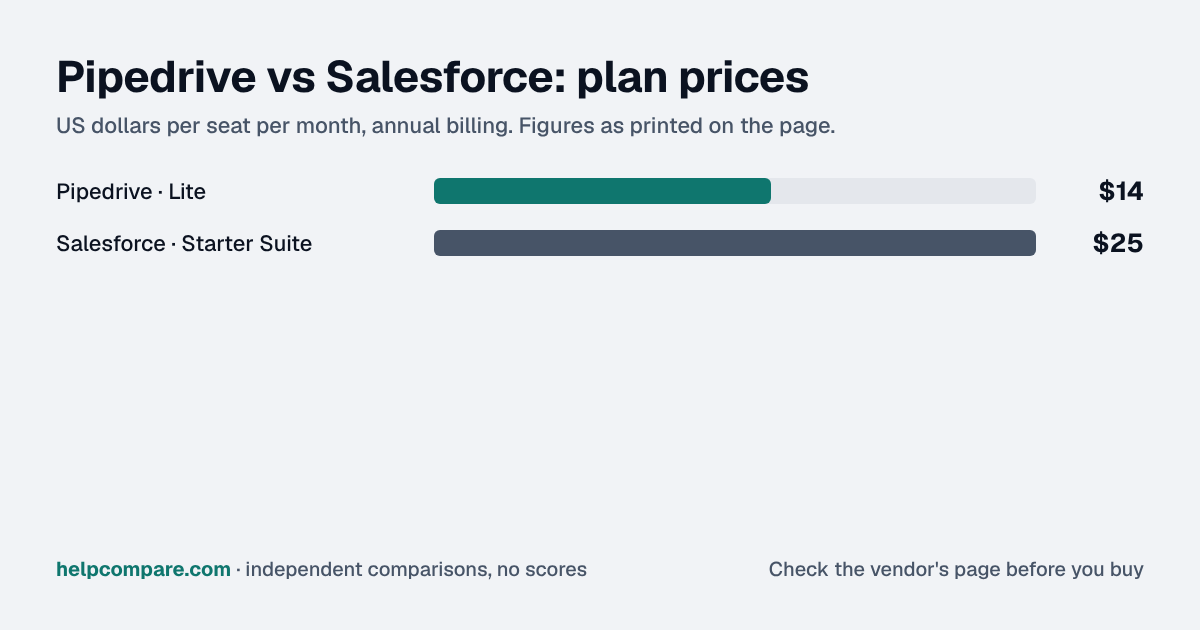
Choose Pipedrive for a simple, self-serve pipeline CRM; choose Salesforce if you need a full platform that scales into Service, Marketing and Commerce. Pipedrive Lite is $14/seat/mo versus Salesforce Starter Suite's $25/user/mo, though Salesforce's Free Suite ($0/user) undercuts Pipedrive at the very entry level.
| At a glance | Pipedrive | Salesforce |
|---|---|---|
| Category | CRM Platforms | |
| Entry price | Lite — $14/seat/mo (annual), $24 monthly | Starter Suite — $25/user/mo (billed monthly or annually) |
| Free plan | No free plan — 14-day free trial, no credit card required | Free Suite — $0/user/mo, core Account/Contact/Lead/Opportunity management |
Pipedrive, by $11 a seat a month: $14 against Salesforce Starter Suite’s $25, both on annual-equivalent billing (Pipedrive rises to $24/seat on monthly billing). Salesforce does undercut Pipedrive at the very bottom with its genuinely free Free Suite tier ($0/user, core objects only) — Pipedrive has no free-forever plan, only a 14-day trial.
| Category | Pipedrive | Salesforce |
|---|---|---|
| Entry paid price | Lite $14/seat/mo (annual), $24 monthly | Starter Suite $25/user/mo (monthly or annual) |
| Free plan | None — 14-day trial only | Free Suite, $0/user/mo, core objects |
| Built for | Simple, visual, self-serve pipeline CRM | Full platform: Sales, Service, Marketing, Commerce |
| App ecosystem | 500+ native integrations, paid add-ons | AppExchange — thousands of apps, from Pro Suite up |
| AI features | Bundled into lower tiers (email/event auto-sync) | Built-in AI from Core ($195); Agentforce add-on from $125/user |
| Implementation | Largely self-serve, no IT needed | Admin expertise or partner typically needed past Starter |
| Reporting depth | Solid, rep-focused, lighter-weight | Tableau-integrated analytics and forecasting from Core up |
| Higher tiers | Ultimate $79/seat/mo (annual) | Pro Suite $100, Core $195, Advanced $395, Max $550/user/mo |
Verified September 23, 2026Prices recorded from each vendor’s own pricing page. See sources
Prices in USD from pipedrive.com/en/pricing and salesforce.com/sales/pricing/, both checked September 23, 2026.
Editorial assessmentBoth are pipeline-and-deal-tracking CRMs, but Salesforce is a platform Pipedrive was never designed to be.
Pipedrive markets itself directly against complex CRMs — “I don’t want to overpay for essential features,” “I don’t want a CRM that needs an IT degree” — and its pricing and setup reflect that: a visual pipeline, add-ons for specific needs (LeadBooster, Projects, Campaigns) rather than a sprawling platform. Salesforce starts simple at Starter Suite but is built to scale into Service, Marketing and Commerce Cloud, custom objects, and an AppExchange with thousands of third-party apps — a ceiling Pipedrive does not aim for.
Salesforce bundles “built-in AI” starting at its Core tier ($195/user/mo) and sells full Agentforce AI agents as a $125/user/mo add-on on lower tiers, or included at Max ($550/user/mo). Pipedrive’s AI (automatic email/event sync) is folded into its lower-priced tiers, narrower in scope but with no separate AI line item to budget for.
Pipedrive’s Import2 tool connects directly to Salesforce and auto-maps standard objects, free for up to 1 million records. Moving the other direction relies on Salesforce’s standard CSV-based Data Import Wizard, since no confirmed native Pipedrive connector exists on the Salesforce side.
Pipedrive Lite is billed annually at $14/seat/mo ($24 monthly). Salesforce Starter Suite is $25/user/mo regardless of billing cadence; its Free Suite ($0/user) is also selectable above. Checked September 23, 2026.
You want a simple, visual pipeline CRM you can set up yourself in an hour, without IT or admin overhead.
You want a genuinely free starting tier, or you know your sales org will need to scale into Service, Marketing or deep customization later.
Uses your selections above. Estimate excludes add-ons, overages, and negotiated discounts.
Pipedrive offers a 14-day trial; Salesforce has an actual free tier. Load your real pipeline into each before committing your sales team to one.
At the entry paid tier, yes: $14/seat/mo against Salesforce Starter Suite’s $25/user/mo. Salesforce does have a free Free Suite tier ($0/user) that undercuts Pipedrive, which has no free-forever plan.
Yes — Free Suite, at $0/user/mo, covering core Account, Contact, Lead and Opportunity management. Pipedrive offers only a 14-day trial, no permanent free tier.
Pipedrive — it is built to be self-serve. Salesforce typically needs admin expertise or a partner once you move past the Starter Suite tier.
Yes — Pipedrive’s Import2 tool connects directly to Salesforce and auto-maps standard objects, free for up to 1 million records.
Step-by-step migration guides covering what transfers automatically, what doesn’t, and how to handle the gap — in both directions.
Every “best CRM” listicle tells you why to buy. Here’s the other half: the specific conditions under which Pipedrive or Salesforce is the wrong purchase for your team.
Buy Pipedrive if:
Do NOT buy Pipedrive if:
Buy Salesforce if:
Do NOT buy Salesforce if:
Every pricing fact, rating, AI billing model and switching guide we hold on each tool, on one page, with the date each figure was last verified.
Prices on this page were recorded from each vendor’s own pricing page on the date shown at the top of the page. Vendors change pricing often — check the live source before you buy.
Every figure is also in our open dataset (JSON and CSV, CC BY 4.0), with its source page and verification date. See how we research pricing.
Plain-language guides: the steps, what to check before you buy, common mistakes, and every tool it takes with verified prices.
Verified prices costed for your team size, a check against your must-have requirements, the questions to settle before you sign, and a source for every figure. Print it, or paste it into an email to whoever approves the spend.
Built for the leader who owns the selection, answers for the spend, drives the rollout, and lives with the results. HelpCompare covers the whole decision, not just the first step.