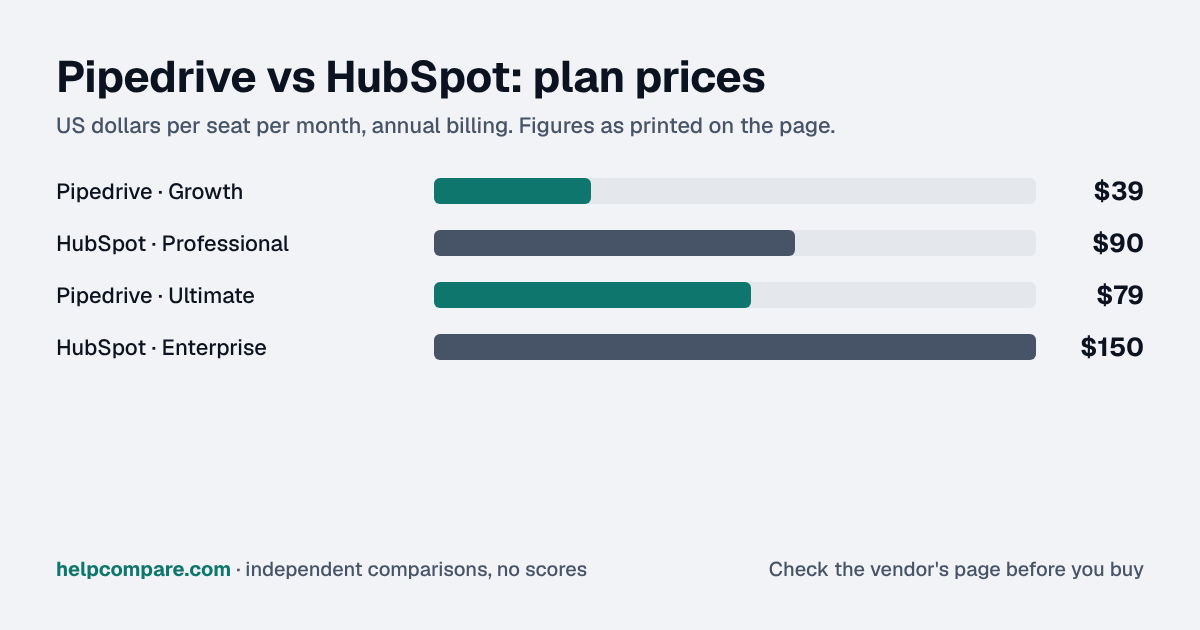
A simple, visual sales-only pipeline vs. a broader marketing-plus-sales suite. Here is what each costs as your team grows.
Pipedrive fits a sales-only team that wants a clean pipeline, and HubSpot fits once marketing email, landing pages or a help desk need to sit on the same customer record.
Pipedrive is $14, $39, $59 or $79 per seat a month with no onboarding fee, while HubSpot goes from $20/seat/mo on Starter (standard price) to $90/seat on Professional plus a mandatory $1,500 onboarding fee. The Pipedrive price hides a second bill, because it has no native marketing automation, so newsletters mean an add-on or a separate email tool. Two contact databases drift apart: unsubscribes, lead source and job changes get updated in one and not the other, and your attribution stops adding up. If you go Pipedrive, decide before launch which system owns each shared field, starting with unsubscribes and lead source, and sync from the owner only.
My read of the verified data on this page, checked against vendor sources on September 12, 2026. Disagree or spot an error? Tell Bill
| At a glance | Pipedrive | HubSpot |
|---|---|---|
| Category | CRM Platforms — Small Teams | |
| Entry price | From $14/seat/mo | Free tier, from $20/seat/mo |
Pipedrive is priced at From $14/seat/mo and HubSpot at Free tier, from $20/seat/mo. See the full breakdown below for what is included at each tier.
| Category | Pipedrive | HubSpot |
|---|---|---|
| Free plan | No | Yes, up to 2 users |
| Entry price | $14/seat/mo (Lite, billed annually) | $20/seat/mo (Starter, standard price) |
| Mid tier | $39/seat/mo (Growth, billed annually) | $90/seat/mo (Professional, billed annually) + $1,500 onboarding |
| Top tier | $79/seat/mo (Ultimate, billed annually) | $150/seat/mo (Enterprise, billed annually) + $3,500 onboarding |
| Native marketing automation | Not native (add-on/integration) | Built-in at every paid tier |
| AI features | AI report/email drafting (Premium+) | Breeze AI agents (credit-based) |
| Ease of setup | Fast, minimal admin needed | Fast at Free/Starter, heavier at Pro+ |
| Integration ecosystem | 500+ integrations | 1,500+ app marketplace |
| G2 rating | 4.3/5 (~3,100 reviews) | 4.4/5 (~14,284 reviews) |
Verified September 12, 2026Prices recorded from each vendor’s own pricing page. See sources
Pipedrive is built for one job: running a visual, sales-only pipeline as simply as possible. Its four tiers (Lite, Growth, Premium, Ultimate) scale in a straight line from $14 to $79 per seat, with automation, AI features, and revenue forecasting gated behind the Growth and Premium tiers. HubSpot’s CRM is free to start, but its pricing jumps sharply at Professional ($90/seat plus a mandatory $1,500 onboarding fee), a real cost most Pipedrive-style buyers don’t expect.
If your team just needs a clean pipeline and reminders, Pipedrive gets you there with less setup time and a lower bill. HubSpot’s advantage shows up the moment you also want marketing emails, landing pages, or a help desk; those are native HubSpot features that Pipedrive simply doesn’t have without bolting on separate tools.
Both vendors pushed AI hard this cycle: Pipedrive added AI report generation and email drafting to its Premium and Ultimate tiers, while HubSpot moved its Breeze AI agents to outcome/credit-based pricing rather than a flat inclusion, which is worth checking your expected usage against before you commit.
Illustrative estimate based on publicly listed pricing as of September 2026. Always confirm current rates before purchasing.
You run a small, sales-only team that wants a fast, visual, affordable pipeline and doesn’t need marketing or support tools bundled in.
You want marketing, sales, and service unified in one platform and you’re comfortable paying more (including onboarding fees) as you move past the free tier.
Uses your selections above. Estimate excludes add-ons, overages, and negotiated discounts.
Both offer a free trial or free tier. See current pricing directly from the source.
How Pipedrive and HubSpot compare on compliance reports, sign-in controls, offline access and the setup details that matter for remote, hybrid and in-office teams. Every value links to the vendor page it came from.
| What we checked | Pipedrive | HubSpot |
|---|---|---|
| Security & compliance | ||
| SOC 2 report | SOC 2 Type IIsource | SOC 2 Type IIsource |
| ISO/IEC 27001 | Certifiedsource | Not published |
| Other certifications | ISO/IEC 27701, SOC 3source | SOC 1 Type II, SOC 3, HIPAA attestation, EU Cloud Code of Conduct, TRUSTe Certified Privacysource |
| HIPAA (BAA) | Not supportedsource | BAA availableEnterprisesource |
| GDPR data processing agreement | DPA offeredsource | DPA offeredsource |
| Single sign-on (SAML/OIDC) | YesAll planssource | YesProfessionalsource |
| SCIM user provisioning | Not published | YesProfessionalsource |
| Two-factor authentication | YesEnforcement: All planssource | YesEnforcement: Free (optional to require); mandatory on Starter, Professional, Enterprisesource |
| Admin audit log | Yessource | YesStartersource |
| Data residency choices | Australia, Canada, EU, UK, USAssigned from your sign-up region; not selectablesource | US, EU, Canada, AustraliaStartersource |
| Encryption | Encrypted at rest and in transit (algorithms not specified publicly)source | AES-256 at rest; TLS 1.2 or 1.3 in transitsource |
| Self-hosting option | Cloud onlysource | Not published |
| Offline access | ||
| Offline mode | Works offlineThe iOS and Android apps keep working without a connection (move deals, add notes and activities) and sync changes to the web app automatically once back online; the web app needs a connection.source | PartialCRM records cannot be created, edited, or viewed in the mobile app without a connection; only Mobile Notetaker can record meetings offline and link them to CRM records once back online.source |
| Desktop apps | Browser onlysource | Browser onlysource |
| Mobile apps | iOS, Androidsource | iOS, Androidsource |
| Offline limits | Mobile apps only; offline mode can't be toggled manuallysource | Offline meeting recording (Mobile Notetaker) is available on Sales Hub or Service Hub Professional and EnterpriseSales Hub / Service Hub Professionalsource |
| Remote, hybrid & in-office | ||
| IP allowlisting | YesUltimatesource | YesStartersource |
| Device & session controls | YesUltimateSecurity rules can limit access to set IP addresses and time windows; the security dashboard shows each user's device, location and login time.source | YesAll plansAdmin-set inactive session timeout (15 minutes to 3 days); users can review and remotely log out their own sessions on other devices.source |
We mapped out exactly what transfers automatically and what you will need to rebuild by hand, in both directions.
Pipedrive is a sales-focused CRM built around a visual pipeline for small and mid-sized sales teams.
HubSpot is an all-in-one CRM platform with marketing, sales, and customer service tools for growing businesses.
Pipedrive starts at $14/seat/mo (Lite, billed annually), while HubSpot starts at $20/seat/mo (Starter, standard price). Pipedrive is the simpler, more affordable, purely sales-focused CRM, fast to set up with a visual pipeline and predictable per-seat pricing.
Pipedrive’s free plan: No. HubSpot’s free plan: Yes — up to 2 users.
You run a small, sales-only team that wants a fast, visual, affordable pipeline and doesn’t need marketing or support tools bundled in.
You want marketing, sales, and service unified in one platform and you’re comfortable paying more (including onboarding fees) as you move past the free tier.
Every pricing fact, rating, AI billing model and switching guide we hold on each tool, on one page, with the date each figure was last verified.
Prices on this page were recorded from each vendor’s own pricing page on the date shown at the top of the page. Vendors change pricing often — check the live source before you buy.
Every figure is also in our open dataset (JSON and CSV, CC BY 4.0), with its source page and verification date. See how we research pricing.
Cite this page: HelpCompare, “Pipedrive vs HubSpot”, helpcompare.com/pipedrive-vs-hubspot/ (updated ).
Source links on this site are checked every month; last check . How sources are checked.
Plain-language guides: the steps, what to check before you buy, common mistakes, and every tool it takes with verified prices.
Verified prices costed for your team size, a check against your must-have requirements, the questions to settle before you sign, and a source for every figure. Print it, or paste it into an email to whoever approves the spend.
Built for the leader who owns the selection, answers for the spend, drives the rollout, and lives with the results. HelpCompare covers the whole decision, not just the first step.