Nearly identical entry-level pricing, but two very different AI billing models. Here is how Zendesk and Freshdesk actually compare on cost, automation, and setup speed.
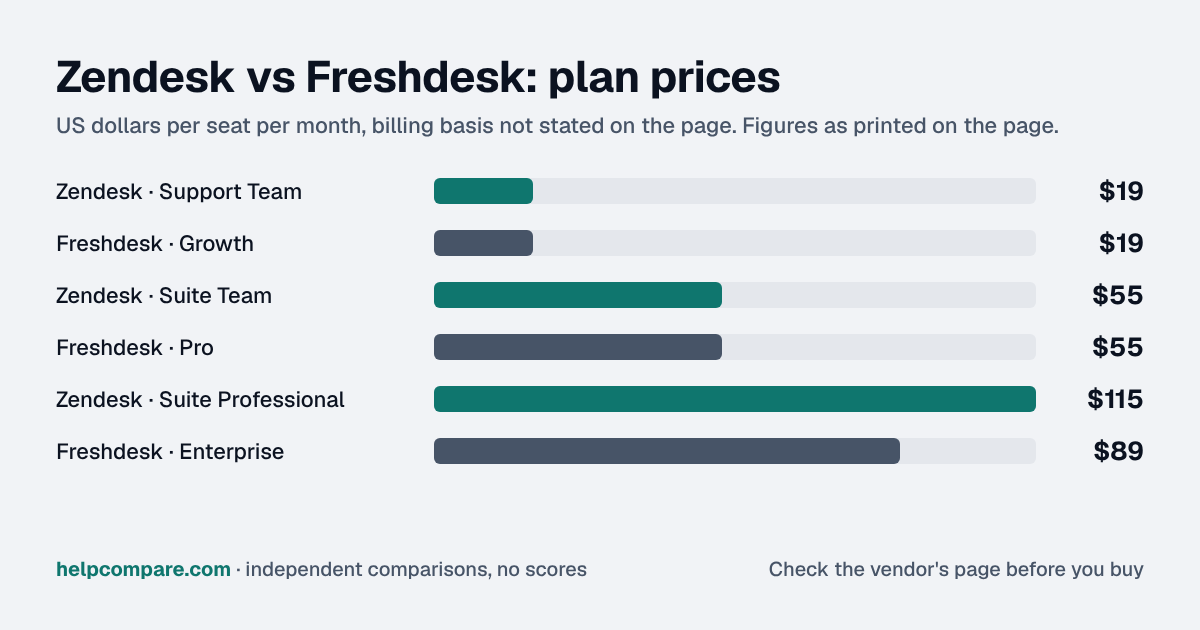
Freshdesk fits SMB and mid-market teams that want to be live in days, Zendesk fits multi-team orgs that need deep routing, and both charge $19 and $55 per agent on their first two tiers.
The gap opens at the top, $89/agent/mo for Freshdesk Enterprise against $115 for Zendesk Suite Professional, and in AI, where the billing units aren't the same thing. Freshdesk charges $49 per 100 AI Agent sessions after 500 free ones, so you pay for conversations the bot handles, while Zendesk bills $1.50 committed or $2.00 pay-as-you-go only for resolutions beyond the plan allowance. Session pricing gets expensive when the bot resolves little, so measure its real resolution rate during those free sessions before you commit to either model. And if some people answer tickets only in busy weeks, Freshdesk's day passes ($2 on Growth, $7 on Pro, $12 on Enterprise) can cost less than full seats.
My read of the verified data on this page, checked against vendor sources on September 12, 2026. Disagree or spot an error? Tell Bill
| Category | Zendesk | Freshdesk |
|---|---|---|
| Entry seat price | $19/agent/mo (Support Team) | $19/agent/mo (Growth) |
| Mid tier | $55/agent/mo (Suite Team) | $55/agent/mo (Pro) |
| Top self-serve tier | $115/agent/mo (Suite Professional) | $89/agent/mo (Enterprise) |
| AI agent pricing | Per automated resolution: $1.50 committed, $2.00 pay-as-you-go, + $50/agent Copilot add-on | 500 free sessions once per account, then $49 per 100, + $29/agent Copilot |
| AI billing transparency | Published — plan allowance, then $1.50 (committed) or $2.00 (pay-as-you-go) per resolution | Partially published — bundled session allowance, flat overage rate |
| Design philosophy | Ticketing-first, omnichannel, enterprise-grade depth | Ticketing-first, faster to configure for SMB/mid-market |
| Free plan | No, free trial only | No public forever-free tier since 2025 |
| Best suited for | Mid-market to enterprise, complex workflows | SMB & mid-market, cost-sensitive, fast setup |
Verified September 12, 2026Prices recorded from each vendor’s own pricing page. See sources
From our original research
Customer Support is one of the priciest self-serve categories we track: our B2B SaaS Sticker Shock Index puts the cheapest published entry price at $19/agent/mo (the rate both Zendesk and Freshdesk charge here) versus $7.00–$7.25/seat/mo for CRM or Team Communication tools. And per our AI Tax report, Zendesk’s per-resolution AI billing is one of only 6 “metered/credit-based” AI pricing models out of 19 we catalogued, the least predictable of the four models vendors use.
Both vendors now monetize AI resolution separately from seats, and both models take some work to budget for. Zendesk charges per successful AI resolution ($1.50 each committed, $2.00 pay-as-you-go) on top of a $50/agent/month Copilot add-on. Freshdesk includes a one-time allowance of 500 AI Agent sessions per account, then charges $49 per 100 sessions, plus a flatter $29/agent/month for Freddy AI Copilot, generally the more predictable of the two to forecast.
Freshdesk is faster and simpler to stand up, which matters for smaller teams that want to be live in days. Zendesk has a steeper learning curve but its Action Builder workflow automation and skills-based routing give larger support orgs more room to grow into.
Freshworks implemented a double-digit percentage price hike across most Freshdesk plans in January 2026, alongside a major routing/SLA engine overhaul (unified Omniroute, intelligent round-robin) rolling out through April 2026. Zendesk shifted its AI monetization to outcome-based “Automated Resolution” pricing: you pay only for tickets an AI agent actually resolves, rather than a flat bot-seat license.
Illustrative estimate based on publicly listed pricing as of September 2026. Always confirm current rates before purchasing.
You run a larger or multi-team support operation that needs deep workflow automation and skills-based routing, and you’d rather pay only for AI tickets that actually get resolved.
You want a helpdesk that’s fast to set up, stays predictable to budget for as you add agents, and you don’t need Zendesk’s advanced enterprise configuration options.
Uses your selections above. Estimate excludes add-ons, overages, and negotiated discounts.
Compare Zendesk against Intercom too, and browse every helpdesk head-to-head we cover.
Both offer a free trial or demo. Confirm current pricing directly with the vendor before you sign.
How Zendesk and Freshdesk compare on compliance reports, sign-in controls, offline access and the setup details that matter for remote, hybrid and in-office teams. Every value links to the vendor page it came from.
| What we checked | Zendesk | Freshdesk |
|---|---|---|
| Security & compliance | ||
| SOC 2 report | SOC 2 Type IIsource | SOC 2 Type IIsource |
| ISO/IEC 27001 | Certifiedsource | Certifiedsource |
| Other certifications | ISO/IEC 27017, ISO/IEC 27018, ISO/IEC 27701, ISO/IEC 42001, FedRAMP LI-SaaS, CSA STAR Level 2, Cyber Essentials Plus, HDS (France)source | ISO/IEC 27701, CSA STAR Level 1, Cyber Essentials Plus, TX-RAMPsource |
| HIPAA (BAA) | BAA availableAdvanced Security or Advanced Compliance add-onsource | BAA availableEnterprisesource |
| GDPR data processing agreement | DPA offeredsource | DPA offeredsource |
| Single sign-on (SAML/OIDC) | YesSuite Teamsource | YesGrowthsource |
| SCIM user provisioning | Nosource | Not published |
| Two-factor authentication | YesEnforcement: Suite Teamsource | YesEnforcement: Yes, org admin policy (plan not stated)source |
| Admin audit log | YesSuite Enterprisesource | YesEnterprisesource |
| Data residency choices | US, EU, UK, Japan, AustraliaSuite Professional (Data Center Location add-on, free)source | US, EU, UAE, India, Australiasource |
| Encryption | AES-256 at rest (AWS); TLS 1.2 or higher in transitsource | AES-256 at rest; TLS 1.2 in transitsource |
| Self-hosting option | Not published | Not published |
| Offline access | ||
| Offline mode | Not documented | Not documented |
| Desktop apps | Not published | Not published |
| Mobile apps | iOS, Androidsource | iOS, Androidsource |
| Remote, hybrid & in-office | ||
| IP allowlisting | YesSuite Teamsource | YesEnterprisesource |
| Device & session controls | YesSuite TeamAdmin-set inactivity session timeout and maximum session duration, separately for team members and end users.source | Not published |
Freshdesk and Zendesk both start at $19/agent/month annually, but Freshdesk stays cheaper as you move up the ladder: its Enterprise tier is $89/agent/mo versus Zendesk Suite Professional at $115/agent/mo, and Freshdesk’s flat $29/agent Copilot fee is typically more predictable than Zendesk’s per-resolution AI pricing.
No. Zendesk offers a free trial only; there is no permanent free tier at any point in 2026.
Not publicly at signup since 2025. New accounts get a 14-day free trial; a legacy 2-agent, 6-month free program still exists for some accounts but isn’t offered during normal sign-up.
Freshdesk suits small teams that want a simpler setup, with the same entry price ($19/agent/mo). Zendesk’s advantages (deep automation, Copilot, omnichannel routing) mostly show up at Suite Team ($55/agent/mo) and above.
Zendesk charges per successful AI resolution ($1.50 each committed, $2.00 pay-as-you-go) plus a $50/agent/month Copilot add-on. Freshdesk includes 500 free AI Agent sessions once per account, then charges $49 per 100 sessions, plus a flat $29/agent/month for Freddy AI Copilot.
Freshdesk is faster and simpler to onboard. Zendesk has a steeper learning curve but offers more configuration depth once set up.
Zendesk, particularly at the Suite Professional and Enterprise+ tiers, which add skills-based routing, App Builder, sandbox environments, and custom roles built for larger, more complex support operations.
Step-by-step migration guides covering what transfers automatically, what doesn’t, and how to handle the gap, in both directions.
Every pricing fact, rating, AI billing model and switching guide we hold on each tool, on one page, with the date each figure was last verified.
Prices on this page were recorded from each vendor’s own pricing page on the date shown at the top of the page. Vendors change pricing often — check the live source before you buy.
Every figure is also in our open dataset (JSON and CSV, CC BY 4.0), with its source page and verification date. See how we research pricing.
Cite this page: HelpCompare, “Zendesk vs Freshdesk: Which Helpdesk Platform Should You Choose in 2026?”, helpcompare.com/zendesk-vs-freshdesk/ (updated ).
Source links on this site are checked every month; last check . How sources are checked.
Plain-language guides: the steps, what to check before you buy, common mistakes, and every tool it takes with verified prices.
Verified prices costed for your team size, a check against your must-have requirements, the questions to settle before you sign, and a source for every figure. Print it, or paste it into an email to whoever approves the spend.
Built for the leader who owns the selection, answers for the spend, drives the rollout, and lives with the results. HelpCompare covers the whole decision, not just the first step.