Skip to content
Start here
Customer Support

Intercom vs Zendesk: Which Support Platform Is Right for You in 2026?

Messaging-first, product-led support vs. ticketing-first, multi-channel enterprise support, and two very different AI billing models.

Intercom logoFrom $29/seat/mo + $0.99 per Fin outcome

Intercom

VS
Zendesk logoFrom $19/seat/mo + per-resolution AI

Zendesk

Bill Belcamino
Bottom line up frontby Bill Belcamino, founder of HelpCompare
Editorial assessment

Bottom line up front: Which costs less once it's all added up, Intercom or Zendesk?

You can't tell until you model the AI line: Intercom charges a flat $0.99 per Fin outcome, while Zendesk bundles an allowance, then bills $1.50 committed or $2.00 pay-as-you-go per extra resolution.

Seats matter too, especially with SSO, which Intercom includes only from Expert at $132/seat/mo and Zendesk from Suite Team at $55/seat/mo, both billed annually. I've bought and cancelled enough software to know the definition of the billable unit matters more than its price, and reviewers report Intercom charging when a customer simply abandoned the conversation. So pull last quarter's chats and count how many ended with the customer going quiet, because under outcome pricing those are the ones that can get counted as the bot's success. Then get the billable-outcome definition, a worst-case estimate and a spending alert in writing from both vendors before you sign.

My read of the verified data on this page, checked against vendor sources on September 12, 2026. Disagree or spot an error? Tell Bill

Verified data

Intercom vs Zendesk: quick facts

At a glanceIntercomZendesk
CategoryCustomer Support
Entry priceFrom $29/seat/mo + $0.99 per Fin outcomeFrom $19/seat/mo + per-resolution AI

Is Intercom cheaper than Zendesk?

Intercom is priced at From $29/seat/mo + $0.99 per Fin outcome and Zendesk at From $19/seat/mo + per-resolution AI. See the full breakdown below for what is included at each tier.

Verified data

Intercom vs Zendesk at a glance

CategoryIntercomZendesk
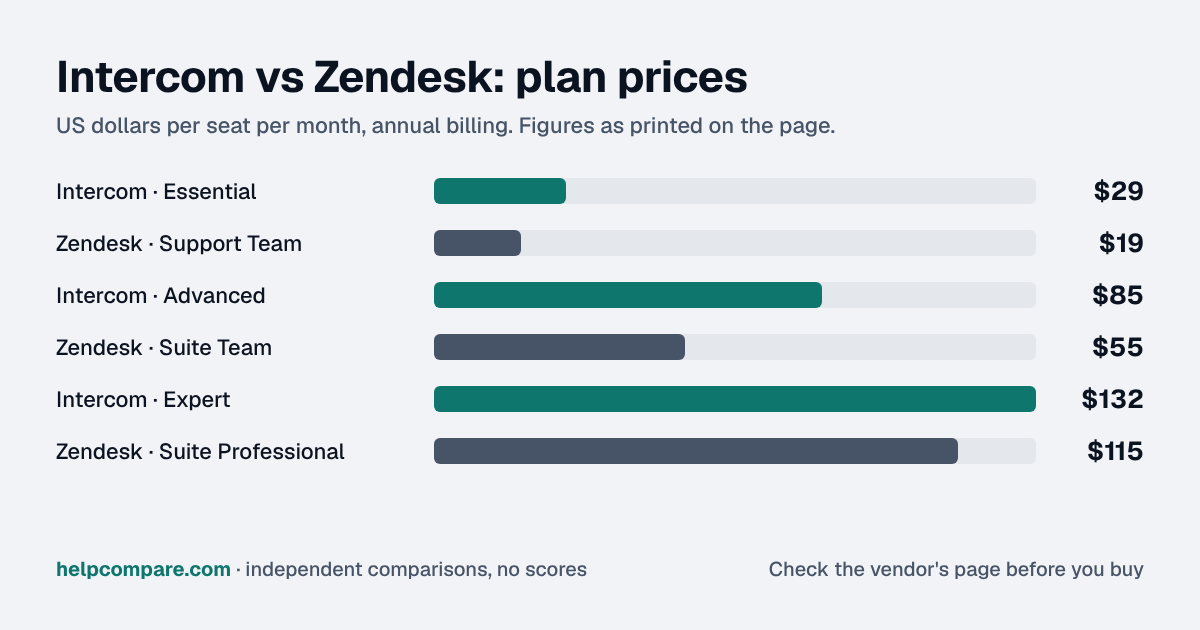
Entry seat price$29/seat/mo billed annually (Essential)$19/seat/mo billed annually (Support Team; $25 billed monthly)
Mid tier$85/seat/mo billed annually (Advanced)$55/seat/mo billed annually (Suite Team; $69 billed monthly)
Top self-serve tier$132/seat/mo billed annually (Expert)$115/seat/mo billed annually (Suite Professional; $149 billed monthly)
AI agent pricingFlat $0.99 per outcome (Fin)Bundled allowance + $1.50 (committed) or $2.00 (pay-as-you-go) per extra resolution
AI billing transparencyPublished flat ratePublished rate — $1.50 committed / $2.00 pay-as-you-go
Design philosophyMessaging/chat-first, in-appTicketing-first, omnichannel
Setup speedFaster for SaaS/product use casesMore configuration, more depth
AnalyticsLighter native reportingDeeper via Explore + HyperArc (GenAI analytics)
Cost at high volumeCan exceed Zendesk above ~10k conversations/moFlatter cost curve at very high volume

Verified September 12, 2026Prices recorded from each vendor’s own pricing page. See sources

Editorial assessment

How they actually differ

Both vendors rebuilt their pricing around AI resolutions in the last two years, and both have drawn real customer criticism for it. Intercom’s Fin AI agent has the more transparent model (a flat $0.99 per outcome, usable even without Intercom seats), but reviewers note ambiguity in what counts as a “resolution” (some report being charged even when a customer simply abandoned the conversation). Zendesk bundles a monthly AI-resolution allowance into each Suite tier (5–15 per agent depending on plan, with a 10,000-resolution annual system cap) and lists extra resolutions at $1.50 each when committed in advance or $2.00 pay-as-you-go on its pricing page.

Design philosophy still matters more than AI pricing

Intercom was built messaging-first (in-app chat, proactive messages, product-led support) and is generally faster to stand up for a SaaS company’s support workflow. Zendesk was built ticketing-first, with more mature multi-channel routing (email, voice, multi-brand) that larger, more traditional support organizations still prefer.

2025–2026 moves

Zendesk acquired HyperArc (GenAI analytics) and earlier Klaus (QA), reporting roughly $200M in AI-related ARR by the end of 2025. Both companies’ per-resolution AI billing has been a recurring pain point in buyer forums, so get a written worst-case-volume estimate before you sign either contract.

Intercom

Pros

  • Simple, flat $0.99-per-outcome AI pricing, published openly
  • Faster to set up for messaging-first, in-app support
  • Well-rated UX, especially for product-led SaaS companies
  • Fin AI agent works even outside a full seat-based deployment

Cons

  • Ambiguity in what counts as a billed “resolution”
  • Lighter native reporting than Zendesk’s Explore/HyperArc
  • Can become the pricier option above ~10,000 conversations/month
  • Smaller legacy ecosystem for complex multi-channel routing

Zendesk

Pros

  • Lower entry seat price ($19 vs. $29)
  • Deeper multi-channel and multi-brand routing for complex orgs
  • Stronger native analytics via Explore and the HyperArc acquisition
  • Flatter cost curve at very high conversation volume

Cons

  • AI resolutions beyond the allowance cost $1.50 each (committed) or $2.00 (pay-as-you-go)
  • Bundled allowances and annual caps make budgeting harder
  • More configuration complexity to stand up multi-channel routing
  • Reviewers describe AI overage billing as prone to “bill shock”
Verified data

Cost calculator: what does your team actually pay?

Intercom

 
$0/mo

Zendesk

 
$0/mo
 

Illustrative estimate based on publicly listed annual-billing seat prices as of September 2026. Intercom is currently showing some visitors a $19 Essential price instead of $29; confirm the current price with Intercom before you budget. Always confirm current rates before purchasing.

Choose Intercom if…

You’re a product-led SaaS company that wants fast-to-deploy, messaging-first support with transparent flat-rate AI pricing.

Choose Zendesk if…

You run a traditional, multi-channel support operation (voice, multi-brand, complex routing) and want deeper native analytics.

Total cost over time

Uses your selections above. Estimate excludes add-ons, overages, and negotiated discounts.

Ready to pick your support platform?

Both offer a free trial or demo. Get a written AI-resolution estimate before you sign.

Verified data

Intercom vs Zendesk: security, offline & remote work

How Intercom and Zendesk compare on compliance reports, sign-in controls, offline access and the setup details that matter for remote, hybrid and in-office teams. Every value links to the vendor page it came from.

What we checkedIntercomZendesk
Security & compliance
SOC 2 reportSOC 2 Type IIsourceSOC 2 Type IIsource
ISO/IEC 27001CertifiedsourceCertifiedsource
Other certificationsISO/IEC 27018, ISO/IEC 27701, ISO/IEC 42001, HIPAAsourceISO/IEC 27017, ISO/IEC 27018, ISO/IEC 27701, ISO/IEC 42001, FedRAMP LI-SaaS, CSA STAR Level 2, Cyber Essentials Plus, HDS (France)source
HIPAA (BAA)BAA availableExpertsourceBAA availableAdvanced Security or Advanced Compliance add-onsource
GDPR data processing agreementDPA offeredsourceDPA offeredsource
Single sign-on (SAML/OIDC)YesExpertsourceYesSuite Teamsource
SCIM user provisioningYessourceNosource
Two-factor authenticationYesEnforcement: All planssourceYesEnforcement: Suite Teamsource
Admin audit logYesAll planssourceYesSuite Enterprisesource
Data residency choicesUS, EU, AustraliasourceUS, EU, UK, Japan, AustraliaSuite Professional (Data Center Location add-on, free)source
EncryptionTLS/SSL-only endpoints in transit; data encrypted at restsourceAES-256 at rest (AWS); TLS 1.2 or higher in transitsource
Self-hosting optionNot publishedNot published
Offline access
Offline modeNot documentedNot documented
Desktop appsNot publishedNot published
Mobile appsiOS, AndroidsourceiOS, Androidsource
Remote, hybrid & in-office
IP allowlistingYessourceYesSuite Teamsource
Device & session controlsNot publishedYesSuite TeamAdmin-set inactivity session timeout and maximum session duration, separately for team members and end users.source
Editorial assessment

What this means for your team

  • Audit reports: both publish a SOC 2 report, and Intercom and Zendesk also hold ISO/IEC 27001. Ask each vendor for the report under NDA before you sign; security reviews usually want the latest one.
  • Single sign-on: Intercom includes it on Expert; Zendesk includes it on Suite Team. If your team signs in through Okta, Microsoft Entra ID or Google, price the plan that includes SSO, not the entry plan.
  • Health data: Intercom and Zendesk will sign a HIPAA business associate agreement (Intercom: Expert; Zendesk: Advanced Security or Advanced Compliance add-on).
  • Working offline: Intercom and Zendesk don’t document an offline mode. Details are in the Offline mode row above.
  • Office-only access: Intercom can restrict sign-ins to approved IP ranges; Zendesk can restrict sign-ins to approved IP ranges on Suite Team. That suits an office network or a company VPN; fully remote teams need a VPN for it to work.
  • Where your data lives: Intercom lets you choose US, EU, Australia; Zendesk lets you choose US, EU, UK, Japan, Australia on Suite Professional (Data Center Location add-on, free). This matters for teams hiring across the EU, UK or Australia.

Intercom: worth knowing

  • SecurityThe IP allowlist covers the web app and the mobile conversations app, but not REST API endpoints. source
  • RemoteRegional Data Hosting (US, EU or Australia) is offered to new customers on a contract account, and existing workspace data can't be migrated directly to another region. source
  • SecurityOn top of TLS/SSL-only endpoints, Intercom says it encrypts data at rest. source
  • RemoteTeammates can reply to customer conversations from the Intercom Conversations apps for iOS and Android. source

Zendesk: worth knowing

  • SecurityWith IP restrictions on, sign-ins, API calls and page access from outside the allowed IP ranges fail; admins can let customers bypass the restriction, but not agents or admins. source
  • RemoteZendesk hosts Service Data in the US, EEA and Asia Pacific, and Suite Professional and above can pin data to the US, EEA, UK, Japan or Australia at no extra cost. source
  • SecurityDefault session timeouts are 60 minutes for agents and eight hours for end users, and admins can shorten them. source
  • RemoteAgents can create and update tickets and get ticket notifications from the iOS and Android Support mobile app. source

Checked September 19, 2026 against each vendor’s own trust center, help docs and app pages. Hover or tap “source” to see the exact wording we relied on. “Not published” means we could not find the vendor saying it on its own site; it doesn’t mean the feature is missing. Plan names are the lowest plan the vendor says includes the feature. Security · Offline · Remote vs office · Download the data

Frequently Asked Questions

What is Intercom?

Intercom is a customer messaging and support platform offering live chat, help desk, and AI-powered customer service tools.

What is Zendesk?

Zendesk is a customer service and support ticketing platform used by support teams to manage customer inquiries across channels.

How much does Intercom cost compared to Zendesk?

Intercom starts at $29/seat/mo billed annually (Essential), while Zendesk starts at $19/seat/mo billed annually (Support Team; $25 billed monthly). Intercom is the faster-to-set-up, messaging-first choice for product-led SaaS companies, with a simple flat $0.99-per-outcome AI pricing model.

How do Intercom and Zendesk differ on mid tier?

Intercom: $85/seat/mo billed annually (Advanced). Zendesk: $55/seat/mo billed annually (Suite Team; $69 billed monthly).

Who should choose Intercom?

You’re a product-led SaaS company that wants fast-to-deploy, messaging-first support with transparent flat-rate AI pricing.

Who should choose Zendesk?

You run a traditional, multi-channel support operation (voice, multi-brand, complex routing) and want deeper native analytics.

Related

See more Customer Support comparisons

See the full Customer Support hub for more helpdesk platform comparisons, including Zendesk vs Freshdesk.

Sources

Prices on this page were recorded from each vendor’s own pricing page on the date shown at the top of the page. Vendors change pricing often — check the live source before you buy.

Every figure is also in our open dataset (JSON and CSV, CC BY 4.0), with its source page and verification date. See how we research pricing.

Cite this page: HelpCompare, “Intercom vs Zendesk”, helpcompare.com/intercom-vs-zendesk/ (updated ).

Source links on this site are checked every month; last check . How sources are checked.

Start with the job

Guides for the jobs this software does

Plain-language guides: the steps, what to check before you buy, common mistakes, and every tool it takes with verified prices.

Need sign-off?

Turn this into a one-page decision brief

Verified prices costed for your team size, a check against your must-have requirements, the questions to settle before you sign, and a source for every figure. Print it, or paste it into an email to whoever approves the spend.

Build a decision brief

From shortlist to switched

Built for the leader who owns the selection, answers for the spend, drives the rollout, and lives with the results. HelpCompare covers the whole decision, not just the first step.

Bill Belcamino, founder of HelpCompare
About the author

Bill Belcamino

Founder and author, HelpCompare

Engineer by training, operator by experience, marketer by choice. Bill spent eight and a half years as an engineer at HP, was COO of Auctiva (the number one third-party selling platform on eBay, past 200,000 users) and ran Google’s $70M/year search syndication partnership at Alot.com. Then he spent 13 years building his own web properties with his own money at stake. He has bought, trialled, integrated and cancelled more SaaS tools than he can count, and started HelpCompare because the real cost of switching tools is the part nobody covers.

“I’ve sat on both sides of the table: the agency recommending the tool and the client paying for it.”

Researched and fact-checked by the HelpCompare team. Pricing on this page was last verified on September 12, 2026. No paid sponsorships, no affiliate commissions.