Skip to content
Start here
Password Managers

1Password vs Bitwarden for Business: Which Password Manager Fits in 2026?

Bitwarden costs less than half as much per user and is open source, with self-hosting on Enterprise. 1Password costs more and bundles SSO unlock, SCIM and free family accounts into its Business plan.

1Password logoTeams Starter Pack $24.95/mo for up to 10 users (annual); Business $8.99/user/mo

1Password

VS
Bitwarden logoFree for 1 user; Teams $4/user/mo (annual)

Bitwarden

Bottom line Editorial assessment

Which is better for business, 1Password or Bitwarden?

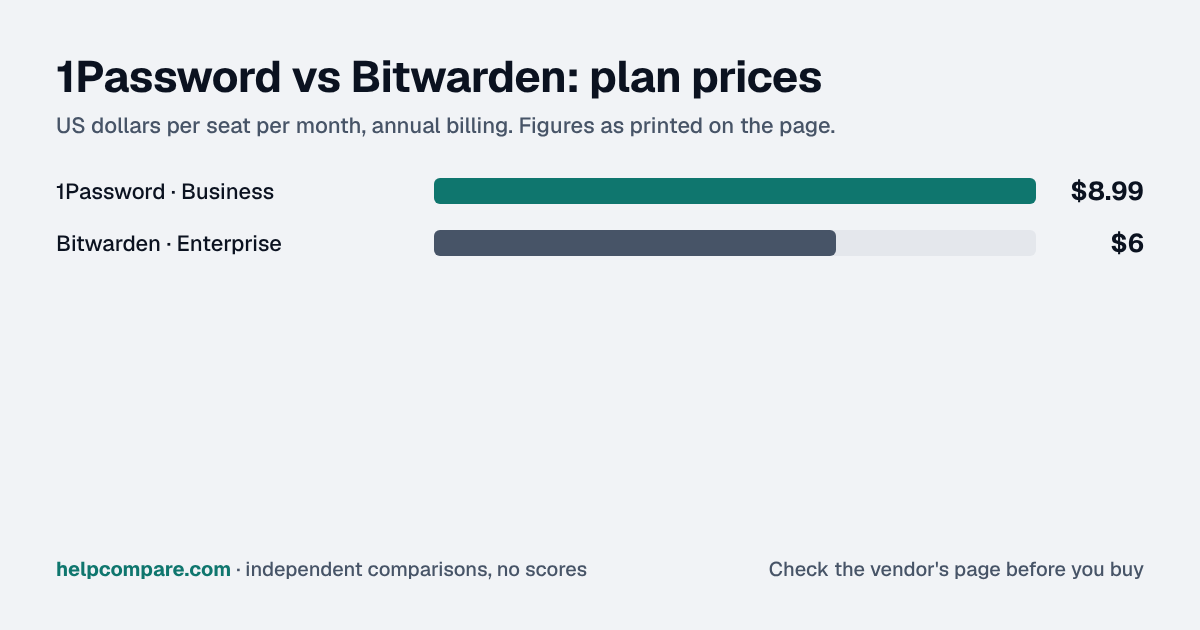
Choose Bitwarden for the lowest price ($4 a user a month on Teams, $6 on Enterprise), open-source code with published audits and self-hosting on Enterprise; choose 1Password Business ($8.99 a user) for SSO unlock, SCIM, policies and family accounts in one mid-priced plan, or its $24.95 pack for 10 users.

Quick verdict: Bitwarden is the value pick: Teams is $4 a user a month and Enterprise $6 on annual billing, it has a free plan for one user, its code is open source, and it publishes yearly third-party audits. SCIM and directory sync come with Teams; single sign-on, admin policies, account recovery, self-hosting and free family plans for employees need Enterprise. 1Password Business costs $8.99 a user a month on annual billing ($10.99 monthly) and includes Unlock with SSO, SCIM provisioning, custom policies and a free Families plan for every employee. For up to 10 people, 1Password’s Teams Starter Pack is a flat $24.95 a month on annual billing, but it has no SSO or SCIM.
Verified data

1Password vs Bitwarden: quick facts

At a glance1PasswordBitwarden
CategoryPassword Managers
Entry priceTeams Starter Pack $24.95/mo for up to 10 users (annual); Business $8.99/user/moFree for 1 user; Teams $4/user/mo (annual)
Free planNo — 14-day free trialYes — 1 user (share with one other person)

Is 1Password cheaper than Bitwarden?

Bitwarden. For 25 users on annual billing, Bitwarden Teams is $100 a month and Enterprise $150; 1Password Business is $224.75. For a team of 10, 1Password’s Teams Starter Pack ($24.95 a month, annual) is cheaper than 10 Bitwarden Teams seats ($40). Bitwarden’s published prices are annual; it offers monthly billing on Teams and Enterprise without publishing the price.

Verified data

1Password vs Bitwarden at a glance

Category1PasswordBitwarden
Free planNone — 14-day trial1 user; share with one other person
Small-team planTeams Starter Pack — $24.95/mo for 10 users (annual), $29.95 monthly; extra seats $4.99Teams — $4/user/mo (annual)
Business planBusiness — $8.99/user/mo annual, $10.99 monthlyEnterprise — $6/user/mo (annual)
SSO to unlock the vaultBusiness (Unlock with SSO)Enterprise (Login with SSO)
SCIM / directory syncBusinessTeams and Enterprise
Admin policiesBusinessEnterprise
Free family plans for staffBusinessEnterprise
Self-hostingNot listedEnterprise
Open sourceNot statedYes
Developer secretsSSH and Git signing, CLI and SDKs includedSecrets Manager add-on: $6 (Teams) or $12 (Enterprise) per user/mo

Verified September 19, 2026Prices recorded from each vendor’s own pricing page. See sources

Prices in USD from 1password.com/pricing and bitwarden.com/pricing; features from each vendor’s pricing pages and help centers. All checked September 19, 2026.

Editorial assessment

How they actually differ

Both are end-to-end encrypted vaults with shared vaults or collections, browser autofill, passkey support and apps on every platform. The split is price, which plan unlocks admin controls, and whether you want open source and self-hosting.

Where the admin features sit

Bitwarden puts SCIM, directory sync, event logs and the public API on Teams, and keeps SSO, custom roles, admin policies, account recovery and self-hosting for Enterprise. 1Password’s Teams Starter Pack has shared vaults, role-based permissions and admin account recovery; Business adds Unlock with SSO, SCIM, custom policies and Business Watchtower reports.

Transparency

Bitwarden is open source and publishes annual third-party audits of its apps and cryptography. 1Password says independent firms review its products, with penetration test reports in its Trust Center, and runs a public bug bounty.

Moving between them

1Password imports Bitwarden’s password-protected encrypted JSON export, but not passkeys or items in shared collections. Bitwarden imports 1Password’s .1pux, .1pif or CSV export, and on recent iOS and Android versions can take data directly from the 1Password app.

1Password

Pros

  • SSO unlock and SCIM on the $8.99 Business plan
  • Free Families plan for every Business user
  • Flat-price Teams Starter Pack for small teams
  • Developer tools (SSH, Git signing) included

Cons

  • More than twice Bitwarden’s per-user price
  • No free plan
  • No self-hosting option listed
  • Starter Pack lacks SSO and SCIM

Bitwarden

Pros

  • Teams at $4 a user; free plan for one
  • Open source with published annual audits
  • SCIM and directory sync on Teams
  • Self-hosting on Enterprise

Cons

  • SSO and admin policies need Enterprise
  • Account recovery only on Enterprise
  • Monthly prices not published
  • Secrets Manager costs extra
Verified data

Cost calculator: what does your team actually pay?

1Password

 
$0/mo

Bitwarden

 
$0/mo
 

List prices checked September 19, 2026. 1Password’s Teams Starter Pack includes 10 users; its pricing page lists up to 10 extra seats at $4.99 each. Bitwarden’s monthly prices are not published. Add-ons (Bitwarden Secrets Manager) and taxes are not included.

Choose 1Password if…

You want SSO unlock, SCIM and admin policies at a mid-range price, free family accounts for staff, or a flat price for a team of 10.

Choose Bitwarden if…

You want the lowest per-user price, open-source code with published audits, directory sync on a cheap plan, or the option to self-host.

Total cost over time

Uses your selections above. Estimate excludes add-ons, overages, and negotiated discounts.

Ready to pick your password manager?

Both offer 14-day trials of their business plans. Import a copy of your current vault into each to see what comes across.

Verified data

1Password vs Bitwarden: security, offline & remote work

How 1Password and Bitwarden compare on compliance reports, sign-in controls, offline access and the setup details that matter for remote, hybrid and in-office teams. Every value links to the vendor page it came from.

What we checked1PasswordBitwarden
Security & compliance
SOC 2 reportSOC 2 Type IIsourceSOC 2 Type IIsource
ISO/IEC 27001CertifiedsourceCertifiedsource
Other certificationsISO/IEC 27017, ISO/IEC 27018, ISO/IEC 27701sourceSOC 3, HIPAAsource
HIPAA (BAA)Not publishedNot published
GDPR data processing agreementNot publishedNot published
Single sign-on (SAML/OIDC)YesBusinesssourceYesEnterprisesource
SCIM user provisioningYesBusinesssourceYesTeamssource
Two-factor authenticationYesEnforcement: BusinesssourceYesEnforcement: Teams (via Duo); Enterprise (two-step login policy)source
Admin audit logYesBusinesssourceYesTeamssource
Data residency choicesUS, Canada, EUsourceUS, EUsource
EncryptionEnd-to-end AES 256-bit encryption; Two-Key Derivation (account password + Secret Key); SRP protocol in transitsourceZero-knowledge, end-to-end encryption of all vault data, decryptable only with the master passwordsource
Self-hosting optionNot publishedYessource
Offline access
Offline modePartialItems synced to a device stay available in the 1Password apps while offline; the vendor does not document offline editing.sourcePartialAny unlocked Bitwarden app works offline in read-only mode; items, attachments and Sends cannot be added or edited until reconnected.source
Desktop appsWindows, macOS, LinuxsourceWindows, macOS, Linuxsource
Mobile appsiOS, AndroidsourceiOS, Androidsource
Offline limitsTeam members who unlock with SSO have no offline access unless an admin turns on biometric unlock; the admin sets the maximum offline period.Businesssource
Remote, hybrid & in-office
IP allowlistingYesBusinesssourceNot published
Device & session controlsYesBusinessAuto-lock and unlock-method policies, sign-in attempt limits, Emergency Kit download control, firewall rules by country/IP/anonymous IP.sourceYesEnterpriseEnterprise policies including session timeout, require SSO, single organization and centralized item ownership.source
Office & room hardwareTwo-step login supports up to 10 hardware security keys and Yubico OTP; no other office hardware documented.source
Editorial assessment

What this means for your team

  • Audit reports: both publish a SOC 2 report, and 1Password and Bitwarden also hold ISO/IEC 27001. Ask each vendor for the report under NDA before you sign; security reviews usually want the latest one.
  • Single sign-on: 1Password includes it on Business; Bitwarden includes it on Enterprise. If your team signs in through Okta, Microsoft Entra ID or Google, price the plan that includes SSO, not the entry plan.
  • Working offline: 1Password and Bitwarden work offline only in part. Details are in the Offline mode row above.
  • Office-only access: 1Password can restrict sign-ins to approved IP ranges on Business. That suits an office network or a company VPN; fully remote teams need a VPN for it to work.
  • Where your data lives: 1Password lets you choose US, Canada, EU; Bitwarden lets you choose US, EU. This matters for teams hiring across the EU, UK or Australia.
  • In the office: Bitwarden: Two-step login supports up to 10 hardware security keys and Yubico OTP; no other office hardware documented.

1Password: worth knowing

  • SecurityFirewall rules in 1Password Business can allow, report or deny sign-ins by country, IP address/CIDR range, or anonymous IP type (Tor, public VPNs, proxies). source
  • OfflineStaff who unlock 1Password with SSO lose offline access unless the admin enables biometric unlock and sets a maximum offline period. source
  • RemoteTeams can choose where data is hosted: United States (1Password.com), Canada (1Password.ca) or European Union (1Password.eu). source
  • RemoteBusiness includes a free Families membership for every employee, covering personal passwords at home. source

Bitwarden: worth knowing

  • OfflineBitwarden apps work offline only in read-only mode: you can view but not add or edit items without a connection. source
  • OfficeThe desktop app can be installed on air-gapped/offline machines from the GitHub release installer and asset bundle, though it will not auto-update. source
  • SecurityEnterprise customers can self-host Bitwarden on their own servers behind a proxy or firewall for data-residency control. source
  • RemoteCloud accounts live in either the US or EU region, chosen at sign-up; an account exists only in the region where it was created. source

Checked September 19, 2026 against each vendor’s own trust center, help docs and app pages. Hover or tap “source” to see the exact wording we relied on. “Not published” means we could not find the vendor saying it on its own site — it doesn’t mean the feature is missing. Plan names are the lowest plan the vendor says includes the feature. Security · Offline · Remote vs office · Download the data

Frequently Asked Questions

Is Bitwarden cheaper than 1Password?

Per user, yes: Bitwarden Teams is $4 and Enterprise $6 a user a month on annual billing; 1Password Business is $8.99. For exactly 10 users, 1Password’s Teams Starter Pack ($24.95 a month) costs less than Bitwarden Teams ($40). Prices checked September 19, 2026.

Which plan includes SSO?

1Password Business (Unlock with SSO) or Bitwarden Enterprise (Login with SSO).

Can I self-host Bitwarden?

Yes, on Enterprise; self-hosted instances still need a cloud subscription and licence file. 1Password’s pricing pages list no self-hosting option.

Can 1Password import from Bitwarden?

Yes, from Bitwarden’s password-protected encrypted JSON export. Passkeys and items in shared collections are not imported.

Do they offer free family accounts for employees?

1Password on Business, Bitwarden on Enterprise.

Migration Guides

Already decided? Here’s how to actually switch.

Step-by-step migration guides covering what transfers automatically, what doesn’t, and how to handle the gap — in both directions.

Editorial assessment

When to Buy — and When to Walk Away

Every “best password manager” listicle tells you why to buy. Here’s the other half: the specific conditions under which 1Password or Bitwarden is the wrong purchase for your team.

1Password

Buy 1Password if:

  • You want SSO and SCIM without an enterprise contract
  • You want family accounts for staff included
  • Your team is about 10 people

Do NOT buy 1Password if:

  • Price per user is the deciding factor
  • You must self-host
  • You require open-source code

Bitwarden

Buy Bitwarden if:

  • You want the lowest per-user price
  • You want open source and published audits
  • You may need to self-host

Do NOT buy Bitwarden if:

  • You need SSO without Enterprise
  • You need admin account recovery on a cheap plan
  • You want published monthly pricing

Sources

Prices on this page were recorded from each vendor’s own pricing page on the date shown at the top of the page. Vendors change pricing often — check the live source before you buy.

Every figure is also in our open dataset (JSON and CSV, CC BY 4.0), with its source page and verification date. See how we research pricing.

Start with the job

Guides for the jobs this software does

Plain-language guides: the steps, what to check before you buy, common mistakes, and every tool it takes with verified prices.

Need sign-off?

Turn this into a one-page decision brief

Verified prices costed for your team size, a check against your must-have requirements, the questions to settle before you sign, and a source for every figure. Print it, or paste it into an email to whoever approves the spend.

Build a decision brief

From shortlist to switched

Built for the leader who owns the selection, answers for the spend, drives the rollout, and lives with the results. HelpCompare covers the whole decision, not just the first step.

Bill Belcamino, founder of HelpCompare
About the author

Bill Belcamino

Founder and author, HelpCompare

Bill has worked in software and digital marketing for more than 20 years. He spent nine years as an engineer at HP, served as COO scaling a platform past 200,000 users, and ran Google’s $70M/year search syndication partnership at Alot.com. He has bought, trialled, integrated and cancelled more SaaS tools than he can count, and started HelpCompare because the real cost of switching tools is the part nobody covers.

“I’ve sat on both sides of the table: the agency recommending the tool and the client paying for it.”

Researched and fact-checked by the HelpCompare team. Pricing on this page was last verified on September 19, 2026. No paid sponsorships, no affiliate commissions.