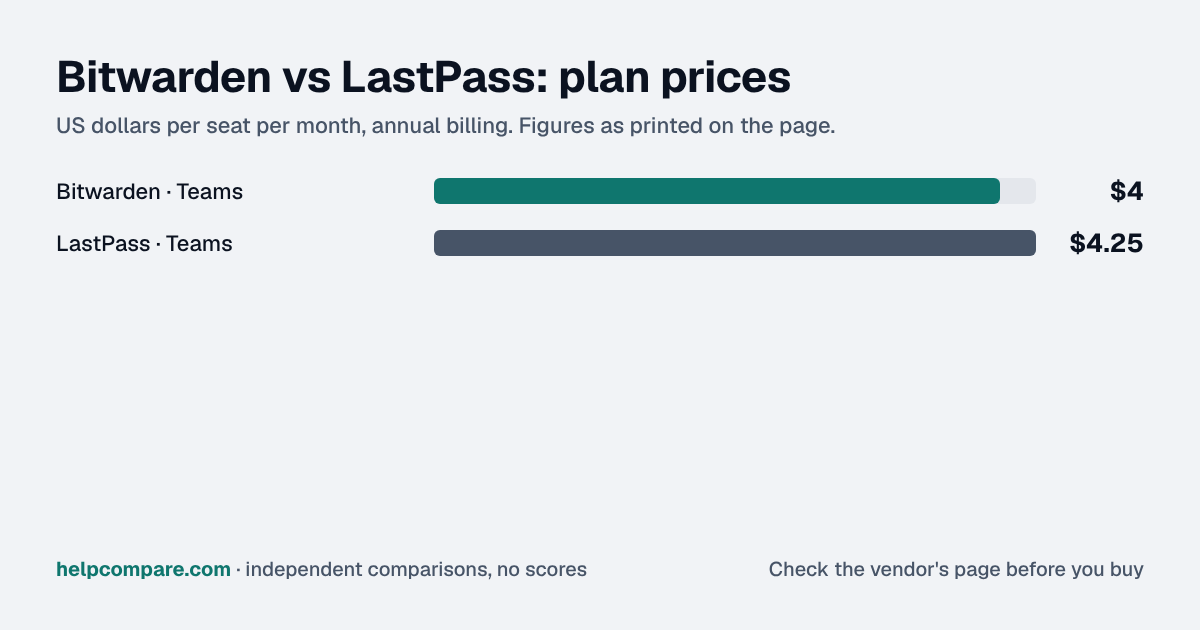
Both start around $4 a user. Bitwarden is open source, puts SCIM on Teams and can be self-hosted. LastPass has more admin policies and a region choice on Business. Its 2022 incidents are part of the decision.
Bitwarden is cheaper ($4 against $4.25 a user on the team plans, annual billing), open source with published audits, and includes SCIM on Teams. LastPass offers more admin policies and a data-region choice on Business, and its own notices describe two incidents in 2022.
| At a glance | Bitwarden | LastPass |
|---|---|---|
| Category | Password Managers | |
| Entry price | Free for 1 user; Teams $4/user/mo (annual) | Teams $4.25/user/mo (annual, up to 50 users) |
| Free plan | Yes — 1 user (share with one other person) | Yes — 1 user, one device type |
Bitwarden. For 25 users on annual billing, Bitwarden Teams is $100 a month and Enterprise $150; LastPass Teams is $106.25 and Business $175. Both publish annual prices only.
| Category | Bitwarden | LastPass |
|---|---|---|
| Free plan | 1 user; share with one other person | 1 user, one device type |
| Team plan | Teams — $4/user/mo (annual) | Teams — $4.25/user/mo (annual), up to 50 users |
| Business plan | Enterprise — $6/user/mo (annual) | Business $7; Business Max $11 (annual) |
| SSO login to the vault | Enterprise | Business |
| SCIM / directory sync | Teams and Enterprise | Business |
| Admin policies | Enterprise | 25 on Teams; 100+ on Business |
| Free family plans for staff | Enterprise | Business |
| Self-hosting / open source | Self-hosting on Enterprise; open source | Neither listed |
| Data regions | US or EU cloud | US by default; other regions on request (Business) |
| Published audits | Annual third-party audits published | Audits referenced; reports not public on pages we read |
| Security incidents | None stated on its own site | Two 2022 incidents described on its own site |
Verified September 19, 2026Prices recorded from each vendor’s own pricing page. See sources
Prices in USD from bitwarden.com/pricing and lastpass.com/pricing-business; features, audits and incident notices from each vendor’s own site. All checked September 19, 2026.
Editorial assessmentThese are the two lowest-priced business password managers we track, a few cents apart per user at the team tier. They differ on transparency, where admin controls sit, and track record.
Bitwarden gives Teams SCIM, directory sync, event logs and the public API, and keeps SSO, policies, custom roles and account recovery for Enterprise ($6). LastPass Teams has 25 policies and basic reporting; Business ($7) adds federated login, SCIM, 100+ policies, SIEM integrations and free family accounts.
Bitwarden is open source and publishes its annual third-party audits. LastPass’s own notices describe two incidents in 2022: an attacker took source code and internal secrets, then accessed cloud backups that included backups of customer vault data. LastPass says sensitive vault fields were encrypted, while other data, such as website URLs, was not.
Bitwarden imports directly from a LastPass account in its browser extension or desktop app, or from a LastPass CSV. LastPass imports Bitwarden’s CSV export through its importer.
List prices checked September 19, 2026, annual billing. LastPass Teams is capped at 50 users. Bitwarden Secrets Manager and taxes are not included.
You want the lowest price, open-source code with published audits, SCIM on a cheap plan, or the option to self-host.
You want many admin policies and federated login on a mid-priced plan, need a non-US data region, and are comfortable with its incident history.
Uses your selections above. Estimate excludes add-ons, overages, and negotiated discounts.
Both offer 14-day business trials. Bitwarden can import straight from a LastPass account, so a trial run is quick.
How Bitwarden and LastPass compare on compliance reports, sign-in controls, offline access and the setup details that matter for remote, hybrid and in-office teams. Every value links to the vendor page it came from.
| What we checked | Bitwarden | LastPass |
|---|---|---|
| Security & compliance | ||
| SOC 2 report | SOC 2 Type IIsource | SOC 2 Type IIsource |
| ISO/IEC 27001 | Certifiedsource | Certifiedsource |
| Other certifications | SOC 3, HIPAAsource | SOC 3, ISO/IEC 27701, IRAP, BSI C5, TRUSTe, APEC CBPR, APEC PRP, EU-US DPFsource |
| HIPAA (BAA) | Not published | Not published |
| GDPR data processing agreement | Not published | Not published |
| Single sign-on (SAML/OIDC) | YesEnterprisesource | YesBusinesssource |
| SCIM user provisioning | YesTeamssource | YesBusinesssource |
| Two-factor authentication | YesEnforcement: Teams (via Duo); Enterprise (two-step login policy)source | YesEnforcement: Teamssource |
| Admin audit log | YesTeamssource | YesTeamssource |
| Data residency choices | US, EUsource | US, Canada, EU, UK, Australia, Singapore, IndiaBusinesssource |
| Encryption | Zero-knowledge, end-to-end encryption of all vault data, decryptable only with the master passwordsource | AES-256 local encryption with PBKDF2 SHA-256 hashing; zero-knowledge modelsource |
| Self-hosting option | Yessource | Not published |
| Offline access | ||
| Offline mode | PartialAny unlocked Bitwarden app works offline in read-only mode; items, attachments and Sends cannot be added or edited until reconnected.source | PartialThe browser extension, desktop app and mobile apps open a locally cached, read-only copy of the vault offline; new entries cannot be created until back online.source |
| Desktop apps | Windows, macOS, Linuxsource | Windows, macOSsource |
| Mobile apps | iOS, Androidsource | iOS, Androidsource |
| Offline limits | — | On Teams, Business and Business Max, admins can limit offline access by policy; clearing the local cache requires an online login to rebuild it.Teamssource |
| Remote, hybrid & in-office | ||
| IP allowlisting | Not published | YesBusiness Maxsource |
| Device & session controls | YesEnterpriseEnterprise policies including session timeout, require SSO, single organization and centralized item ownership.source | YesBusiness MaxContextual (location/IP/device) authentication policies and workstation MFA on Business Max; travel mode and admin policies (e.g. prohibit export) on lower plans.source |
| Office & room hardware | Two-step login supports up to 10 hardware security keys and Yubico OTP; no other office hardware documented.source | Hardware MFA options (standalone fingerprint scanners, card readers, hardware keys like YubiKey) on all business plans; Windows/Mac workstation MFA and a Universal Proxy for LDAP/RADIUS VPN apps on Business Max.source |
Yes, slightly: Bitwarden Teams is $4 a user a month on annual billing against $4.25 for LastPass Teams; Bitwarden Enterprise is $6 against $7 for LastPass Business. Prices checked September 19, 2026.
Yes, directly from a LastPass account in Bitwarden’s browser extension or desktop app, or from a LastPass CSV. Teams using LastPass SSO need an admin setup step first.
Yes, and it publishes annual third-party security audits.
LastPass’s own notices describe two incidents in 2022: an attacker took source code and internal secrets, then accessed cloud backups that included backups of customer vault data. LastPass says sensitive vault fields were encrypted, while other data, such as website URLs, was not.
Step-by-step migration guides covering what transfers automatically, what doesn’t, and how to handle the gap — in both directions.
Every “best password manager” listicle tells you why to buy. Here’s the other half: the specific conditions under which Bitwarden or LastPass is the wrong purchase for your team.
Buy Bitwarden if:
Do NOT buy Bitwarden if:
Buy LastPass if:
Do NOT buy LastPass if:
Every pricing fact, rating, AI billing model and switching guide we hold on each tool, on one page — with the date each figure was last verified.
Prices on this page were recorded from each vendor’s own pricing page on the date shown at the top of the page. Vendors change pricing often — check the live source before you buy.
Every figure is also in our open dataset (JSON and CSV, CC BY 4.0), with its source page and verification date. See how we research pricing.
Plain-language guides: the steps, what to check before you buy, common mistakes, and every tool it takes with verified prices.
Verified prices costed for your team size, a check against your must-have requirements, the questions to settle before you sign, and a source for every figure. Print it, or paste it into an email to whoever approves the spend.
Built for the leader who owns the selection, answers for the spend, drives the rollout, and lives with the results. HelpCompare covers the whole decision, not just the first step.