Skip to content
Compare tools
Workflow Automation

Zapier vs n8n: Which Automation Platform Is Cheaper in 2026?

Zapier bills for every action step; n8n bills for each whole workflow run and can be self-hosted for free. Here is what that difference does to your bill, and where Zapier still earns its price.

Zapier logoFrom $19.99/mo

Zapier

VS
n8n logoFrom $20/mo (2,500 executions, billed annually)

n8n

Bottom line Editorial assessment

Which is better, Zapier or n8n?

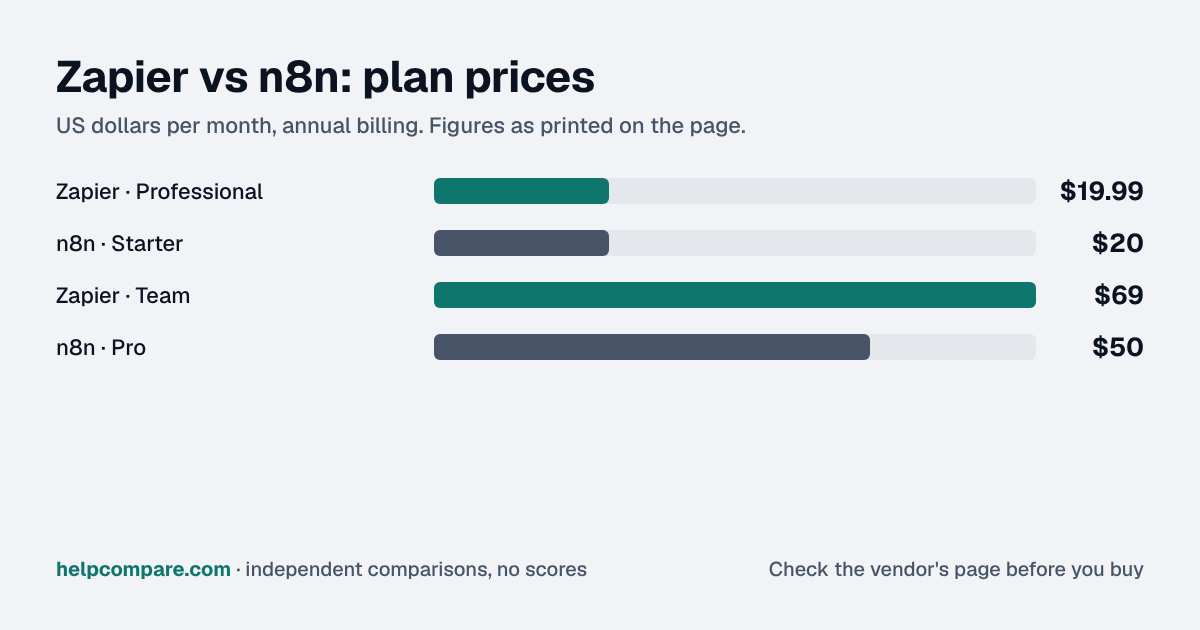
Choose Zapier if non-technical people will build the automations or you need its 9,000+ app connections; choose n8n for multi-step or high-volume workflows. Both start at about $20/mo billed annually, but Zapier's covers 750 tasks (one per action step) while n8n's covers 2,500 executions (one per whole workflow run), and n8n can be self-hosted free.

Quick verdict: The entry prices are almost identical ($19.99 vs $20 a month on annual billing), but they buy very different amounts of work. Zapier’s $19.99 covers 750 tasks, and every successful action step is a task; n8n’s $20 covers 2,500 executions, and an execution is a whole workflow run no matter how many steps it has. For multi-step workflows at volume, n8n is usually far cheaper — and its Community Edition can be self-hosted at no licence cost. Zapier is the easier tool for non-technical teams and claims 9,000+ app connections.
Verified data

Zapier vs n8n: quick facts

At a glanceZapiern8n
CategoryWorkflow Automation
Entry priceFrom $19.99/moFrom $20/mo (2,500 executions, billed annually)
Free plan100 tasks/monthFree self-hosted Community Edition; no free cloud plan

Is Zapier cheaper than n8n?

Usually, once workflows have more than one action. Zapier counts each successful action step as a task (triggers, filters, paths and formatter steps are free); n8n counts one execution per workflow run, however many steps it has. 1,000 runs a month of a three-action workflow is 3,000 Zapier tasks — the Professional 5,000-task tier at $89/mo on annual billing — against 1,000 n8n executions, inside the $20/mo Starter plan. n8n also includes unlimited users on every plan, where Zapier Professional has 1 seat and Team 25.

Verified data

Zapier vs n8n at a glance

CategoryZapiern8n
Free optionFree plan — 100 tasks a month, two-step ZapsCommunity Edition — free to self-host (fair-code licence)
Entry paid tierProfessional — $19.99/mo annual (750 tasks); $29.99 monthlyStarter — $20/mo annual (2,500 executions); $24 monthly
Mid tierTeam — $69/mo annual (2,000 tasks, 25 users); $103.50 monthlyPro — $50/mo annual (10,000 executions); $60 monthly
Upper tierEnterprise — contact salesBusiness (self-hosted) — $800/mo annual (40,000 executions); Enterprise by quote
What you are billed forTasks — each successful action stepExecutions — one run of the entire workflow
Users1 (Professional), 25 (Team), unlimited (Enterprise)Unlimited on every plan
Annual discountSave 33%Save 17%
Going over the limitPay-per-task up to 3x your plan’s tasks (1.25x rate on annual plans), then Zaps pauseCloud: executions beyond concurrency limits queue; Business overage priced in EUR only
App connections (vendor claim)9,000+ apps2,192 integrations in n8n’s directory
AICopilot included; Agents add-on from $33.33/mo; AI steps billed in tasksAI Assistant credits included (2,300 on Starter); self-hosted uses your own API keys

Verified September 18, 2026Prices recorded from each vendor’s own pricing page. See sources

Prices in USD from zapier.com/pricing and n8n.io/pricing (US view; n8n shows EUR outside the US), checked September 18, 2026. n8n Pro tiers above 10,000 executions are not listed in USD on the US page and are not shown.

Editorial assessment

How they actually differ

The single most important difference is the billing unit. Zapier sells tasks: “a task is any successful action that runs in Zapier.” Triggers, filters, paths, formatter, delay and looping steps do not count, but every successful action does — and Advanced and Premium AI steps count 3x and 5x. n8n sells executions: “an execution is a single run of your entire workflow,” so a ten-step workflow costs the same as a two-step one. Only production runs count; manual test runs and sub-workflows do not.

Hosted convenience vs self-hosting

Zapier is cloud-only. n8n runs in its cloud (Starter and Pro) or on your own servers: the Community Edition is free under n8n’s Sustainable Use License, which allows internal business, personal and non-commercial use but not, for example, hosting n8n and charging people to access it. The Community Edition leaves out SSO, environments, projects, sharing and Git version control; the paid Business plan is self-hosted and adds them.

Who each is built for

Zapier is the more approachable tool: linear Zaps, Copilot to draft them, and the widest app catalogue we have seen claimed (9,000+). n8n is a node-based canvas aimed at technical users, with code steps, unlimited users and no per-step charges — which is why teams running high-volume or AI-heavy workflows often move to it.

Limits that bite

Zapier’s pay-per-task billing lets you run up to three times your plan’s task limit at a higher per-task rate before Zaps pause; it is on by default for newer accounts. n8n Cloud limits concurrent executions — 5 on Starter, 20 on Pro — and queues anything beyond that rather than failing it.

Zapier

Pros

  • 9,000+ app connections, the largest catalogue claimed
  • Easiest for non-technical users; Copilot included on all plans
  • Free plan for simple two-step Zaps
  • Fully managed — nothing to host

Cons

  • Every action step is a billed task
  • Professional includes only 1 seat
  • AI steps can cost 3x or 5x the task rate
  • No self-hosted option

n8n

Pros

  • Bills per workflow run, not per step
  • Unlimited users and workflows on every plan
  • Free self-hosted Community Edition
  • Code steps and a flexible node-based canvas

Cons

  • Steeper learning curve than Zapier
  • Self-hosting means running servers yourself
  • Cloud plans cap concurrent executions (5 on Starter)
  • Some larger tiers and overages are priced only in EUR
Verified data

Cost calculator: what does your team actually pay?

Zapier

 
$0/mo

n8n

 
$0/mo
 

Annual-billing list prices checked September 18, 2026. Zapier tasks = runs x action steps (triggers, filters, paths and formatter steps are free; Advanced and Premium AI steps count 3x and 5x, which this estimate ignores). n8n counts one execution per run. Self-hosting costs are not included.

Choose Zapier if…

Your team is non-technical, you need connectors for niche SaaS apps, your workflows are short or low-volume, or you want a fully managed service with nothing to host.

Choose n8n if…

Your workflows have many steps or run at high volume, many people need access, you want code-level control, or you are able to self-host to cut costs to the bone.

Total cost over time

Uses your selections above. Estimate excludes add-ons, overages, and negotiated discounts.

Ready to pick your automation platform?

Zapier has a free plan and n8n a free trial with no card — build one real workflow in each before you commit.

Frequently Asked Questions

Is n8n cheaper than Zapier?

For multi-step workflows, usually. Zapier bills every successful action step as a task; n8n bills one execution per workflow run. 1,000 runs of a three-action workflow is 3,000 Zapier tasks ($89/mo on the Professional 5,000-task tier, billed annually) but only 1,000 n8n executions, within the $20/mo Starter plan.

What counts as a task in Zapier?

Any successful action. Triggers, filters, paths, formatter, delay, looping, digest and storage steps, and errored steps, do not count. Code by Zapier is 1 task per run; Zapier MCP calls count 2 tasks.

What counts as an execution in n8n?

A single run of the entire workflow. Only production executions count — manual runs, sub-workflow runs and error-workflow runs do not.

Is n8n free?

The self-hosted Community Edition is free under n8n’s Sustainable Use License, for internal business, personal or non-commercial use. n8n’s cloud plans start at $20/mo billed annually.

How many users do I get?

n8n includes unlimited users on every plan. Zapier Professional has 1 seat, Team 25 and Enterprise unlimited.

What happens if I go over my Zapier task limit?

With pay-per-task billing (on by default for accounts created after January 2024), Zapier keeps running up to three times your plan’s task limit at a higher per-task rate — 1.25x on annual plans — then pauses your Zaps.

Can I import my Zaps into n8n?

Not with an official tool. n8n imports its own workflow JSON, and Zapier exports Zaps in Zapier’s format, so workflows are rebuilt. See our migration guides for both directions.

Migration Guides

Already decided? Here’s how to actually switch.

Step-by-step migration guides covering what transfers automatically, what doesn’t, and how to handle the gap — in both directions.

Editorial assessment

When to Buy — and When to Walk Away

Every “best automation platform” listicle tells you why to buy. Here’s the other half: the specific conditions under which Zapier or n8n is the wrong purchase for your team.

Zapier

Buy Zapier if:

  • Non-technical people will build and own the automations
  • You rely on niche apps that only Zapier connects to
  • Your workflows are short or run a few hundred times a month

Do NOT buy Zapier if:

  • Your workflows have many action steps and run thousands of times a month
  • You lean on Advanced or Premium AI steps billed at 3x or 5x
  • Many teammates need to build — Professional has 1 seat

n8n

Buy n8n if:

  • You run multi-step workflows at volume
  • You want unlimited users without per-seat pricing
  • You can self-host, or want the option to

Do NOT buy n8n if:

  • No one on the team is comfortable with a technical, node-based builder
  • You need a managed connector for a niche app n8n lacks
  • You plan to resell hosted n8n access — the licence does not allow it

Sources

Prices on this page were recorded from each vendor’s own pricing page on the date shown at the top of the page. Vendors change pricing often — check the live source before you buy.

Every figure is also in our open dataset (JSON and CSV, CC BY 4.0), with its source page and verification date. See how we research pricing.

Bill Belcamino, founder of HelpCompare
About the author

Bill Belcamino

Founder and author, HelpCompare

Bill has worked in software and digital marketing for more than 20 years. He spent nine years as an engineer at HP, served as COO scaling a platform past 200,000 users, and ran Google’s $70M/year search syndication partnership at Alot.com. He has bought, trialled, integrated and cancelled more SaaS tools than he can count, and started HelpCompare because the real cost of switching tools is the part nobody covers.

“I’ve sat on both sides of the table: the agency recommending the tool and the client paying for it.”

Researched and fact-checked by the HelpCompare team. Pricing on this page was last verified on September 18, 2026. No paid sponsorships, no affiliate commissions.