Framer is a design-first builder with an AI agent and a CMS, priced per site; Squarespace is the all-in-one builder with commerce built in. Here is what each costs per site, what the plans include and how hard it is to leave.
Only for small teams: Framer Basic is $10 a month per site on yearly billing, but each additional editor adds $20 a month, while Squarespace Core at $29 on an annual plan includes unlimited contributors.
Framer has a free plan where Squarespace offers a 14-day trial, and if you sell online, Squarespace takes a 2% store fee on Basic and 0% from Core. Before you price either one, count who actually publishes changes in a normal month, not who asked for a login. Editor lists grow because access is easy to hand out and rarely taken back, and on Framer every extra editor is a line on the bill. I'd put writers on Framer's $10 content-only editor role and reviewers on free viewer access. If more than a couple of people still need full editing after that, Squarespace Core is the simpler fit.
My read of the verified data on this page, checked against vendor sources on September 27, 2026. Disagree or spot an error? Tell Bill
| At a glance | Framer | Squarespace |
|---|---|---|
| Category | Website Builders | |
| Entry price | Free plan; Basic $10/mo per site (yearly billing) | From $19/mo |
| Free plan | Yes: Framer domain, 1 GB bandwidth, Made in Framer banner | No free plan — 14-day trial only |
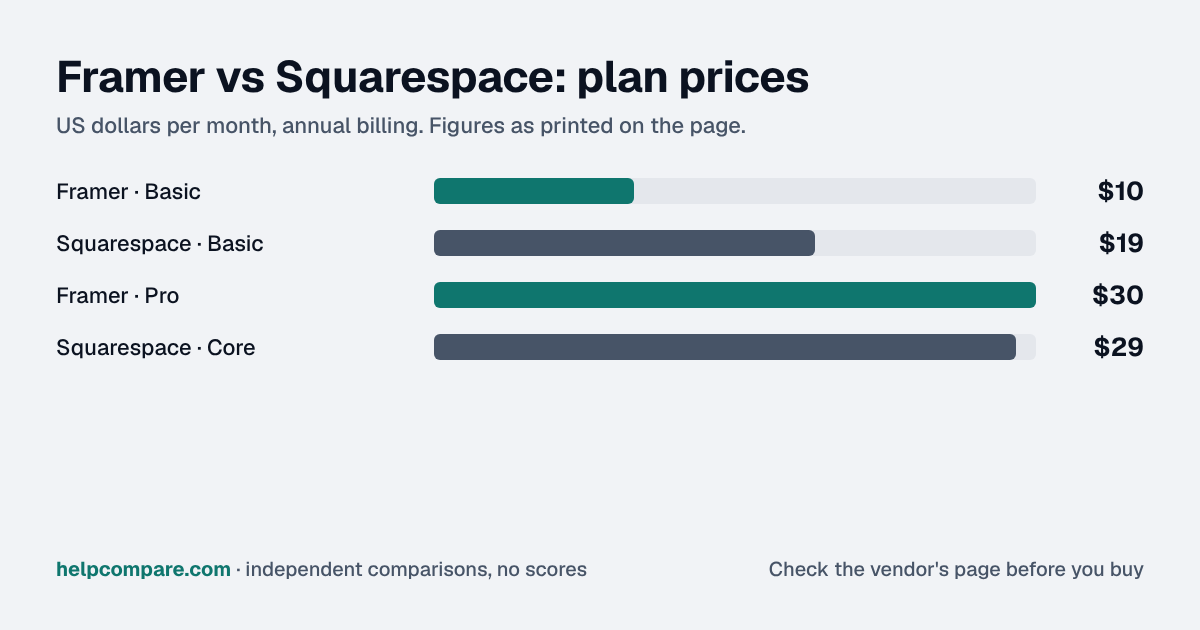
Framer for one site with a small team: Basic is $10 a month per site on yearly billing, against $19 for Squarespace Basic (annual). At the next tier they are close: Framer Pro is $30 and Squarespace Core $29. The gap flips with people: Framer charges $20 a month per additional editor, while Squarespace Core includes unlimited contributors. Framer’s monthly-billing prices were not visible on the pricing page when we checked, so the comparison uses yearly prices for both.
| Category | Framer | Squarespace |
|---|---|---|
| Free plan | Yes: Framer domain, 1 GB bandwidth, Made in Framer banner | No; 14-day free trial, no card |
| Entry paid price | Basic $10/mo per site (yearly) | Basic $19/mo (annual), $25 monthly |
| Next tier | Pro $30/mo per site (yearly) | Core $29/mo (annual), $39 monthly |
| Top published tier | Enterprise: custom | Advanced $99/mo (annual), $139 monthly |
| Bandwidth | 50 GB (Basic), 100 GB (Pro) | See vendor pricing page |
| CMS | 2 collections (Basic), 10 (Pro) | Blog and pages built in |
| Team | Additional editors $20/mo each; viewers free | Basic up to 2 contributors; Core and up unlimited |
| AI | 1,000 AI credits/mo (Basic), 3,000 (Pro) | See vendor pricing page |
| Online store fee | See vendor pricing page | 2% on Basic, 0% on Core and up |
| Export | No HTML export; CMS to CSV or JSON via plugins | WordPress XML of some pages and one blog |
Verified September 27, 2026Prices recorded from each vendor’s own pricing page. See sources
Prices in USD from framer.com/pricing (yearly billing view) and squarespace.com/pricing, checked September 27, 2026. Framer sells a Site plan for each site.
Editorial assessmentBoth host your site and both are no-code. Framer comes from design tools: a freeform canvas, a Figma import plugin and an AI agent that spends monthly credits. Squarespace sells a finished template-based site with commerce, scheduling and marketing features on higher plans.
Framer bills a Site plan for each site and $20 a month for each additional editor ($10 for a content-only editor; viewers are free). Squarespace Basic includes up to 2 contributors and Core and above include unlimited contributors, so a larger team can be cheaper on Squarespace even though the plan costs more.
Squarespace takes a 2% online store transaction fee on Basic and 0% on Core and up, and imports products from Shopify, Etsy, Big Cartel or a CSV. Framer is built around marketing sites and a CMS; check your commerce needs before choosing it for a store.
Framer’s help center says it “does not offer HTML export for self-hosting”; CMS content can be exported to CSV or JSON with plugins. Squarespace exports a WordPress XML file that covers layout pages, one blog and basic blocks, but not store pages or style settings. In both directions the design is rebuilt by hand.
Per-site list prices on yearly/annual billing, checked September 27, 2026. Framer additional editors ($20/mo each) and add-ons are not included; Squarespace Basic includes up to 2 contributors. Taxes not included.
You are a designer or a design-led team, you build marketing sites from Figma, you want the lowest price per site, or you want to start on a free plan.
You sell online, many people need to edit, or you want commerce, scheduling and templates in one bill.
Uses your selections above. Estimate excludes add-ons, overages, and negotiated discounts.
Framer has a free plan and Squarespace a 14-day trial. Count your editors first: at more than a couple of people, Framer’s $20 editor seats change the math.
How Framer and Squarespace compare on compliance reports, sign-in controls, offline access and the setup details that matter for remote, hybrid and in-office teams. Every value links to the vendor page it came from.
| What we checked | Framer | Squarespace |
|---|---|---|
| Security & compliance | ||
| SOC 2 report | SOC 2 Type IIsource | Not published |
| ISO/IEC 27001 | Certifiedsource | Not published |
| HIPAA (BAA) | Not published | Not published |
| GDPR data processing agreement | DPA offeredsource | DPA offeredsource |
| Single sign-on (SAML/OIDC) | YesEnterprisesource | YesPremiumsource |
| SCIM user provisioning | YesEnterprisesource | YesPremiumsource |
| Two-factor authentication | Not published | Yessource |
| Admin audit log | Not published | Not published |
| Data residency choices | Not published | Not published |
| Encryption | AES-256 at restsource | TLS in transitsource |
| Self-hosting option | Cloud onlysource | Not published |
| Offline access | ||
| Offline mode | Not documented | Needs a connectionSquarespace point of sale in the Squarespace app requires an internet connection; there is no offline checkout.source |
| Desktop apps | Windows, macOSsource | Not published |
| Mobile apps | Not published | iOS, Androidsource |
| Remote, hybrid & in-office | ||
| IP allowlisting | Not published | Not published |
| Device & session controls | Not published | Not published |
| Office & room hardware | — | In-person sales run in the Squarespace app with Tap to Pay (iPhone/Android) or a Square Reader (US only); Square Register, Stand and Terminal are not supported.source |
Per site, Framer: Basic is $10 a month on yearly billing against Squarespace Basic at $19 (annual). Framer charges $20 a month for each additional editor, while Squarespace Core includes unlimited contributors. Prices checked September 27, 2026.
Yes. It includes a Framer domain, 1 GB bandwidth and 500 AI credits to try; published free sites show a Made in Framer banner.
Yes. Framer sells a Site plan for each site; a paid Site plan lets you connect a custom domain and remove Framer branding.
Not as HTML. Framer’s help center says it does not offer HTML export for self-hosting; CMS content can be exported to CSV or JSON with plugins.
Not automatically. Export what Squarespace allows (a WordPress XML file), bring CMS content in by CSV, and rebuild pages in Framer; its browser extension can copy sections from a live page.
Step-by-step migration guides covering what transfers automatically, what doesn’t, and how to handle the gap — in both directions.
Every “best website builder” listicle tells you why to buy. Here’s the other half: the specific conditions under which Framer or Squarespace is the wrong purchase for your team.
Buy Framer if:
Do NOT buy Framer if:
Buy Squarespace if:
Do NOT buy Squarespace if:
Every pricing fact, rating, AI billing model and switching guide we hold on each tool, on one page, with the date each figure was last verified.
Prices on this page were recorded from each vendor’s own pricing page on the date shown at the top of the page. Vendors change pricing often — check the live source before you buy.
Every figure is also in our open dataset (JSON and CSV, CC BY 4.0), with its source page and verification date. See how we research pricing.
Verified prices costed for your team size, a check against your must-have requirements, the questions to settle before you sign, and a source for every figure. Print it, or paste it into an email to whoever approves the spend.
Built for the leader who owns the selection, answers for the spend, drives the rollout, and lives with the results. HelpCompare covers the whole decision, not just the first step.